Browser Extension Security: Content Scripts, DOM Exfiltration and the Manifest V3 Reality
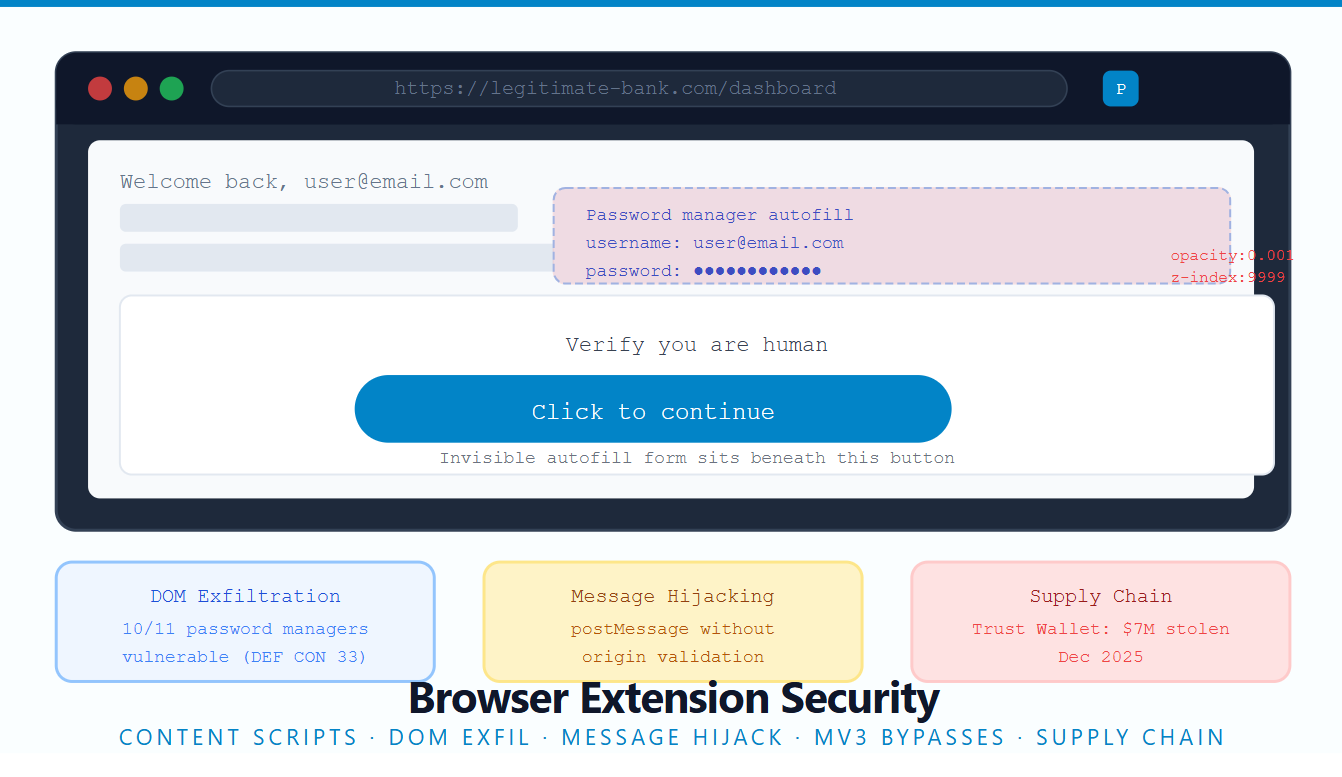
Browser extensions occupy a uniquely dangerous position in the security landscape. They are installed by users who trust them, they run inside the browser with elevated privileges, and they can touch every page you visit. More importantly, the security research community has largely ignored them in favour of server-side bugs, leaving an enormous attack surface that is quietly paying out significant bounties.
In December 2025, Trust Wallet's Chrome extension was compromised via a leaked Web Store API key. The attacker published malicious version 2.68 to the Chrome Web Store on December 24, exfiltrated users' mnemonic phrases through a disguised analytics channel, and drained approximately $7 million in Bitcoin, Ethereum and Solana before the extension was pulled. Three months earlier, at DEF CON 33, researcher Marek Tóth presented findings showing that ten out of eleven major password managers were vulnerable to DOM-based extension clickjacking, with approximately 40 million active installations at risk across Chrome, Firefox and Edge.
These are not fringe cases. They reflect a structural problem with how extensions are built and how little scrutiny they receive.
The extension security model: three worlds, one browser
Understanding extension security starts with understanding the three distinct JavaScript execution contexts that coexist inside a single browser tab.
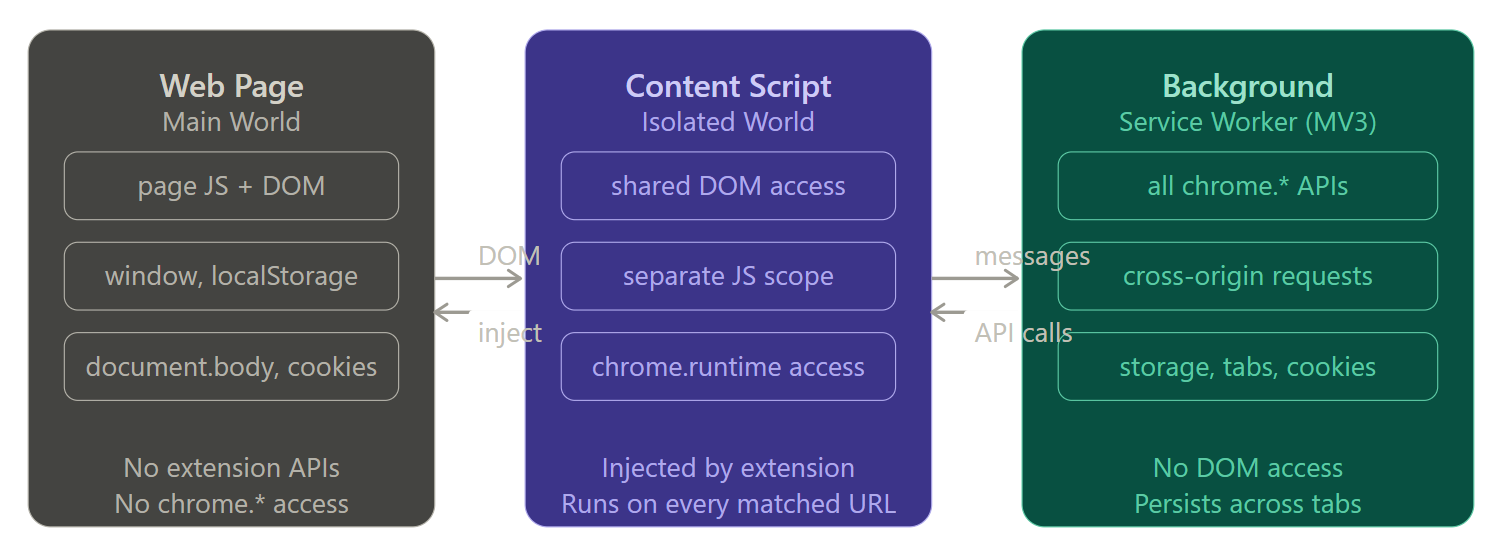
The Main World is ordinary webpage JavaScript. It can read the DOM but has no access to extension APIs. The Isolated World is where content scripts run; it shares the page's DOM but lives in a separate JavaScript scope, so page JS cannot read the extension's variables directly. The Background Service Worker has full access to all Chrome APIs, can make cross-origin requests, and persists across browser tabs; but it cannot touch the DOM at all.
The bridge between these worlds is what attackers target. Messages flow between the isolated world and the background, and DOM elements injected by content scripts are readable by page JavaScript. Every handoff is a potential attack surface.
Attack 1: DOM exfiltration from content scripts
When a password manager's content script injects an autofill form into your page, it writes HTML into the shared DOM. The page's own JavaScript can read that HTML. If an attacker can run JavaScript on the page (via XSS, a subdomain takeover, or their own malicious site), they can read whatever the extension injected.
The principle is that a browser extension injects elements into the DOM, which an attacker can then make invisible using JavaScript. The attack works by hiding extension UI elements using opacity adjustments and DOM overlay techniques. When users encounter seemingly legitimate elements on the page, a single click triggers automatic filling of hidden forms with their stored sensitive data.
This is the DOM-based extension clickjacking technique presented by researcher Marek Tóth at DEF CON 33 in August 2025. The mechanics in plain terms:
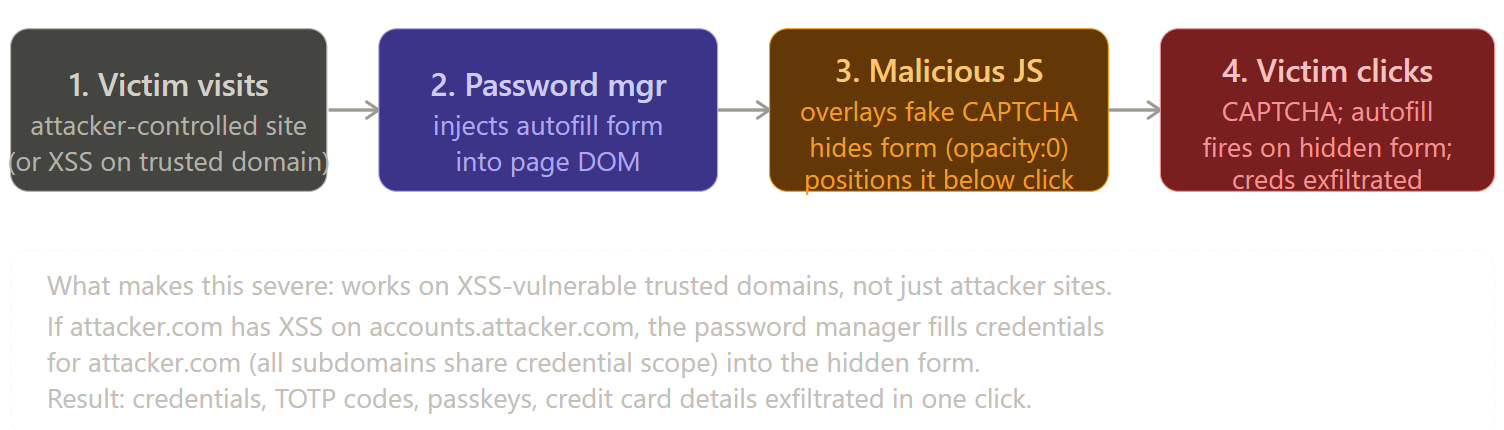
All tested password managers were initially vulnerable to at least one variant. Six out of nine were vulnerable to credit card extraction; ten out of eleven were vulnerable to credential theft including TOTP codes. As of August 2025, 1Password, Bitwarden, LastPass, iCloud Passwords, Enpass and LogMeOnce remained unpatched, representing approximately 32.7 million active installations still at risk. 1Password and LastPass both marked the report as "informative" without committing to fixes.
Attack 2: Cross-extension message hijacking
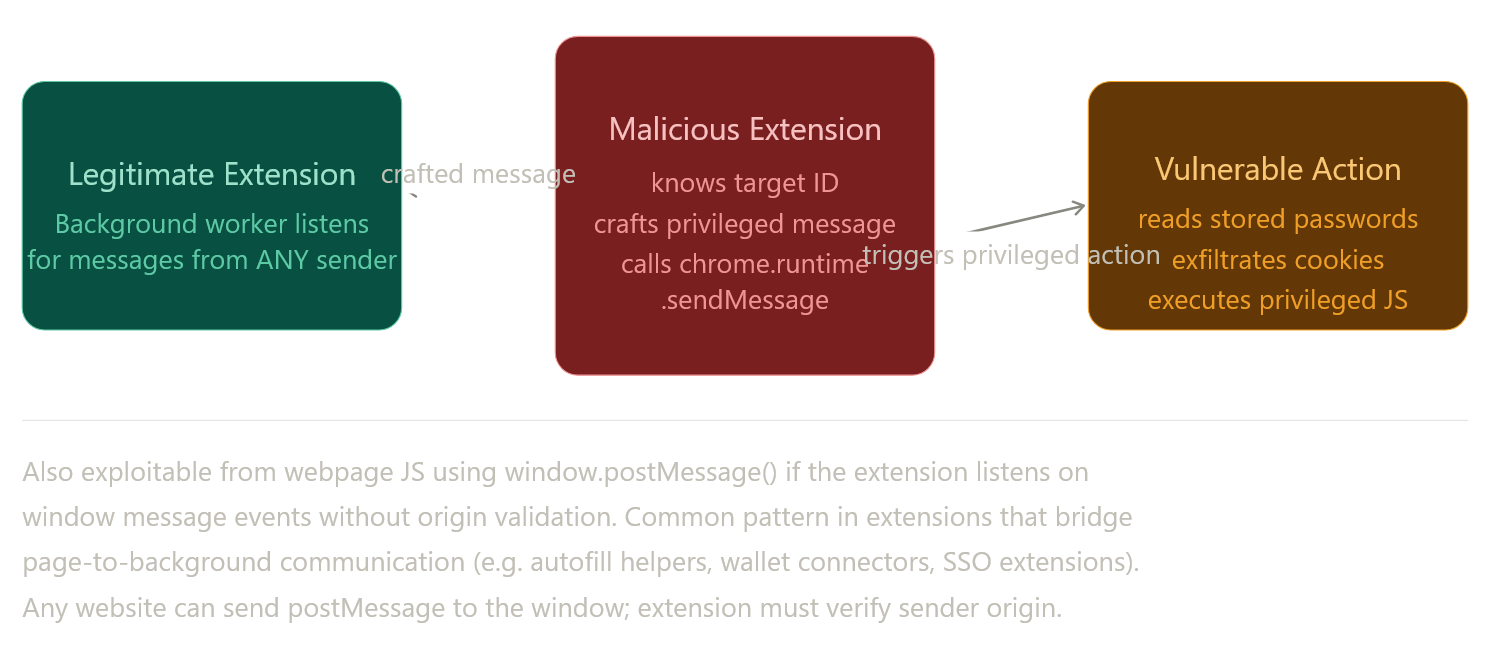
Extensions communicate internally using chrome.runtime.sendMessage(). The background service worker listens for these messages and dispatches privileged actions in response. The attack surface opens up when an extension exposes a message listener that accepts commands from content scripts, but does not verify which content script is sending them.
An extension with the activeTab permission can inject JavaScript code into any domain the user is currently interacting with. If malicious input reaches the executed JavaScript, the attacker may gain Universal XSS (UXSS) capability.
Extensions that act as message bridges (wallet connectors, SSO helpers, autofill systems) are particularly at risk. When they listen for window.postMessage events from page JavaScript and relay those to the background worker without validating the sender's origin, any malicious page can craft a privileged command. The manifest never revealed this to the user during installation.
Attack 3: Manifest V3 does not fix what people think it fixes
Manifest V3 (MV3) was positioned as a major security upgrade. The reality is more complicated.
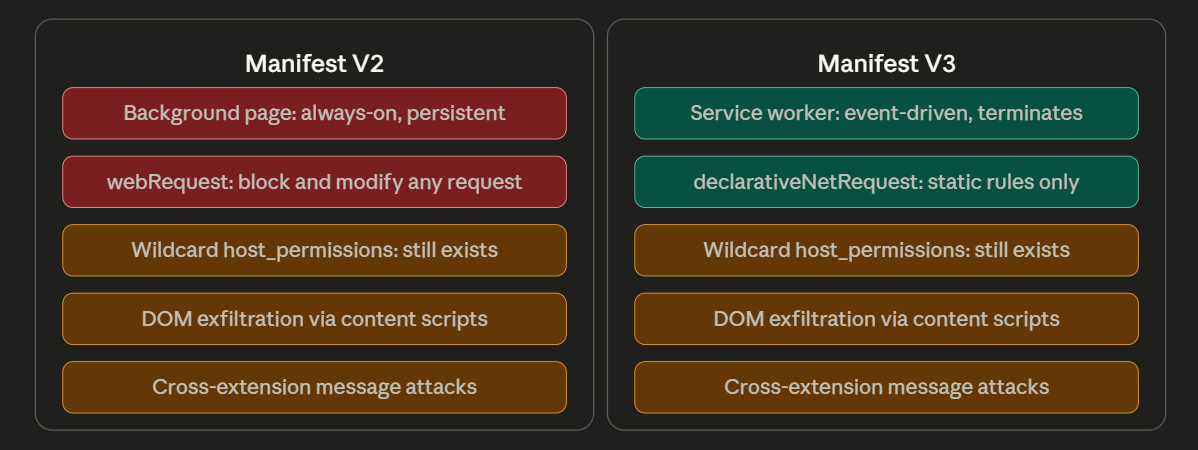
SquareX researchers demonstrated at DEF CON 32 that even with Manifest V3, extensions could steal live video feeds from platforms like Google Meet and Zoom without requiring any special permissions. They showed how attackers could use MV3-compliant extensions to redirect users to credential-stealing pages, add collaborators to private GitHub repositories, and steal site cookies.
The permission that changes nothing between MV2 and MV3 is the one that matters most: host_permissions with a wildcard pattern like *://*/*. An extension that declares this can read and modify every page you visit. Grammar checkers, productivity tools, and price comparison extensions routinely hold this permission. When they are compromised, whether through a supply chain attack or a malicious update, every page the user visits becomes an exfiltration surface.
Real cases: how these attacks play out
The December 2025 Trust Wallet incident is the most instructive supply chain attack to study in this space. The attacker compromised the Chrome Web Store API key, bypassed Trust Wallet's internal release process, published malicious version 2.68, and exfiltrated mnemonic phrases by disguising the traffic as analytics data through the posthog-js library. The first exfiltration request was observed three days before the malicious extension was even published, suggesting the attacker had been planning the campaign for weeks.
What makes this particularly instructive from an auditing perspective: the malicious code was not doing anything structurally unusual. It was using a legitimate analytics library, it had appropriate permissions for its stated purpose, and it passed the Chrome Web Store review. The only difference was the exfiltration endpoint.
The January 2025 Cyberhaven incident followed a similar pattern. The worker.js file established communication with a C2 server and downloaded configurations from it. The content.js file was statically injected into all URLs before DOM creation, collecting information on every page the user visited. The malicious version differed from the legitimate one only in these two files.
What to look for when auditing extensions
The testing methodology for extension security breaks into three stages: static analysis of the manifest, dynamic analysis of message handling, and content script DOM interaction testing.
Stage 1: Manifest review
Before installing anything, read the manifest. The danger signals are:
Wildcard host_permissions (*://*/* or https://*/) mean the extension can touch any website. Combined with scripting permission, this enables injection of arbitrary JavaScript into any tab. tabs permission enables reading tab URLs and content. webNavigation enables tracking every page transition. storage with broad permissions enables persistence across sessions. nativeMessaging enables communication with desktop applications, which is frequently the bridge to file system access.
{
  "permissions": ["tabs", "storage", "webNavigation", "nativeMessaging"],
  "host_permissions": ["*://*/*"],
  "content_scripts": [{
    "matches": ["*://*/*"],
    "js": ["content.js"],
    "run_at": "document_start"
  }]
}
This manifest gives a single extension complete visibility into every page, tab, and navigation event in the browser. It is not inherently malicious; many legitimate tools require it. But it should trigger deeper scrutiny of what the extension does with that access.
The externally_connectable backdoor
Developers often use externally_connectable to let their main web app talk directly to their extension's background worker.
"externally_connectable": {
  "matches": ["https://*.company.com/*"]
}
If you find a Subdomain Takeover or an XSS vulnerability on any subdomain of company.com, you instantly have a direct, privileged communication channel to the extension's background script. You don't need to mess with content scripts or postMessage ,you can directly invoke the extension's internal APIs.
Framing web_accessible_resources (WAR)
For extension clickjacking to work, the attacker often needs to frame the extension's UI. The web_accessible_resources field dictates which extension files can be accessed by web pages. If sensitive HTML pages (like an autofill prompt or vault unlock screen) are listed here without strict matches restrictions, a malicious site can load them into a hidden iframe and overlay their own invisible buttons to hijack clicks.
Stage 2: Message handler analysis
Unzip the extension (rename .crx to .zip) and search for message listeners. Specifically look for handlers that accept external messages without sender validation:
// Vulnerable pattern - no sender origin check
chrome.runtime.onMessage.addListener((message, sender, sendResponse) => {
    if (message.action === 'getStoredCredentials') {
        sendResponse({ data: sensitiveData });
    }
});

// Also check for window.postMessage listeners without origin validation
window.addEventListener('message', (event) => {
    // Missing: if (event.origin !== 'https://trusted-domain.com') return;
    handleCommand(event.data);
});
The absence of sender.id verification in onMessage handlers, or the absence of event.origin validation in postMessage handlers, is your finding.
Stage 3: Content script DOM interaction
Install the target extension and open DevTools on a page where it is active. In the Elements panel, look for injected elements with IDs or classes that correspond to the extension. Open the Console and attempt to read the values directly. If the extension is injecting autofill forms with credentials already pre-filled, those values are readable from page JavaScript. Try:
// Check if extension-injected autofill inputs are readable from page context
document.querySelectorAll('input[type=password]').forEach(el => console.log(el.value));
document.querySelectorAll('[data-extension-injected]').forEach(el => console.log(el.innerHTML));
If any of these return extension-populated values, DOM exfiltration is possible.
Remediation
The most important fix for any extension is message sender validation. Every onMessage handler should verify that the sender is the extension itself before handling privileged commands.
For DOM-injected UI elements that contain sensitive data, extensions should avoid pre-filling values until the user explicitly interacts with the extension's own UI, rather than injecting filled forms into the shared DOM. The attack chain in the DOM clickjacking case works specifically because the autofill values are written to DOM elements that page JavaScript can observe.
For supply chain protection, extension developers should rotate Web Store API keys regularly, enforce code signing verification on release pipelines, and monitor the diff between released versions on the Store versus the source repository.
// Secure message handler pattern
chrome.runtime.onMessage.addListener((message, sender, sendResponse) => {
    // Only accept messages from this extension's own content scripts
    if (sender.id !== chrome.runtime.id) return;
    // Optionally: also verify sender.url matches expected patterns
    if (!sender.url?.startsWith('https://trusted-domain.com')) return;
    handlePrivilegedAction(message);
});
The principle underlying all of these fixes is the same one that applies to server-side security: do not trust the caller, validate the sender, and never expose more capability through a message interface than the caller's verified identity justifies.
References
- DOM-Based Extension Clickjacking (DEF CON 33) - Marek Tóth, August 2025
- Attacking Browser Extensions - GitHub Security Lab, October 2024
- Trust Wallet Chrome Extension Supply Chain Attack, December 2025
- Compromised Browser Extensions - Pulsedive / Cyberhaven Analysis, 2025
- Malicious Browser Extensions Impacting 3.2M Users - GitLab Threat Intelligence, February 2025
- OWASP Browser Extension Vulnerabilities Cheat Sheet
- SquareX Research: MV3 Bypass Techniques - DEF CON 32