How to Find Hidden API Endpoints in Webpack Bundles

Modern web applications ship more logic to the browser than ever before. Single Page Applications (SPAs) rely heavily on JavaScript to handle routing, feature flags, and data access, which means the client often contains a surprisingly complete “map” of the backend it talks to.
For security testers, that is an opportunity. Webpack bundles can unintentionally expose deprecated endpoints, internal routes, admin-only functions, and implementation details that never appear in the UI. None of this is automatically a vulnerability, but it expands the attack surface and gives you direct leads for deeper API testing.
This guide walks through a practical, end-to-end approach to uncovering hidden API endpoints inside Webpack bundles, using both static and dynamic techniques, and then explains how to validate and exploit what you find responsibly.
Understanding Webpack Bundles: Why Endpoints Leak
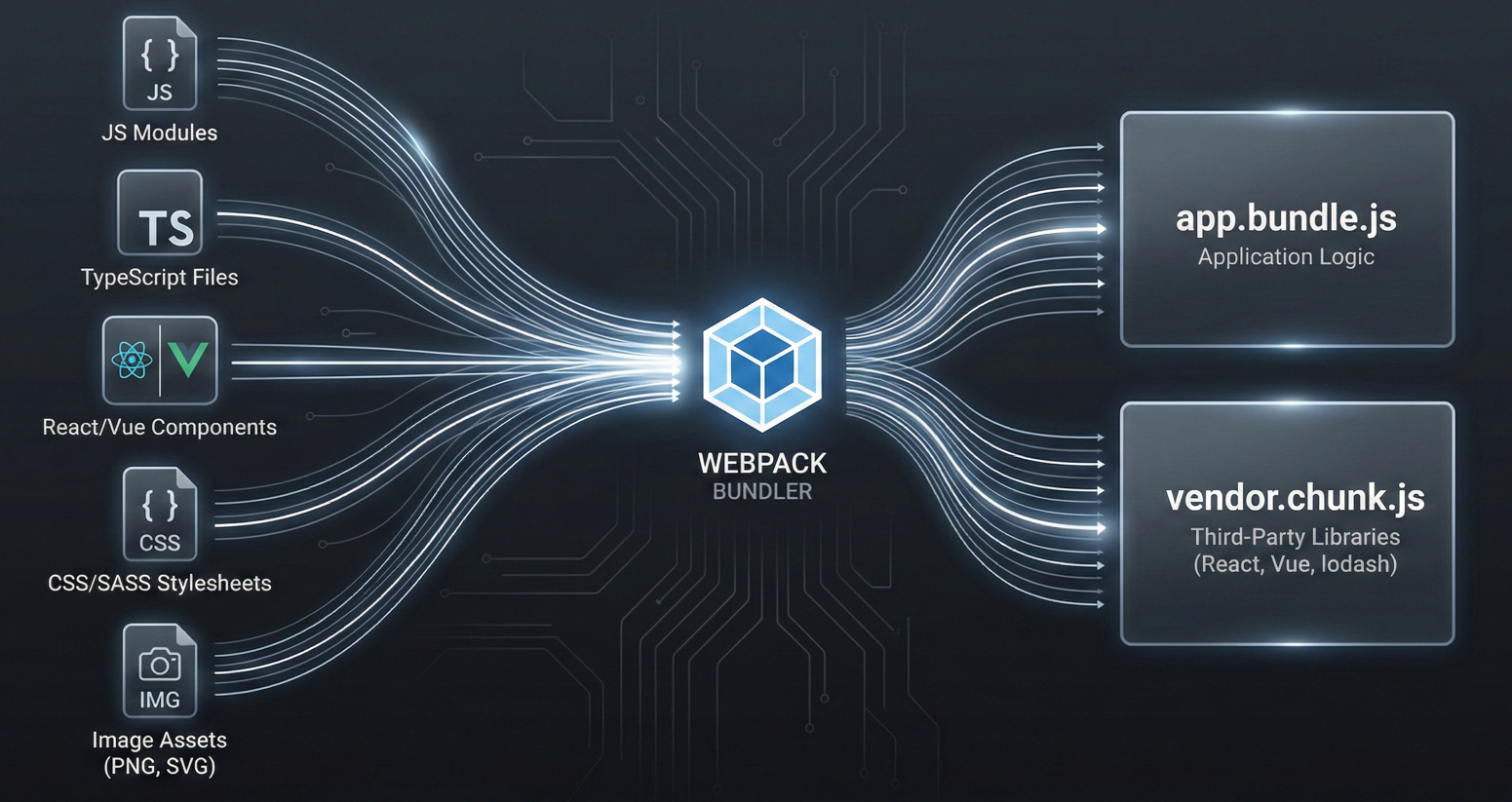
Webpack is a static module bundler. It starts at one or more entry points, builds a dependency graph, and produces optimized output files (bundles) intended for the target environment.
How Webpack Compiles and Packages Web Applications
A typical Webpack build process will:
- Treat everything as a module, including JavaScript, images, and raw assets.
- Pull in modules referenced by the entry point and recursively follow imports.
- Output one or more bundles, sometimes split into chunks for better performance.
- Optimize aggressively through minification, tree shaking, and dead code elimination.
Why Minification Fails to Hide API Routes
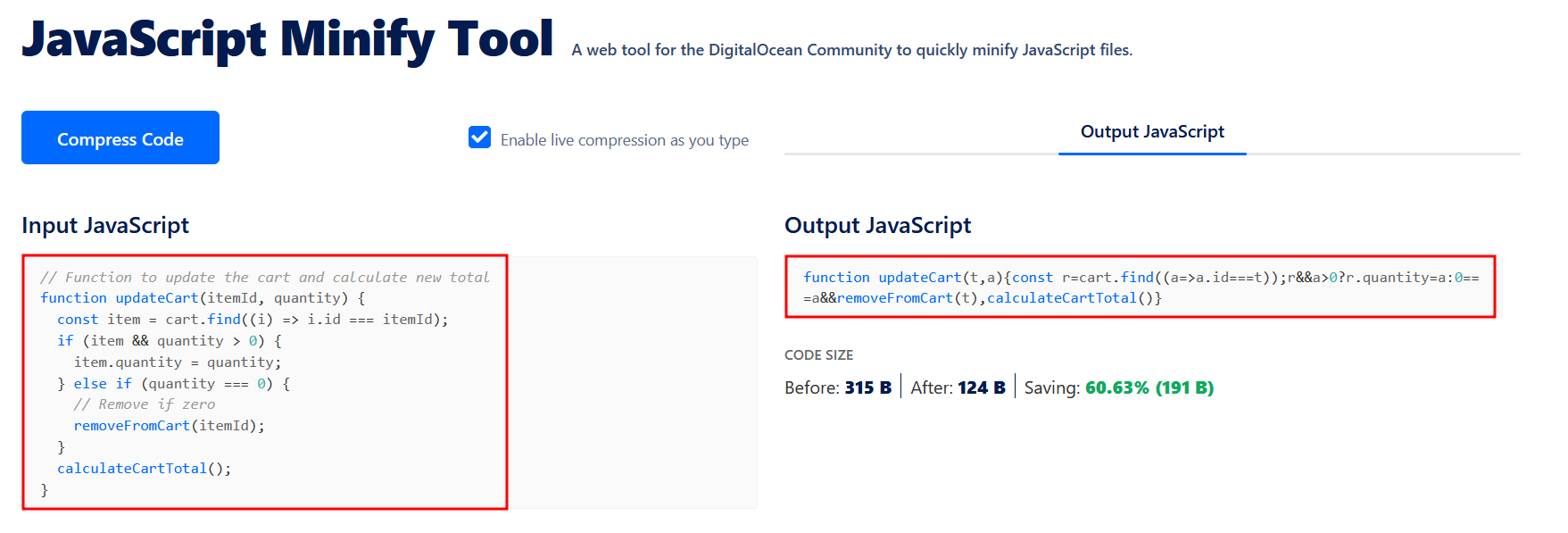
Minification can shorten variable names and strip whitespace, but it cannot safely rewrite many string literals without breaking behavior.
That detail matters because API endpoints frequently appear as plain strings such as:
/api/users/api/v2/orgshttps://api.example.com/graphql
Even when code is heavily minified, the strings that represent routes, methods, and parameter keys often remain readable.
The Real-World Impact on API Attack Surfaces
If the frontend ever references an endpoint (even for a feature that is disabled or hidden behind a flag), there is a decent chance the bundle still contains that route. And if that endpoint still exists server-side, you have something concrete to test.
Hunting for Exposed Webpack Source Maps (.map Files)
If you find a production sourcemap, you are no longer “reverse engineering” minified JavaScript. You are simply reading the original source in a reconstructed structure.
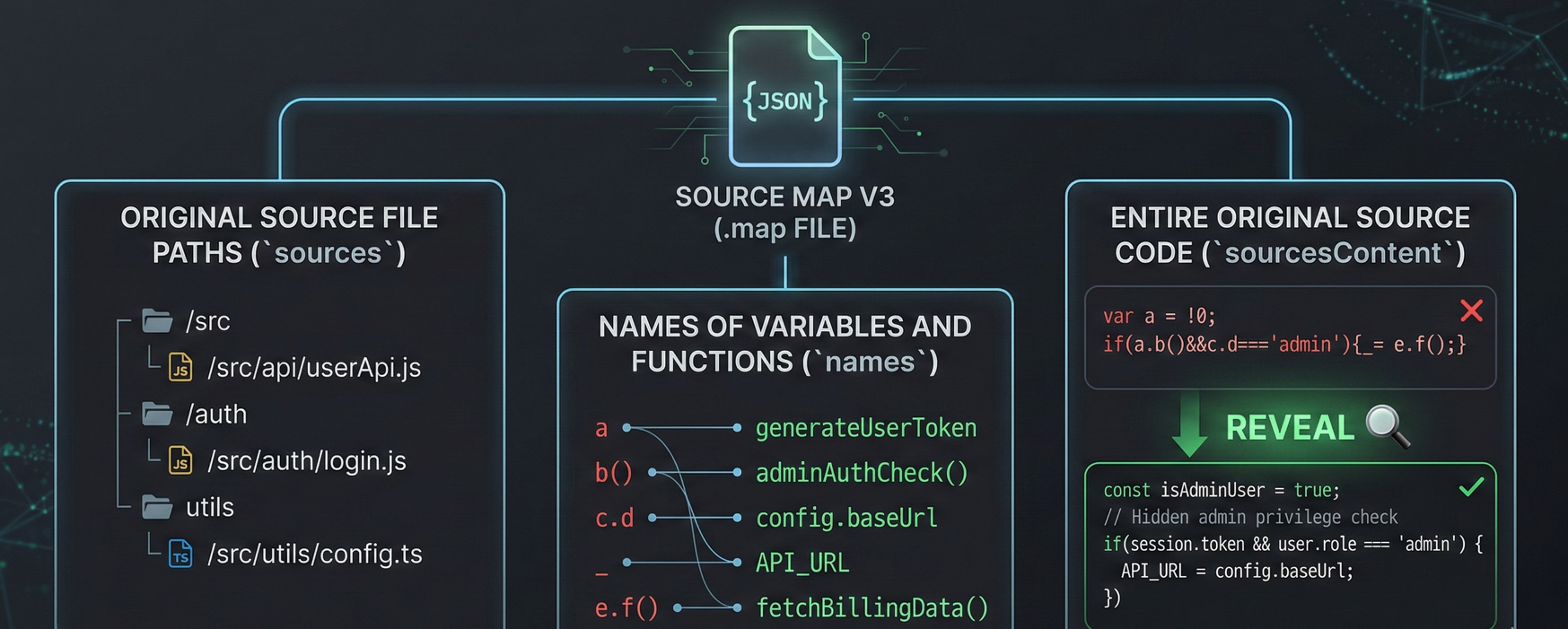
Sourcemaps are designed to help developers debug production errors by mapping minified code back to the original source files. Webpack commonly uses the Source Map V3 format, which can include:
- The original source file paths (
sources) - The names of variables and functions (
names) - Sometimes, the entire original source code (
sourcesContent)
If sourcesContent is present, you can often recover full frontend source files, including internal helper utilities, API client modules, and feature-specific endpoint lists.
Step-by-Step Guide to Finding Source Maps
Locate the map reference
Many bundles include a comment at the end like: //# sourceMappingURL=app.bundle.js.map
If that .map file is publicly accessible, you may be able to download it directly.
Search common exposure patterns
Sourcemaps are often left behind by:
- Misconfigured CI/CD pipelines
- Static hosting that publishes everything in a build directory
- Incorrect “debug” builds deployed to production
Common discovery approaches include:
- Checking for
.mapfiles near known bundle paths - Using search engine dorks like
site:example.com filetype:mapto find indexed maps
Unpack the map into source code
Tools like unwebpack-sourcemap or Sourcemapper can reconstruct the original directory structure and files from a .map URL.
Once unpacked, your job becomes much easier: search the recovered codebase for:
- API client modules (
api.js,client.ts,http.ts) - Route builders and URL constructors
- GraphQL queries and REST paths
- Feature flags referencing “hidden” functionality
The Security Risks of Exposed Source Maps
In real-world engagements, testers have used exposed sourcemaps to uncover undocumented backend functions (for example, an internal function like updateUserData). If that backend endpoint is still active and authorization is weak, this can escalate quickly into account takeover, data modification, or privilege abuse.
Mapping the Bundle Structure with Webpack Bundle Analyzer
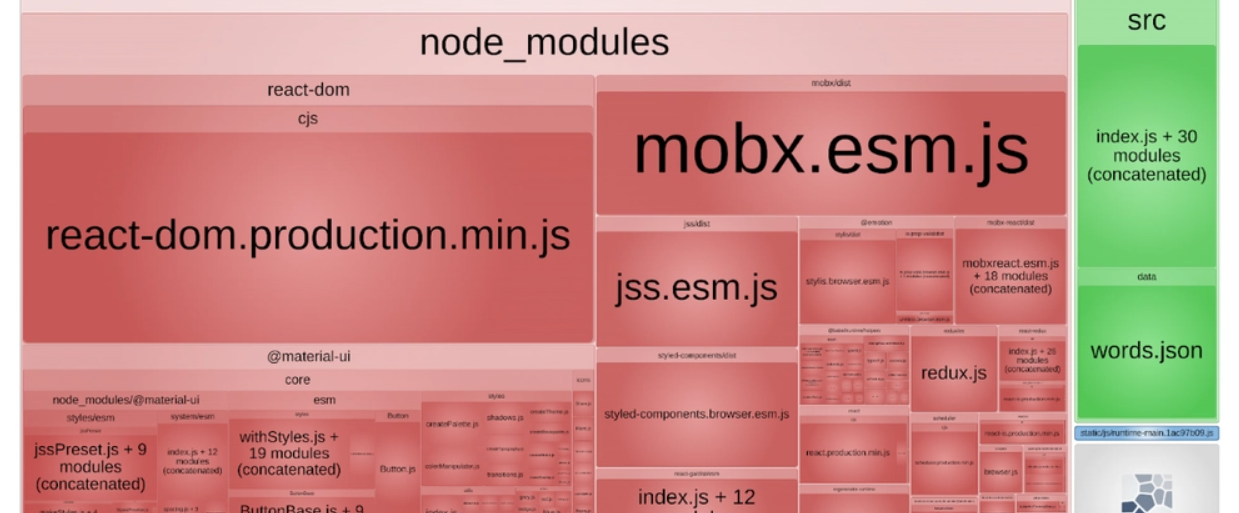
Not every target will expose sourcemaps. In those cases, you need to work with the minified bundles directly. A key challenge is that bundles are large and full of third-party libraries that create noise.
That is where webpack-bundle-analyzer becomes useful, even offensively.
Visualizing Chunks and Application Logic
Webpack frequently splits output into chunks:
- Vendor chunks (frameworks, UI libraries, analytics, SDKs)
- Application chunks (custom business logic)
The analyzer generates a treemap UI (often from a stats.json file) that helps you:
- Visually identify which chunks contain proprietary logic
- Separate “vendor noise” from code likely to contain internal endpoints
- Prioritize where to spend your time
Offensive Security Benefits of Bundle Analysis
Instead of searching blindly across megabytes of minified vendor code, you can focus on smaller, application-specific chunks where routes, API clients, and business logic are more likely to exist.
Static Analysis: Extracting API Endpoints from Minified JS
When sourcemaps are unavailable, static analysis becomes a game of extracting meaningful strings and patterns from minified code.
Key Indicators of Hidden API Routes
Even minified bundles typically contain:
- Relative paths:
/api/,/admin/,/internal/ - Full URLs:
https://api... - HTTP method indicators:
GET,POST,PUT,DELETE - Parameter keys that hint at privilege:
role,isAdmin,permissions - Versioning signals:
/v1/,/v2/,/beta/,/legacy/
Using Regex to Find Endpoints in Obfuscated Code
Most endpoint artifacts appear as string literals. While concatenation and runtime building can hide some routes, a large percentage can still be extracted by:
- Searching for patterns like
/apior/graphql - Looking for URL-ish strings (
://,?,&,.com) - Identifying common internal naming (e.g.,
/admin,/staff,/debug)
Top Tools for JavaScript Endpoint Extraction
LinkFinder / xnLinkFinder
These tools use broad regex patterns to identify endpoints and links inside JS files. They are good for quickly producing a list of candidate paths to investigate.
TruffleHog
While not an endpoint finder by design, TruffleHog is excellent for scanning JavaScript chunks for:
- API keys
- Tokens
- Hardcoded credentials
- JWTs
- Service secrets
This is important because a hidden endpoint becomes far more actionable if you also find credentials that can authenticate to it.
Burp Suite JS Miner
A passive approach: proxy normal browsing through Burp and let JS Miner automatically parse JavaScript responses. This integrates nicely into a workflow where you are already mapping the site and collecting traffic.
Compiling a Target List of Hidden API Routes
Static tools produce false positives. A practical approach is:
- Extract endpoints from all relevant JS chunks.
- Normalize them (remove duplicates, decode escaped characters, unify base paths).
- Rank them by:
- “Interesting” keywords (
admin,internal,billing,export,impersonate) - Versioning (
v2,beta,legacy) - Sensitive domains (auth, payments, identity, org management)
- “Interesting” keywords (
That ranked shortlist is what you validate next.
Dynamic Analysis: Finding Runtime API Endpoints
Static analysis fails when routes are dynamically constructed, for example:
const url = base + '/users/' + id + '/delete'const endpoint = routes[actionType]const path = getApiPath(orgId, featureFlag)
In these cases, the fastest path is to observe the application while it is running and force it to reveal what it computes.
Using Chrome DevTools and the webpack:// view
If sourcemaps are loaded, Chrome DevTools can display original source under a webpack:// namespace in the Sources tab.
This lets you:
- Set breakpoints in the API client code.
- Step through how URLs are assembled.
- Inspect variables that hold endpoint fragments.
Even if you cannot recover full source maps, DevTools can still help you trace network calls and locate which bundle function is building the request.
Using Chrome Local Overrides to Deobfuscate Code
Chrome’s “Local Overrides” feature lets you save a JS file locally, edit it, and have the browser run your modified version when the page loads.
A practical use case:
- Identify the function that sends a request.
- Inject logging right before the request is dispatched:
console.log(endpointVariable)console.log(requestConfig)
- Reload the page and capture the computed runtime endpoints.
This is especially effective when endpoints are derived from configuration objects, feature flags, or runtime state.
Tracing API Requests with Burp DOM Invader
DOM Invader (via Burp Suite) is helpful when request data flows through the DOM or client-side transformations. By injecting canaries and tracking where they land, you can identify:
- The exact code path that creates an API request
- The variable names or objects holding route definitions
- Where to hook logging or breakpoints to reveal hidden paths
Exploiting Discovered API Endpoints: Practical Test Cases
Finding a hidden route is not a vulnerability by itself. The vulnerability appears when the backend trusts the client too much or fails to enforce authorization.
The right mindset is: every discovered endpoint becomes a test target.
High-impact test categories
BOLA / IDOR (Broken Object Level Authorization)
If you find something like:
/api/v2/org/{id}/billing
Test whether changing {id} allows access to another organization’s billing data. This is one of the most common and severe API issues in real systems.
Mass assignment
If frontend code reveals parameters that are not exposed in the UI, you may find hidden fields such as:
roleisAdminverifiedaccountStatus
Try injecting additional fields into JSON bodies and see whether the backend improperly binds user-controlled input into privileged attributes.
Unauthenticated or weakly authenticated access
Some endpoints exist for internal tooling and rely on “security by invisibility.” Test the endpoint directly:
- Without authentication
- With a low-privilege user session
- With missing or malformed tokens
If it behaves differently than expected, you may have found a serious access control flaw.
Version and environment drift
Bundles often reference:
- Old API versions (
/api/v1/) - Legacy endpoints (
/legacy/) - Staging-style patterns accidentally pointed at production
If a backend kept old routes alive, they may have weaker authorization or older validation logic.
Defensive Guidance: How to Prevent API Leaks in Webpack
Even though this guide is written from a tester’s viewpoint, remediation is straightforward and worth stating clearly. Most of the risk comes from deployment hygiene and backend authorization discipline.
Remove or secure sourcemaps in production
The simplest fix is often the most important:
- Ensure
.mapfiles are not deployed publicly. - If sourcemaps are needed for monitoring, store them securely (for example, in an error tracking platform) instead of exposing them on the public site.
Do not rely on UI hiding
Hiding a feature in the frontend does not make the backend endpoint private. If an endpoint exists:
- It must enforce authentication.
- It must enforce authorization.
- It must validate inputs rigorously.
Strip debug and unnecessary metadata
Production builds should avoid shipping extra debug information that helps reverse engineering. Keep bundles lean and remove anything not required for runtime.
Treat backend authorization as non-negotiable
The core rule is simple:
Every endpoint must independently verify identity and permissions.
Assume an attacker has full visibility into the client-side code. Because in many cases, they do.
Automating JS Reconnaissance with Jsmon
While tools like LinkFinder are great for raw regex extraction, Jsmon is built specifically for continuous reconnaissance on JavaScript bundles.
- Tracking Changes: Webpack bundles change with every deployment. Jsmon monitors these files over time, alerting you the moment a developer accidentally commits a new hidden endpoint, a staging URL, or a feature-flagged route to the production bundle.
- Contextual Extraction: It doesn't just pull strings; it helps parse the structure of the JS files to extract parameters and object keys, giving you the exact blueprint needed to craft a valid request to the hidden API routes you discover.
Conclusion
Webpack bundles are not just “frontend code.” For modern SPAs, they are often an executable blueprint of backend behavior: endpoints, parameters, feature logic, and sometimes even secrets.
A strong workflow to find hidden API endpoints looks like this:
- Check for exposed sourcemaps first.
- Use bundle structure analysis to prioritize application chunks.
- Extract endpoints statically using purpose-built tooling.
- Fall back to dynamic analysis for runtime-built routes.
- Convert every discovery into structured API tests, focusing on authorization and data access.
If you approach bundles methodically, they stop being an overwhelming blob of minified code and become one of the most reliable sources of actionable leads in web application testing.