Stop Grepping, Start Contextualizing: Reducing False Positives in Secret Scanning
Traditional secret scanning in security research often starts with: grep or similar CLI tools. Tools like Jsmon are built around this model, using regex as a first pass and Abstract Syntax Trees (ASTs) for the deeper, contextual analysis.
Introduction
If you have ever run a regex-based recon tool against a large codebase, you already know the story.
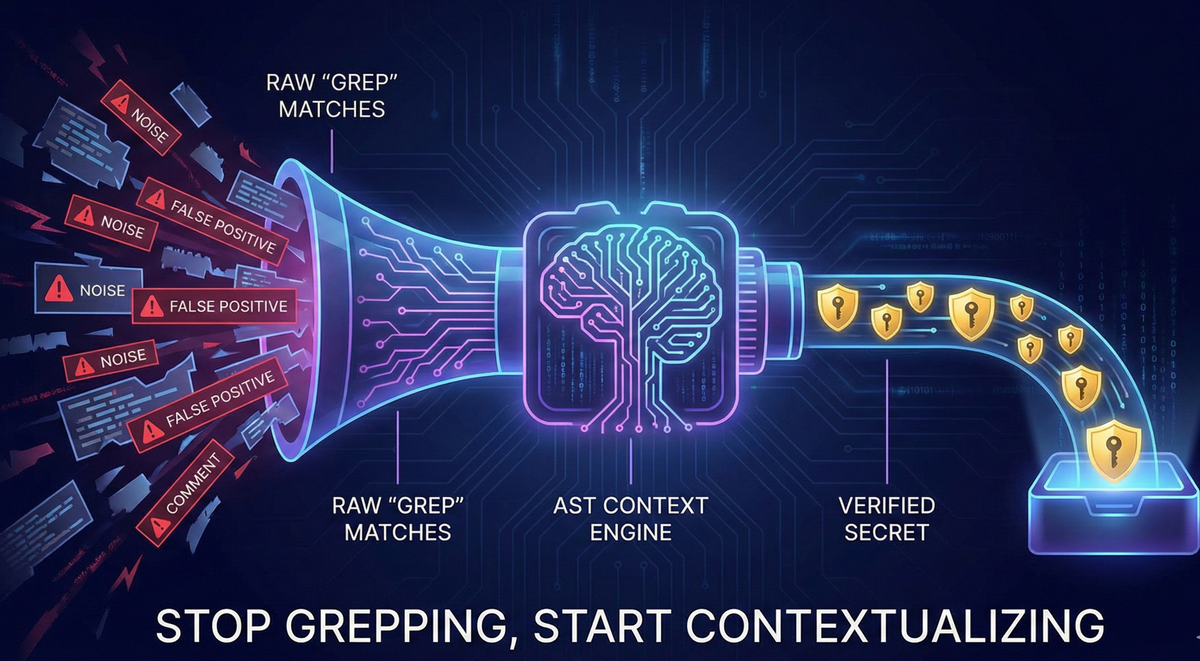
You search for things like API_KEY, token, or secret, and your terminal explodes with dozens or even hundreds of matches. Then comes the real work: manually sorting through noise to figure out what is a real credential and what is just a comment, sample value, or placeholder.
This is where alert fatigue sets in. When every result looks important, nothing truly stands out. Real bugs are buried under false positives.
This article explores a more modern approach: combining regex-based detection with AST-based validation (as implemented in tools like Jsmon) to move from dumb pattern matching to contextual understanding. The goal is simple:
Stop grepping. Start contextualizing.
The Problem: “Grep” Fatigue in Secret Scanning
Why Simple Regex Is Not Enough
Traditional secret scanning in security research often starts with:
grepor similar CLI tools- Custom regex patterns
- Keyword-based searches like
key|secret|token|password|auth
These tools are:
- Fast at scanning large volumes of text
- Good at pattern matching
- Bad at understanding meaning or context
A regex can tell you:
- “This string matches the shape of an AWS key.”
But it cannot tell you:
- Whether that string lives in a production config or a throwaway unit test
- Whether it is real, mock, expired, or example data
- Whether it is actively used at runtime
The result is a familiar pain point for security engineers:
- Hundreds of “hits,” most of which are harmless
- Hours spent manually verifying each match
- High chance of missing the one critical secret hidden in the noise
This is the essence of grep fatigue.
The Power of Two: Regex + AST
Finding a needle in a haystack is not just about sharper eyes. It is about knowing which parts of the haystack are worth looking at.
Effective secret scanning benefits from a two-step engine:
- Detection - cast a wide net using regex
- Validation - narrow down real risks using AST-based context
In other words:
- Regex: “Does this text look like a secret?”
- AST: “What is this text doing in the code?”
Tools like Jsmon are built around this model, using regex as a first pass and Abstract Syntax Trees (ASTs) for the deeper, contextual analysis.
Step 1: Regex as the Wide Net
What Regex Does Well
Regular Expressions (Regex) are excellent at recognizing shapes in raw text.
Examples:
- AWS Access Key ID
- Pattern:
AKIAfollowed by 16 alphanumeric characters
- Pattern:
- Stripe Live Key
- Pattern:
sk_live_followed by a specific character set
- Pattern:
Regex is like a metal detector:
- It beeps whenever it detects “metal” (something that looks like a secret)
- It is fast, cheap, and easy to point at arbitrary text
- It does not care whether the “metal” is a gold coin or a rusty bottle cap
In practice:
- Regex is necessary to identify candidate secrets
- But if you stop at regex, you end up digging up a lot of “bottle caps”
You need regex to make sure you do not miss anything, but you also need something smarter to decide what actually matters.
Step 2: AST Parsing for Context
What Is an Abstract Syntax Tree (AST)?
To a computer, source code starts as a long string of text.
An Abstract Syntax Tree (AST) transforms that raw text into a structured, machine-readable representation. It breaks code into nodes that represent its grammatical components.
Imagine the sentence:
“The quick brown fox jumps.”
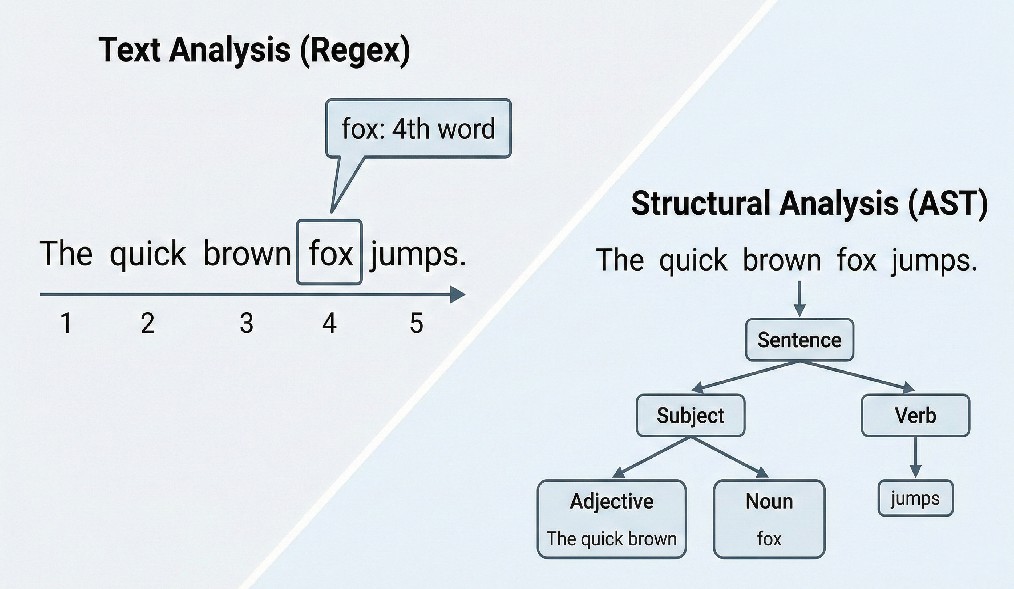
Similarly, for code like:
const api_key = "12345";
An AST might represent it as:
VariableDeclaration- a variable is being createdIdentifier- the name of the variable (api_key)Literal- the value assigned ("12345")
This structure allows a tool like Jsmon to understand not just what the string looks like, but how it is used in the code.
How Jsmon Uses the AST
When Jsmon scans JavaScript:
- Regex first identifies candidate strings that look like secrets.
- Jsmon then parses the surrounding code into an AST.
- The AST tells Jsmon:
- Is the string part of a variable?
- What is the variable name?
- Where in the codebase does this variable live?
- Is it inside a configuration object, test file, or dependency?
This lets Jsmon distinguish between:
- A random test value
- A genuine secret in a critical configuration path
Under the Hood: Visualizing the Tree
From Text to Structure
Consider a snippet like:
const config = {
  AWS_SECRET: "AKIA...",
  OTHER_KEY: "value"
};
An AST visualization (such as those from tools like AST Explorer) shows how the code is decomposed:
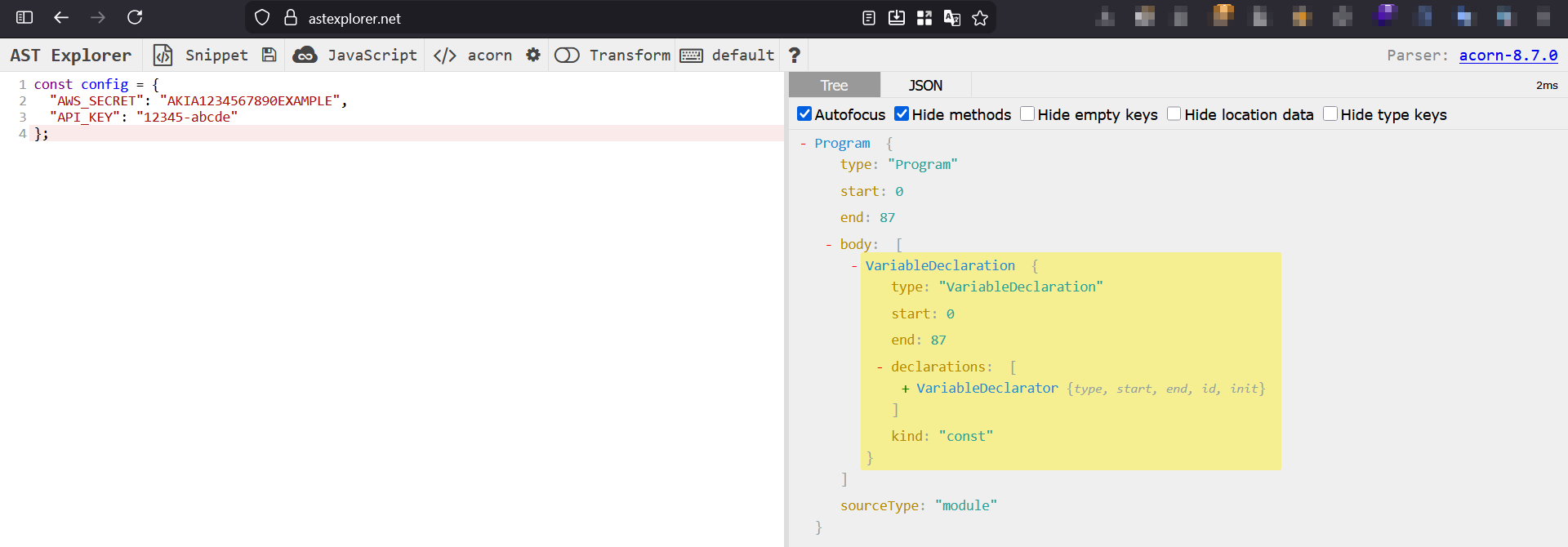
VariableDeclaration(The Container)- The parser identifies that a variable named
configis being declared. - This immediately hints that we are dealing with configuration data, a high-risk region for secrets.
- The parser identifies that a variable named
ObjectExpression(The Body)- The value of
configis an object, not just a flat string. - The AST knows it holds multiple key-value pairs.
- The value of
Property(The Data)- Each property is mapped as:
- Key: e.g.,
"AWS_SECRET" - Value: e.g.,
"AKIA..."
- Key: e.g.,
- Each property is mapped as:
At this point, the difference between regex and AST becomes clear:
- Regex: “I found the pattern
AKIA...somewhere in the file.” - AST: “I found
AKIA...assigned to a key namedAWS_SECRETinside aconfigobject that looks like a production configuration.”
This is semantic context, and it is critical for reducing false positives.
The Three Layers of Context
AST-based analysis lets Jsmon apply multiple layers of context that grep alone cannot see.
1. Syntactic Context (The Grammar)
This layer answers: “Where is this string in the code’s structure?”
Examples:
- Often documentation, examples, or dead code.
- Much higher risk, especially if it appears in production code.
Inside an active assignment:
const API_KEY = "12345";
Inside a comment:
// API_KEY: 12345
2. Semantic Context (The Meaning)
This layer focuses on intent: what the surrounding identifiers suggest about the data.
Examples:
const mock_token = "..."- Variable name signals that the value is likely a placeholder.
const prodStripeSecretKey = "sk_live_..."- Naming strongly implies a real, production secret.
Semantic context helps distinguish between:
- Dummy data used for development or tests
- High-value secrets connected to real infrastructure
3. Environmental Context (The Location)
This layer looks at where the file lives in the project and how it is used.
High-risk environments:
- Production configuration files
- Exported modules like
module.exports = config - Bundled/minified files used in deployment
Lower-risk environments:
tests/directoriesexamples/or sample codenode_modulesor third-party libraries- Local utility scripts not shipped to production
By combining environmental cues with syntactic and semantic context, Jsmon can rank findings with much greater accuracy than regex alone.
The Showdown: test.js on S3
To see the difference in practice, consider a demo file, test.js, hosted on S3 and intentionally packed with:
- 50+ secret-like values
1. The Grep-Only Approach
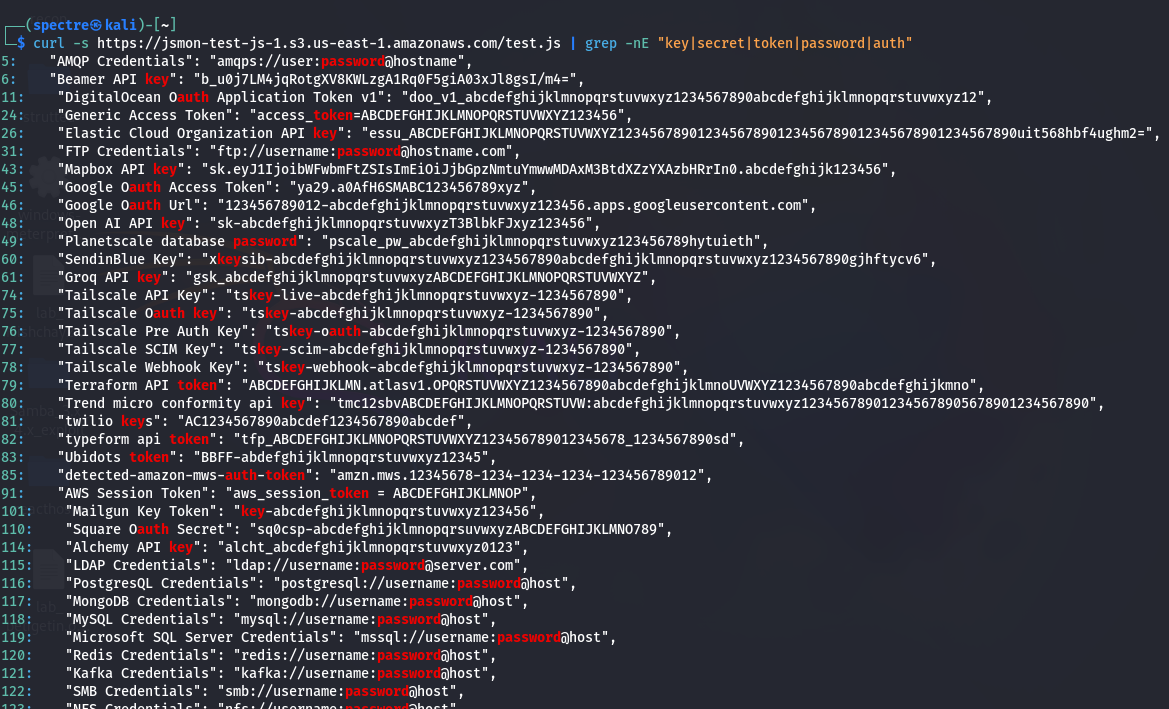
A basic grep command might look like:
curl -s <https://jsmon-test-js-1.s3.us-east-1.amazonaws.com/test.js> \\
  | grep -nE "key|secret|token|password|auth"
Outcome:
- Multiple lines of results
- Everything is treated equally:
- Real secrets
- Random words containing “key” or “auth”
- Generic object keys like
"key2": "..."
- Manual triage is mandatory
- High cognitive load and time cost
This is where false positives turn into alert fatigue.
2. The Jsmon Approach
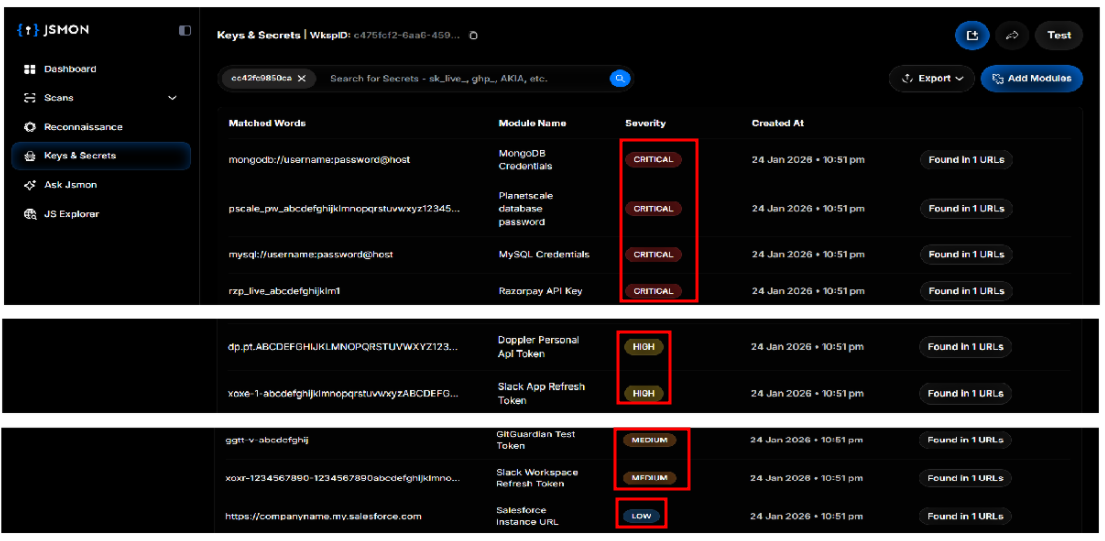
Running the same test.js through Jsmon produces a very different experience.
Outcome: Structured, prioritized findings.
- Jsmon parses the file into an AST.
- Regex finds candidate strings.
- AST-based logic validates and ranks them.
Key benefits:
- Severity grading
- Config awareness
- This is a configuration object used by the application.
- Secrets in this context are likely active and sensitive.
If secrets appear inside: module.exports = config;
Jsmon infers that:
Instead of scrolling through raw text, you get:
- A smaller, more accurate list of findings
- Clear severity levels
- Strong hints about where to focus your attention first
Performance: Can Context Be Faster Than Grep?
A common assumption is that “smarter” tools must be slower. In reality, this is not always true.
Regex at Scale
On large JavaScript bundles:
- Complex regex patterns may cause:
- Backtracking issues
- High CPU usage
- Memory pressure
- Maintaining a custom zoo of regexes becomes its own job:
- Every new provider or format = new regex
- If AWS or another provider changes their key format, your patterns break
- Tuning regex for performance and coverage is non-trivial
Optimized AST Parsing
A tool like Jsmon:
- Parses the structure once
- Navigates the AST efficiently
- Focuses checks where secrets are actually likely to live
Combined with a maintained internal regex library:
- You offload the burden of:
- Tracking provider-specific patterns
- Updating formats as ecosystems change
- You spend less time debugging the tool
- You spend more time actually finding and exploiting real issues
In short:
- Grep may be fast per line, but slow in human time.
- AST-based tools may do more work per file, but can be faster end-to-end when you factor in analyst time and reduced false positives.
Conclusion
Security research time is finite. Every hour spent confirming that a match is not a real secret is an hour not spent exploring genuine attack paths.
By combining Regex and AST parsing,
…tools like Jsmon transform secret scanning from a noisy, grep-heavy chore into a more focused, intelligence-driven workflow.
Stop grepping. Start contextualizing.
How We Can Help?
In 2026, rely on context, not just pattern matching. Jsmon's advanced AST engine moves beyond simple regex to understand the intent and environment of your code, drastically reducing false positives and alerting you only when it matters.
Use jsmon.sh to detect hardcoded secrets, PII leaks, and configuration vulnerabilities with precision, so you can stop chasing ghosts and start fixing real risks.
Secure your business, in real-time!