Passive Recon 2.0: Mapping Attack Surfaces While You Browse

If you've ever done security reconnaissance on a web application, you know the drill. You spend time clicking around, understanding how the app works, mentally mapping out its functionality. Then you switch gears, fire up your terminal, run tools like waybackurls or subjs, download files, and start grepping through them looking for interesting patterns. It works, but let's be honest: the constant context switching gets exhausting fast.
What if there was a better way? What if your browser could do the heavy lifting while you simply browse like a normal user?
Challenges with Manual JavaScript Reconnaissance
Here's the typical workflow most security researchers are familiar with:
The Old Way involves manually browsing a target site to understand its functionality. You click through pages, observe behavior, and get a feel for what the application does. Then, you pivot to your terminal, fire up your favorite recon tools, download JavaScript files, and start analyzing them offline.
The Friction is real. Your browser is where the app logic lives, where you see how things actually work. But your recon data lives in your terminal, scattered across different tools and outputs. You're constantly jumping between these two worlds, and each switch breaks your flow.
The Solution is simpler than you might think. What if your browser was your recon tool? Imagine every JavaScript file loading automatically as you click around, captured, analyzed, and mapped in real-time, without typing a single command.
Introducing the Jsmon Browser Extension
Enter the Jsmon Browser Extension: a lightweight tool that sits quietly in your browser, passively listening for JavaScript files as you navigate through a target application. It automatically sends these files to the Jsmon engine for deep analysis.
Here's the game-changer: it captures authenticated JavaScript files, the ones that only load after you log in. These are the files that external scanners typically miss because they can't get past the login wall. If your browser can load it, Jsmon can analyze it.
Step-by-Step Installation & Setup
Let me walk you through getting this set up. It's surprisingly straightforward.
Step 1: Installation & Configuration
First, grab the extension from the Jsmon integrations page at jsmon.sh/integration#instant-integrations.
Next, you'll need to connect the extension to your account. Head over to your dashboard at app.jsmon.sh, navigate to Settings → API Keys, and generate a new key. This key is what links your browser extension to your cloud account.
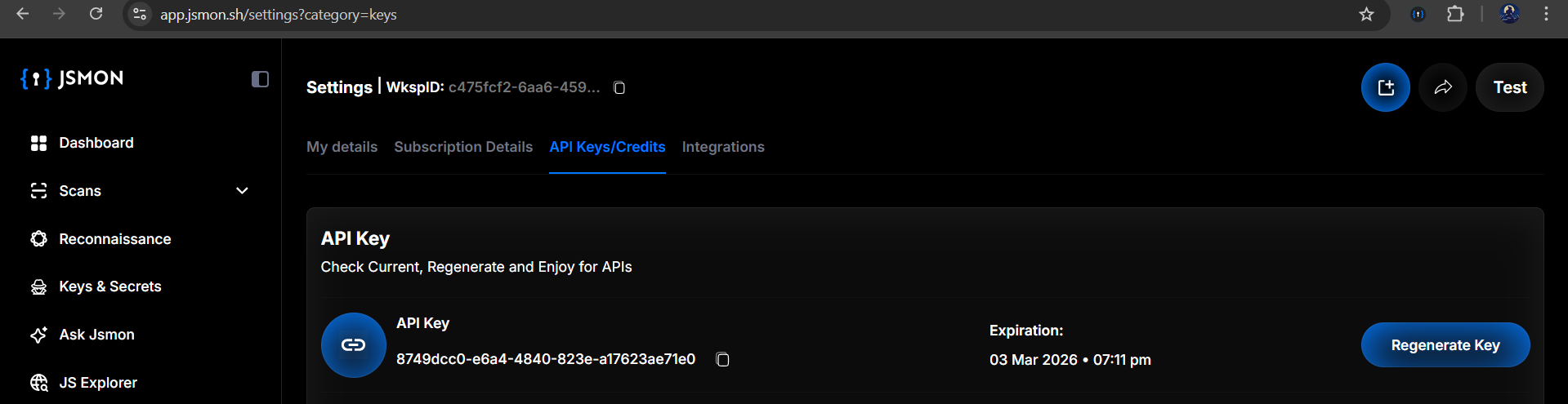
Step 2: Authenticating the Extension
Open the extension in your browser and paste in the API key you just generated. This authenticates the extension and ensures all the data it collects flows into your Jsmon account.
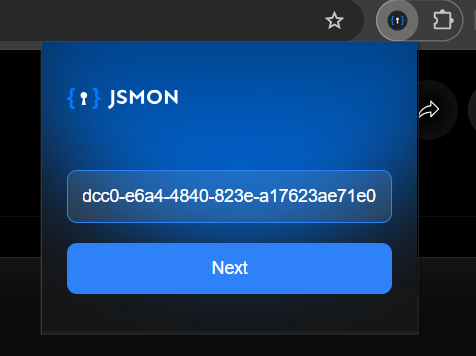
Once you've entered the key, click Next to continue.
Step 3: Selecting Your Workspace
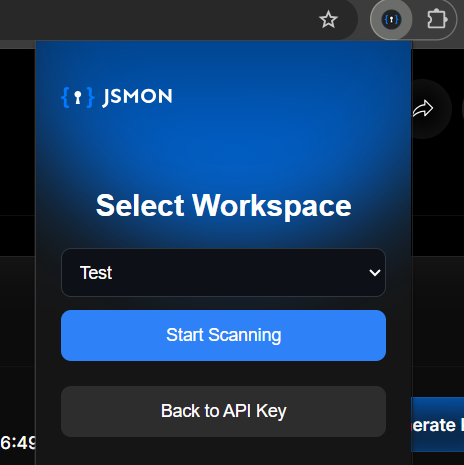
If you're like most security researchers, you probably juggle multiple projects, maybe you have separate workspaces for bug bounty programs, work projects, or penetration tests. The extension lets you choose which workspace should receive the data from this browsing session.
Select the appropriate workspace (for example, you might choose a "Test" workspace to keep things organized), then click Start Scanning.
How to Configure Target Scope for Scanning
Here's where things get important. You don't want to waste time and API credits scanning every JavaScript file from Google Analytics, ad networks, or CDNs. Scope configuration ensures you're only analyzing what matters.
Defining Your Targets
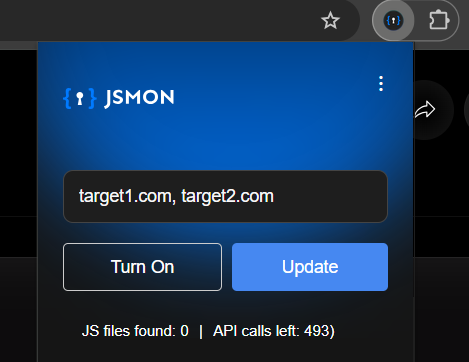
Click the extension menu and enter your target domains into the scope box. For example, if you're testing target1.com and target2.com, add both of them here.
Hit Update
Once you've defined your targets, click the Update button. This tells Jsmon to only capture and analyze JavaScript files originating from these specific domains. Everything else gets ignored.
After configuring your scope, toggle the switch to Turn On. Your extension is now active and ready to intercept relevant traffic.
Performing Real-Time Passive Reconnaissance
Let's see this in action with a real example. We'll use testphp.vulnweb.com, a classic intentionally vulnerable test application that's perfect for demonstrations.
The Test Drive
We navigated to http://testphp.vulnweb.com/ and started browsing normally, no scripts, no terminal commands, just clicking around like any regular user would. We visited the "Artists" page, checked out the "Cart" functionality, and browsed through the "Guestbook."
Passive Collection
Here's where it gets interesting. While we were just casually browsing, the extension was working in the background. We didn't have to manually download anything or run any commands.
Instant Feedback
Looking at the extension sidebar, it instantly showed "JS files found: 19". Jsmon had passively detected 19 JavaScript files on the vulnweb.com domain without any manual interaction from us.
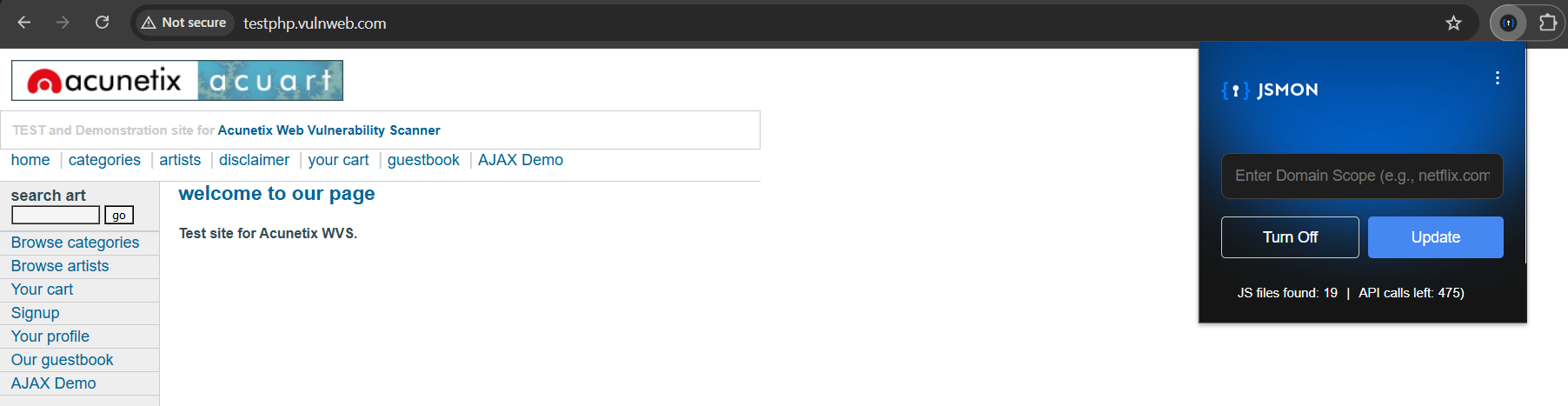
Why this matters: These files aren't just listed, they're already queued for processing. Jsmon is analyzing them in the background while you continue browsing. No manual downloads, no grepping through files locally. It's all happening automatically.
Analyzing Scan Results and Risk Scores
Now comes the satisfying part, seeing what your passive browsing session uncovered.
The Dashboard View
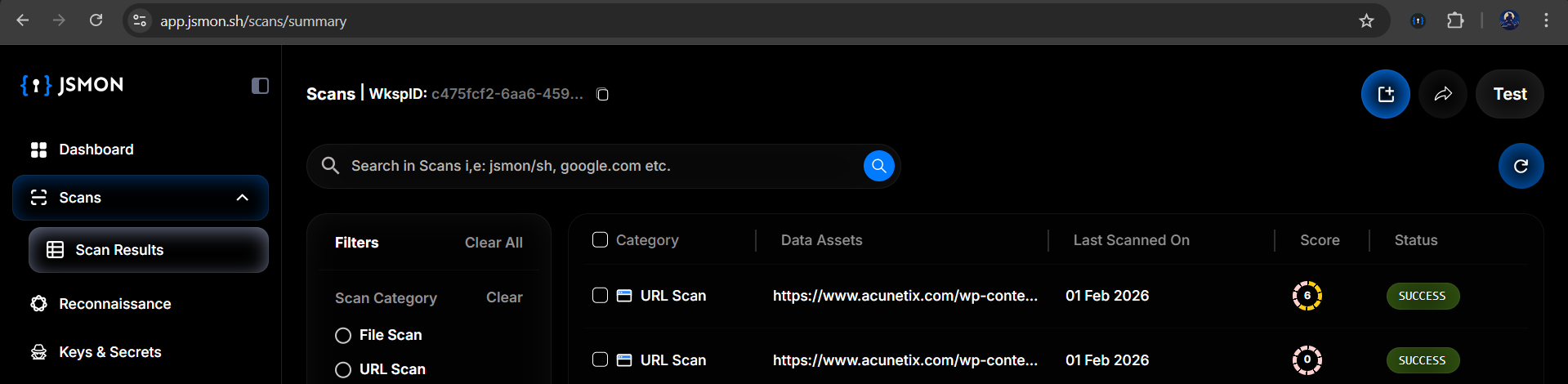
Navigate back to app.jsmon.sh/scans/summary, and you'll see the results automatically populated. The Scan Results page shows all the assets captured during your browsing session.
What You'll See
Data Assets appear as specific JavaScript URLs, for instance, files from /wp-content/ and other paths that were loaded as you clicked around.
Score & Status indicators show that Jsmon has already assigned risk scores to these files. For example, you might see a score of "6" on a particular file, indicating that Jsmon found something interesting during its analysis, perhaps an API key, a sensitive endpoint, or an exposed configuration.
And remember: you were just clicking links. The analysis happened automatically in the background.
Benefits of Automated Browser-Based Recon
Here's the bottom line: by using the Jsmon Browser Extension, you ensure that no asset slips through the cracks. If your browser loads it, Jsmon analyzes it. It's that simple.
This approach closes the gap between manual testing and automated scanning. You get the depth and context of manual exploration combined with the thoroughness and speed of automation. No more forgetting to run a tool or missing files because you switched tasks.
Your daily browsing becomes a continuous security audit. Every authenticated session, every click, every dynamically loaded script, all automatically captured and analyzed.
Ready to Get Started?
Download the extension today from jsmon.sh/integration and turn your browser into a passive reconnaissance powerhouse. Your future self will thank you for the time saved and the findings you would have otherwise missed.
References:
- Jsmon Integration Page: https://jsmon.sh/integration#instant-integrations
- Video Tutorial: https://youtu.be/qJxeuPkmhaI