From Cache Poisoning to Account Takeover: A Modern Web Security Case Study

In many bug bounty programs and security teams, reflected XSS has earned a reputation as “boring.”
It is often downgraded to a low-severity issue because it typically requires a user to click a crafted link or interact with suspicious input.
But what happens when you remove that dependency on user interaction?
What if you can:
- Inject your payload once
- Let the server and cache do the rest
- And have your malicious response served to every visitor, including high-value users such as admins?
At that point, you are no longer dealing with a simple reflected XSS. You are looking at Web Cache Poisoning and related cache abuse techniques that can escalate all the way to Account Takeover (ATO).
This article walks through how unkeyed inputs, cache behavior, and subtle implementation details can turn “just XSS” into full account compromise.
Understanding the Core Mechanism: Unkeyed Input and Cache Behavior
How Caches Think: The Cache Key
When a request hits a cache (for example, a CDN or reverse proxy), it needs a way to decide whether it has seen this request before. It does that by computing a cache key, often based on:
- The
Hostheader - The request path, such as
/settings.jsor/dashboard
In simple terms, the cache key is the fingerprint that tells the cache,
“Do I already have a response for this kind of request?”
Unkeyed Inputs: Where Things Go Wrong
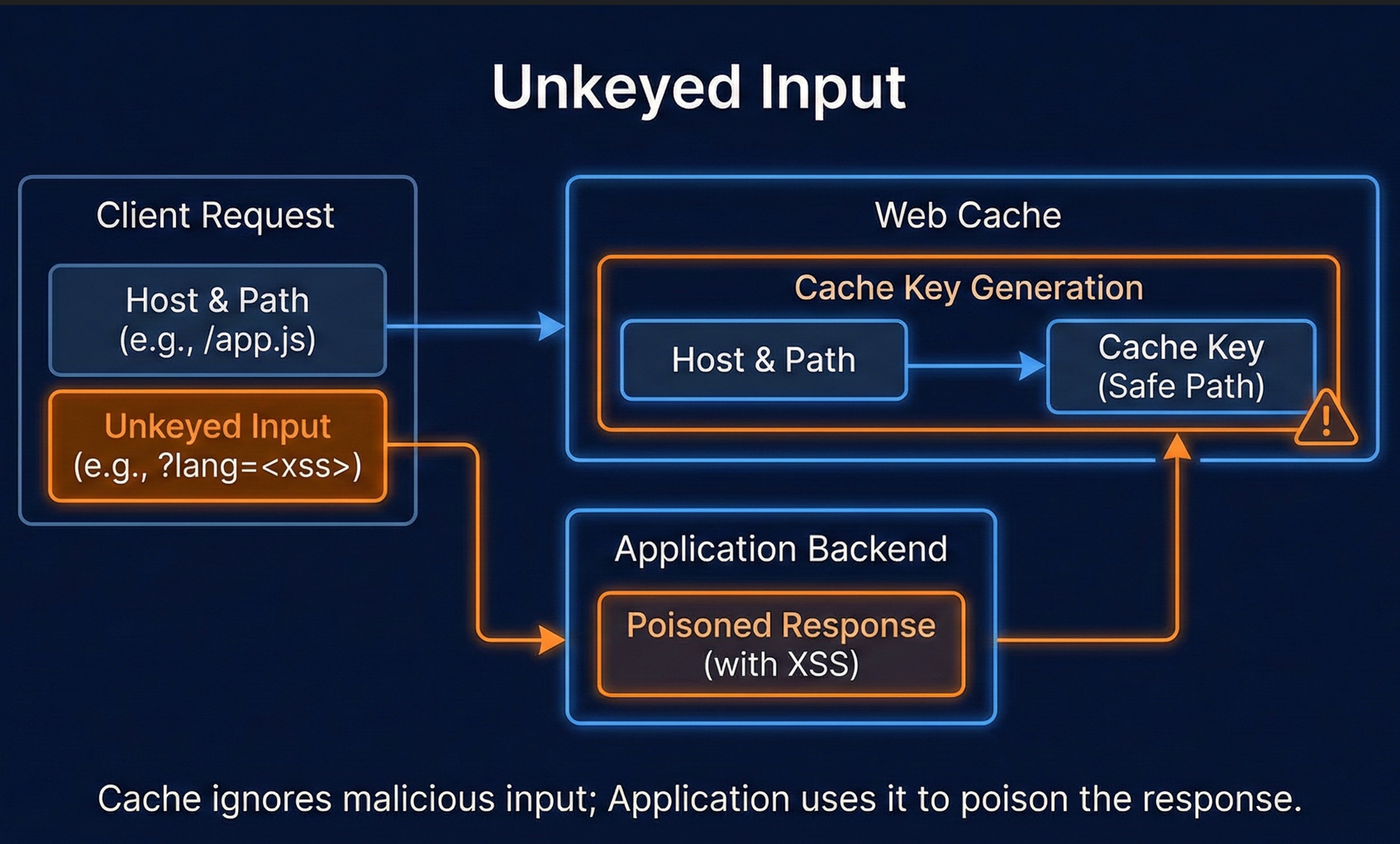
To improve performance and reduce cache fragmentation, caches frequently ignore certain inputs when building the cache key. These unkeyed inputs can be:
- Query parameters like
?lang=en,?utm_source=... - Headers like
X-Forwarded-Hostor evenHostin some edge cases - Path tricks or suffixes that the backend ignores
The problem arises when:
- The application uses one of these inputs (for example,
lang) to generate different responses - The cache ignores the same input when constructing the key
This mismatch creates a dangerous window where an attacker can:
- Send a request using a malicious value in an unkeyed input.
- Cause the server to generate a poisoned response.
- Let the cache save that response under a clean, widely used URL (for example,
/settings.js). - Have all subsequent users receive this poisoned content, no special link required.
That is the core idea behind Web Cache Poisoning.
Attack Chain Overview: From Cache Poisoning to Full Account Takeover
Once you understand how unkeyed inputs and cache keys interact, several powerful attack paths emerge. In this case study, we focus on three main scenarios that all lead to Account Takeover:
- Cache Poisoning → Stored XSS → ATO
- Cache Poisoning → Password Reset Poisoning → ATO
- Web Cache Deception → Exposure of Sensitive Data → ATO
Each scenario exploits the same underlying reality:
the cache is treating sensitive or user-influenced content as if it were a safe, cacheable resource.
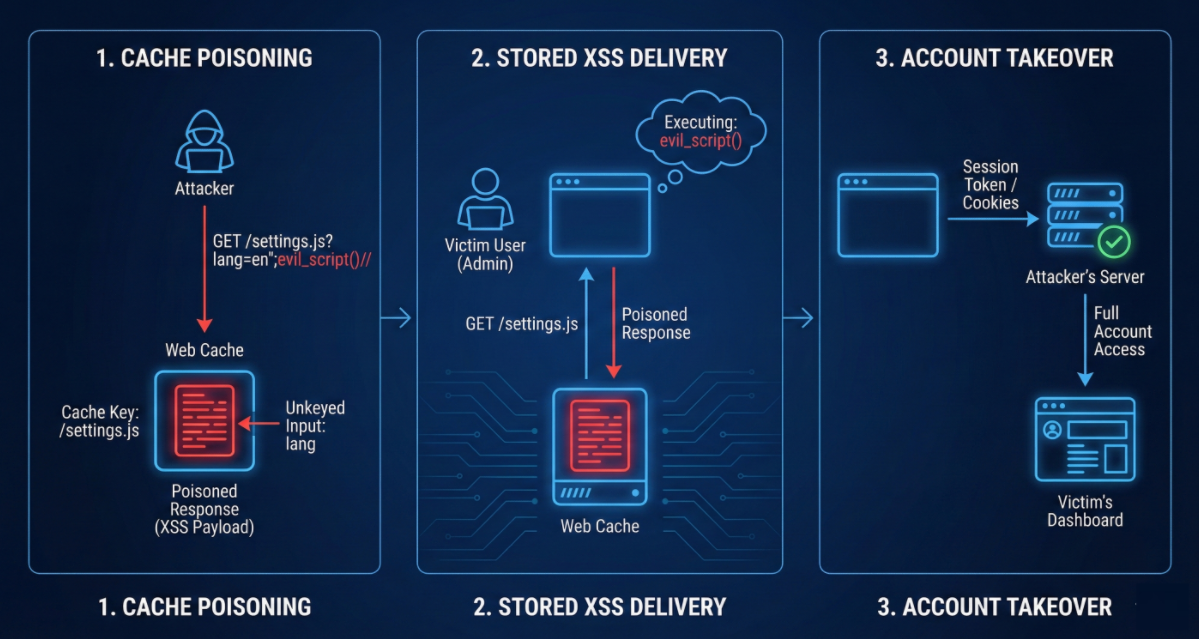
Scenario A: Cache Poisoning → Stored XSS → Account Takeover
Discovery: A “Harmless” Reflected XSS in a JS File
Imagine you discover a JavaScript configuration file at:
/settings.jsThis file reflects the lang parameter directly into the response.
Request:
GET /settings.js?lang=en";alert(document.cookie)// HTTP/1.1
Host: target.com
Reflected response (simplified):
HTTP/1.1 200 OK
...
var config = {
    "language": "en";alert(document.cookie)//",
    "theme": "dark"
};
At first glance, this looks like a classic reflected XSS:
- You control
lang - It’s placed into a JavaScript context
- You can inject arbitrary script
Many teams would label this low impact because you need to convince a victim to click that specific URL.
The Turning Point: Cache Behavior and Unkeyed Input
Now you notice response headers such as:
X-Cache: MISS
Cache-Control: public, max-age=3600
You also confirm that:
- The cache key is effectively just the path
/settings.js - The
langparameter is not part of the key (it is an unkeyed input)
This means:
- Your malicious request with
?lang=en";alert(document.cookie)//causes the server to generate a poisoned JS file. - The cache then saves that response and associates it with the plain URL
/settings.js.
From this point forward, anyone visiting the site and requesting /settings.js,without any query parameters, will receive your poisoned script.
Exploitation: Silent Account Takeover
When an authenticated user, perhaps an administrator, views their dashboard:
Request:
GET /settings.js HTTP/1.1
Host: target.com
Because the cache key is just /settings.js, the cache returns your previously poisoned file. The victim’s browser executes the injected alert(document.cookie) snippet, which in a real attack would be replaced by:
- Session token exfiltration to an attacker-controlled endpoint
- CSRF or other privileged actions within the admin interface
At this point, your “boring” reflected XSS has effectively become a stored XSS via cache poisoning, and you can move to full account takeover.
Scenario B: Cache Poisoning → Password Reset Flow Abuse → Account Takeover
Discovery: Dynamic Host-Based Password Reset Links
Many applications generate password reset links using the incoming Host (or related headers) to build absolute URLs in emails.
For example, the backend might build a reset link like:
https://<host>/reset-token/<token>If the application:
- Trusts the
Hostheader directly - Or uses
X-Forwarded-Hostor similar headers without validation
then you have a chance to rewrite where reset links point.
Poisoning the Reset Response
Consider the following request:
POST /reset-password HTTP/1.1
Host: attacker.com
X-Forwarded-Host: target.com
...
email=victim@target.com
If the application uses Host (or a combination of headers) incorrectly, it might generate a response such as:
HTTP/1.1 200 OK
Cache-Control: public, max-age=300
...
Check your email: <https://attacker.com/reset-token/12345>
Now pay attention to:
- The
Cache-Control: public, max-age=300header - The cache key: if it is based only on
/reset-passwordand ignores theHostheader or relevant metadata, this response may be cached and reused.
Triggering the Trap: Users Receive Attacker-Controlled Links
The next legitimate user who tries to reset their password simply visits the normal password reset flow.
Because the cache key is too broad, the cache returns the previously poisoned response:
- The UI tells them to check their email for a reset link
- The email contains a link that points to
attacker.com, not the legitimate domain
When the user clicks that link:
- The legitimate reset token is sent to the attacker’s infrastructure
- The attacker can now use that token to reset the victim’s password
- This results in a full Account Takeover
In this case, cache poisoning turns a logic flaw in password reset link generation into a practical, scalable exploitation path.
Scenario C: Web Cache Deception → Sensitive Data Exposure → Account Takeover
Concept: Caching “Good” Content in the Wrong Place
While cache poisoning involves inserting malicious content into the cache,
Web Cache Deception focuses on tricking the cache into storing sensitive data, such as account pages, API keys, or session-linked content, under URLs that seem static or harmless.
Exploit Flow: Making Dynamic Content Look Static
Consider a victim who is already logged in. You trick them into visiting:
<https://example.com/my-account;non-existent.css>
Under the hood, two things happen:
- Backend behavior:
- The application may parse the URL and treat everything before the
;as the real path. - It effectively resolves the request to
/my-account. - It then generates a fully personalized account page for the victim, including potentially sensitive data.
- The application may parse the URL and treat everything before the
- Cache behavior:
- The cache might rely on simple pattern matching of the URL.
- Seeing
;non-existent.css(or any suffix suggesting a static asset, like.css,.js,.png), it assumes this is a static resource. - It therefore considers the content safe to cache publicly.
Exploitation: Retrieving the Victim’s Cached Data
Once the victim has loaded this crafted URL:
- The cache stores the resulting HTML (their private account page) under the URL
https://example.com/my-account;non-existent.css.
Now, as the attacker, you simply request the same URL:
GET /my-account;non-existent.css HTTP/1.1
Host: example.com
The cache responds with the stored HTML that belongs to the victim.
From there, you can:
- View source
- Extract API keys, session identifiers, or any sensitive fields
- Use those secrets to impersonate the victim and perform Account Takeover
In this scenario, Web Cache Deception converts a subtle path-handling quirk into a full disclosure of private data via the public cache.
Defense Strategies: Securing Caches and Preventing ATO
Cache-related vulnerabilities are so dangerous because they break the mental model many teams rely on:
“Reflected attacks are user-specific and short-lived.
Cached responses are static and safe.”
When those assumptions are wrong, the blast radius is huge. The following controls significantly reduce the risk.
1. Enforce Strict and Accurate Cache Keys
Any input that influences the response content must be reflected in the cache key. Examples include:
- Language parameters such as
lang - Theme or layout parameters
- Geolocation or user segment parameters
You should:
- Configure your CDN or reverse proxy to vary on all such parameters.
- Avoid ignoring inputs that your application logic actively relies on.
- Ensure the backend and cache agree on how URLs and query strings are parsed.
2. Disable Caching for Dynamic and Sensitive Content
For pages that:
- Reflect user input
- Contain PII
- Expose account or session-related information
you should favor no caching at all. Use headers like:
Cache-Control: no-store
Pragma: no-cache
This is especially important on:
- Account pages
- Password reset flows
- User dashboards
- Any endpoint returning personalized data
3. Validate and Lock Down Host-Derived URLs
Never trust raw Host, X-Forwarded-Host, or similar headers for generating external-facing links.
Instead:
- Use a hardcoded, well-reviewed configuration for allowed domains.
- Enforce strict validation: reject or ignore any unexpected host value.
- On the infrastructure side, ensure your reverse proxy normalizes and sanitizes these headers before they reach the application.
This is critical for:
- Password reset links
- Login links
- Magic link flows
- Any URL that ends up in emails or out-of-band channels
4. Harden Cache Configuration and URL Parsing
To avoid the kind of confusion seen in Web Cache Deception:
- Align URL parsing between the cache and backend so that both treat paths and suffixes consistently.
- Avoid treating paths with dynamic semantics (like
/my-account) as static assets just because they contain;, odd suffixes, or file-like endings. - Carefully review patterns that allow static-looking paths to back dynamic content.
5. Implement Strong Transport and Session Security
While cache-specific controls are crucial, surrounding security measures still matter:
- Use end-to-end HTTPS to prevent intermediaries from tampering with or observing responses.
- Apply secure session management so that even if some tokens are leaked, their lifetime and scope are minimized.
- Ensure sensitive cookies are marked with
HttpOnly,Secure, and appropriateSameSitesettings.
6. Sanitize and Validate User Inputs
Even in cache-related chains, input validation helps:
- Properly sanitizing user input can neutralize many XSS payloads, making it harder for attackers to turn cache misconfigurations into code execution.
- Validation at boundaries reduces the chances that untrusted values end up in dangerous contexts such as JavaScript, HTML, or headers.
How Modern Tooling Can Help: Monitoring for Cache Abuse
In 2026, the web ecosystem is saturated with automation, both defensive and offensive. Attackers chain subtle behaviors, such as unkeyed parameters and misaligned URL parsing, into impactful account takeovers.
To stay ahead, you need:
- Visibility into how your application behaves under real traffic
- Continuous detection of suspicious patterns in request parameters, headers, and response behavior
- Awareness of unkeyed inputs that influence dynamic content
Tools like jsmon.sh aim to:
- Track application-layer vulnerabilities in real time
- Surface supply chain risks and dangerous interactions in your JavaScript and HTTP flows
- Identify the exact places where cache keys and application logic diverge, revealing potential cache poisoning vectors before attackers find them
By continuously monitoring these signals, you can catch:
- Unexpected reflections of query parameters in JS or HTML
- Host header misuse in link generation
- Dynamic content being served with overly permissive caching headers
In short, you can move from reactive, incident-driven fixes to proactive hardening.
Conclusion: From “Low Severity” to Business-Critical Risk
Reflected XSS, misused headers, and odd URL suffixes are often dismissed as minor issues.
However, when combined with real-world cache behavior, they can become:
- Highly scalable
- Hard to detect
- Directly exploitable paths to Account Takeover
The key lessons are:
- Treat caches as part of your security boundary, not just a performance layer.
- Align cache keys with the actual logic your application uses.
- Disable caching for any endpoint that handles sensitive or user-specific content.
- Rigorously validate host-derived URLs and user inputs.
- Use modern tooling and continuous monitoring to spot dangerous patterns before attackers do.
By recognizing how “boring” bugs chain into serious compromise, you can design defenses that reflect how the web really works today, where one poisoned response can be enough to compromise every session that follows.
How We Can Help?
In 2026, focusing on smart code practices and proactive monitoring is key to staying ahead of automated attacks. Use jsmon.sh to track application-layer vulnerabilities and supply chain risks in real time. We help you identify "unkeyed" inputs and potential cache poisoning vectors that traditional scanners miss.
Secure your business, in real-time!